Pricing For Talent RAMP
Login Free Trial
Virtru Secure Share ★ 4.3 · 119 reviews
Schedule Meeting
Marketplace › Security › Virtru Secure Share  · Virtru Secure Share alternatives

Virtru Secure Share

Easily control access to sensitive data shared via email, files, and apps.

AiDOOS Verified SAAS Security
4.3 ★★★★☆ 119 reviews · 6,100+
Live in 72 hours
Starting from
$499
per user / month
Schedule Meeting
Category
Security
Deployment
Cloud (SaaS)
API Access
Yes
AiDOOS Deploy
72 hours

About Virtru Secure Share

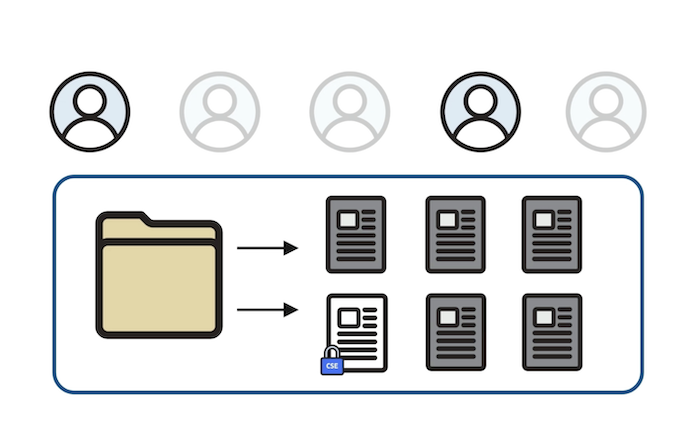
Virtru Secure Share is a cloud-based file sharing solution that provides end-to-end encryption and granular access controls for sensitive data. It enables users to securely share files through browsers and integrates with popular cloud storage platforms like Google Drive, Microsoft OneDrive, SharePoint, and Teams. With Virtru Secure Share, organizations can protect data at rest and in transit, enforce expiration dates, revoke access at any time, and maintain audit logs. It supports compliance with regulations such as HIPAA, CMMC, ITAR, and GDPR. Virtru Secure Share is easy to use, requiring no new passwords or software for recipients, and it leverages the Trusted Data Format (TDF) standard. AiDOOS enhances deployment and adoption by providing expert implementation, migration, and ongoing support services, ensuring smooth integration with existing systems and maximizing the value of secure file sharing.

Challenges It Solves

  • Securely share sensitive files with external partners and clients
  • Meet regulatory compliance requirements (HIPAA, CMMC, ITAR, etc.)
  • Prevent data loss and unauthorized access
  • Maintain control over shared data even after it leaves the organization's perimeter

Screenshots
Virtru Secure Share screenshot 1
Virtru Secure Share screenshot 1 Virtru Secure Share screenshot 2 Virtru Secure Share screenshot 3 Virtru Secure Share screenshot 4 Virtru Secure Share screenshot 5 Virtru Secure Share screenshot 6 Virtru Secure Share screenshot 7

Use Cases

Secure File Sharing

Share sensitive documents with partners and clients securely, ensuring only authorized recipients can access them.

Regulatory Compliance

Meet requirements for HIPAA, CMMC, ITAR, and other regulations by enforcing encryption and access controls.

Data Loss Prevention

Prevent unauthorized sharing of sensitive data by enforcing policies and auditing access.

Pricing

Custom pricing — built for your team

Virtru Secure Share pricing is tailored to your organisation's size, integrations, and requirements. AiDOOS generates your proposal instantly — scoped & ready in seconds.

Starter Business Compliance (CMMC / FedRAMP / ITAR / PCI DSS)
Schedule a Meeting
💡 Pricing insight from reviewers: Virtru Secure Share is often bundled with Virtru's email encryption packages, making it cost-effective for small to mid-sized teams.

Key Features

End-to-End Encryption

Protects files with AES-256 bit encryption during transit and at rest.

Granular Access Controls

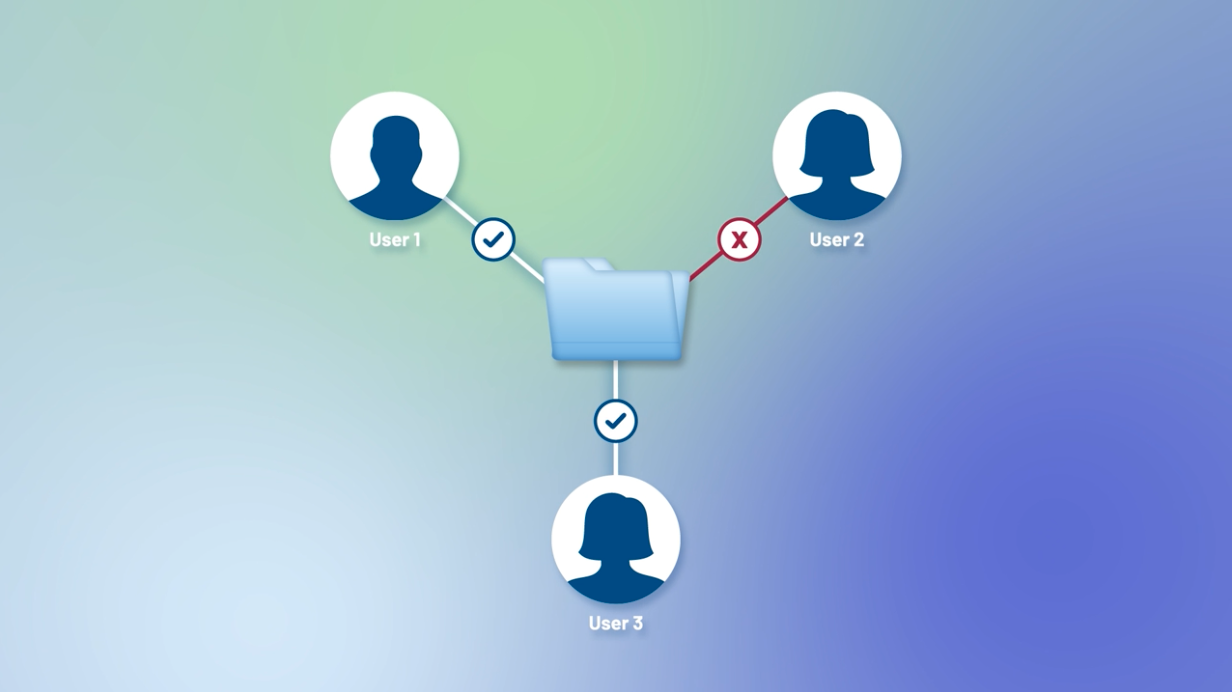
Set expiration dates, revoke access, and control who can view or download files.

Cloud Storage Integrations

Seamlessly works with Google Drive, Microsoft OneDrive, SharePoint, and Teams.

Audit Logging

Track access and activity for compliance and security monitoring.

Easy Recipient Experience

Recipients don't need new software or passwords to open encrypted files.

Compliance Support

Helps meet HIPAA, CMMC, ITAR, and other regulatory standards.

What Reviewers Say AI-synthesized from 119 reviews

What works well

  • Easy to use and integrate with existing workflows like Gmail and Outlook.
  • Provides strong security with AES-256 encryption and FedRAMP authorization.
  • Allows granular controls like expiration dates and access revocation.

Common concerns

  • Pricing is not transparent per user; only package-level pricing is shown.
  • Limited to certain cloud storage integrations; may require additional setup for others.

Reviews

119 verified reviews
4.3
★★★★☆
out of 5 · 119 reviews
By segment
Enterprise24%
Mid-Market76%
M
Mid-Market (51-1000 emp.)
"Straightforward Secure Sharing with Large Attachments Across Multiple Clients"
Its simplicity and the ability to attach large files are major pluses. It facilitates integrations when sharing secure credentials and works effectively with most clients. I wish Edge had an add-on so I could use it in Gmail like in Chrome. It lets us securely share credentials for new client onboarding and PHI-related data.
S
Small-Business (50 or fewer emp.)
"Low-Friction Secure Sharing with a Minor Onboarding Hurdle for New Recipients"
We've adopted Virtru Secure Share for safeguarding sensitive emails and attachments, and it's been largely excellent. The standout feature is its simplicity—no complicated setup, and both our staff and external parties can access protected content with minimal effort. New recipients may need some initial guidance to navigate secure messages. It helps with compliance and protecting customer personal data.
D
Developer
"Baffling and Maddening Experience"
Virtru is widely recognized in my industry (medical billing) as a secure sharing solution. I often receive Virtru-encrypted emails from clients and colleagues, so I trust it when needed. Unfortunately, the two times I actually needed it, I couldn't manage it and had to ask a coworker for help. The interface is perplexing and far from user-friendly. After logging in, I see 'My Data', 'Settings', 'User', 'Admin' screens—none of which guide me to sharing. I have to scroll down to find 'Products > Share' (even below the logout button!). After clicking 'Secure Share', it asks for another sign-in. My initial attempt to share failed because I tested it by sending to myself, which consumed my daily limit, and then I couldn't send to actual recipients. The error message falsely claimed success, leading me to get help from a colleague. There's no advance warning about the limit, which is frustrating. On another occasion, knowing I had just one email slot, I tried to send to four recipients, but it said I exceeded the limit. Even reducing to one recipient didn't work, saying I'd hit my daily message cap. This is ridiculous, especially for HIPAA-compliant messaging.
M
Mid-Market (51-1000 emp.)
"Virtru’s Persistent Protection Makes Secret Sharing Simple for Beginners"
Virtru is an easy-to-learn platform for securely exchanging secrets. It offers a simple way to share credentials accessible only to authorized users. The persistent protection feature adds a valuable security layer. Overall, the platform is solid, but I have a minor gripe: not all file types can be shared directly. For instance, .pem files get converted to .tdf. I use Virtru to share encrypted credentials instead of less-reliable methods like direct messages. I also appreciate having control over shared credentials, including revoking access and specifying permitted users.
M
Mid-Market (51-1000 emp.)
"User-Friendly Secure Sharing with Room for Integration Improvements"
Virtru Secure Share is incredibly straightforward, solving the issue of safely emailing confidential information. It operates swiftly, and recipients can open documents without hassle. Initial setup was simple, and logging in with Gmail is convenient. However, I wish it were integrated directly into email rather than requiring the portal for sending attachments or files. I rely on it to share sensitive files with another group, and it effectively addresses the need for secure email transmission.
S
Senior Travel Advisor
"Effortlessly Email Confidential Information"
I'm able to send sensitive data via email securely without needing additional paperwork or services. It doesn't support shared inboxes, so I can't use it with our teamvert@marchay.com address. This tool lets me securely reach the right people without wasting time on extra forms.
N
NERC CIP Consultant
"Virtru Secure Share Provides Robust Security and Peace of Mind"
The main benefit is the inherent safety I feel when using Secure Share. I trust that the transmission is highly resistant to interception or tampering, which is essential these days. I can't identify any downsides or aspects I dislike. Given my experience as a cybercrime victim and repeated hacking attempts, ensuring data integrity is vital in my cybersecurity profession.
S
Small-Business (50 or fewer emp.)
"Confidential Sharing Made Reliable with Virtru"
I trust Virtru for sending private information! The option to set an expiry date is handy, though I'd appreciate a reminder before it expires. I've lost access to messages because I didn't notice they had an expiration. During my recent onboarding at a new job, Virtru was invaluable for handling all the sensitive paperwork and personal data. We also travel for work, and Virtru ensures travel documents stay safe from identity theft.
S
Special Education Teacher
"VIRTRU ENSURES STUDENT SAFETY"
As an educator in special education, I need my email to be safe from scams and cyber threats at all times. My students' data is handled constantly, increasing their risk of online harm and privacy breaches. Virtru's security measures alleviate the anxiety tied to handling sensitive materials. Its user-friendly drag-and-drop interface also distinguishes it from other tools. While I haven't explored the AI features yet, I expect they'll prove beneficial as I get more accustomed to them. Colleagues who've used it praise its smart functionality. With outstanding performance and a reasonable price point, it fits seamlessly into our operations. The setup process and support have been exceptional. I have no complaints at all—every aspect has met my expectations. Before Virtru, my emails were unencrypted and unsafe, potentially harming my students. Now, I can confidently assure parents their kids are in good hands.
S
Support Coordinator Manager
"Swift and Secure Confidential Data Exchange with Virtru"
This tool lets me send sensitive details to those who require them, speeding up the intake of confidential records compared to traditional fax or postal methods. I can obtain necessary client documentation much quicker to assist them and their families. On several occasions, Virtru has disappeared from my laptop, forcing me to visit IT to reinstall it. Recently, I managed to restore it myself. When it vanishes, I'm unable to transmit protected information. I'm able to securely exchange confidential data with my staff and collect the information needed for my clients.

Reviewer Demographics

Top Industries

No data available

Enterprise Readiness

FedRAMP
FIPS 140-2

Identity & Access

SSO Okta, Azure AD, Ping Identity
RBAC Attribute-based access controls (ABAC)
Audit Logs

Data Security

At restAES-256
In transitTLS 1.2+
Key mgmtSplit-key architecture

SLA & Availability

Uptime SLA99.9%
RPO
RTO
Pen test

Compliance & Portability

Data residencyUS, EU
Data export JSON, CSV
Right to erasure✓ Supported

Integrations

Google Drive

Secure file sharing with Google Drive integration for encrypted storage and sharing.

Native < 1 hour ⇄ Bi-directional ⚡ AiDOOS Pre-wired

Microsoft OneDrive

Encrypted file sharing and storage integration with Microsoft OneDrive.

Native < 1 hour ⇄ Bi-directional ⚡ AiDOOS Pre-wired

SharePoint

Secure file sharing within SharePoint for enterprise collaboration.

Native 1-2 hours ⇄ Bi-directional ⚡ AiDOOS Pre-wired

Microsoft Teams

Encrypted file sharing and collaboration within Microsoft Teams.

Native 1-2 hours ⇄ Bi-directional ⚡ AiDOOS Pre-wired

Gmail

End-to-end encryption for email and attachments in Gmail.

Native < 1 hour ⚡ AiDOOS Pre-wired

Microsoft Outlook

End-to-end encryption for email and attachments in Microsoft Outlook.

Native < 1 hour ⚡ AiDOOS Pre-wired

Zendesk

Integration for secure file sharing within Zendesk support workflows.

Native 1-2 hours ⇄ Bi-directional

Google Vault

Integration with Google Vault for eDiscovery and compliance archiving of encrypted data.

Native 1-2 hours ⇄ Bi-directional

Governance & Compliance

EU AI Act

No data available

Data Processing Agreement

Data Processing Addendum DPA available

View DPA →

Sub-processors

Fully disclosed

View list →

Right to Erasure

✓ Supported

Change Notifications

No data available

NIST AI RMF

No data available

AiDOOS Managed Deployment

Deploy Virtru Secure Share in 72 hours

AiDOOS handles setup, CRM integration, SSO config, and user provisioning. Your team goes live — not your IT department.

12
Deployments
94%
Adoption rate
4.8/5
Post-deploy sat.
2-4 weeks
Time to value

Prerequisites

  • Active Google Workspace or Microsoft 365 subscription
  • Admin access to Gmail or Outlook
  • Valid Virtru account or trial signup

Configuration Options

  • Integration with Gmail or Outlook
  • Integration with Google Drive, OneDrive, SharePoint, Teams
  • Deployment type: browser extension or standalone app
  • Custom security policies and data retention rules

How Virtru Secure Share Compares

Product AI & Analytics Ease of Use Enterprise Features Pricing Integrations Mobile Experience Quick Setup Customer Support Rating Price/mo
Virtru Secure Share This product
Poor Excellent Good Fair Excellent Good Excellent Good ★ 4.3 $499/user
Microsoft Purview (Azure Information Protection)
Good Fair Excellent Good Excellent Good Fair Good $Custom/user
Tresorit
Poor Good Good Good Fair Good Excellent Good $10/user
Box (Box Shield)
Excellent Good Excellent Good Excellent Excellent Good Good $5/user
Virtual Delivery Center · A new delivery category

A Virtual Delivery Center for Virtru Secure Share

Pre-vetted experts and AI agents in the loop, assembled as a delivery pod. Pay in Delivery Units — universal pricing across roles, seniority, and tech stacks. No hiring, no contracting, no procurement cycle.

  • Plans from $2,000 — Starter Pack, 10 Delivery Units, 90 days
  • Refundable on unused Delivery Units, anytime — no questions asked
  • Re-delivery guarantee on acceptance miss
  • Pre-flight delivery sizing — you see the plan before you commit

How a Virtual Delivery Center delivers Virtru Secure Share

Outcome-based delivery via AiDOOS’s VDC model.  Why VDC vs traditional consulting? →

Outcome-Based

Pay for results, not hours

Milestone-Driven

Clear deliverables at each phase

Expert Network

Access to certified specialists

Implementation Timeline

1
Discover
Requirements & assessment
2
Integrate
Setup & data migration
3
Validate
Testing & security audit
4
Rollout
Deployment & training
5
Optimize
Performance tuning
Schedule a Meeting

Frequently Asked Questions

How does Virtru Secure Share work for file sharing?
Virtru Secure Share allows you to upload and encrypt files in your browser, then share them securely via a link. You can control access, set expiration dates, and revoke access at any time. It integrates with cloud storage like Google Drive and OneDrive for seamless collaboration.
Does Virtru Secure Share require recipients to install software?
No, recipients can access encrypted files through a secure web interface using a one-time passcode or their existing email authentication. No software installation is required on their end.
What encryption standards does Virtru use?
Virtru uses AES-256 bit encryption for data at rest and TLS 1.2+ for data in transit. Its cryptography is FIPS 140-2 validated.
Is Virtru Secure Share compliant with regulations like HIPAA or CMMC?
Yes, Virtru is designed to help organizations meet compliance requirements such as HIPAA, CMMC, ITAR, and more. It offers features like audit logs, access controls, and data residency options to support compliance.
Can I integrate Virtru Secure Share with my existing cloud storage?
Yes, Virtru Secure Share integrates with popular cloud storage platforms like Google Drive, Microsoft OneDrive, SharePoint, and Teams, as well as Zendesk and Gmail/Outlook for email encryption.

Quick Stats

★ 4.3
Rating
12
Deployments
72 hours
Live in
99.9%
Uptime SLA
Deployment Complexity
Moderate (3/5)
Schedule a Meeting

Vendor

Virtru
Founded 2012 · 201-500 employees · Washington, DC
Verified Vendor

Get an Instant Proposal

You'll get a structured implementation plan — scope, timeline, and cost — in seconds.