Pricing For Talent
Login Free Trial Book a Demo
Templafy ★ 4.3 · 59 reviews
Schedule Meeting
Marketplace › Marketing › Templafy  · Templafy alternatives

Templafy

Agentic document generation for better consistency, higher quality, and faster document workflows.

AiDOOS Verified SAAS Marketing
4.3 ★★★★☆ 59 reviews · 800+
Live in 72 hours 30-day free trial
Starting from
$40
per user / month
Schedule Meeting

30-day free trial · No credit card required

Category
Marketing
Deployment
Cloud (SaaS)
API Access
Yes
AiDOOS Deploy
72 hours

About Templafy

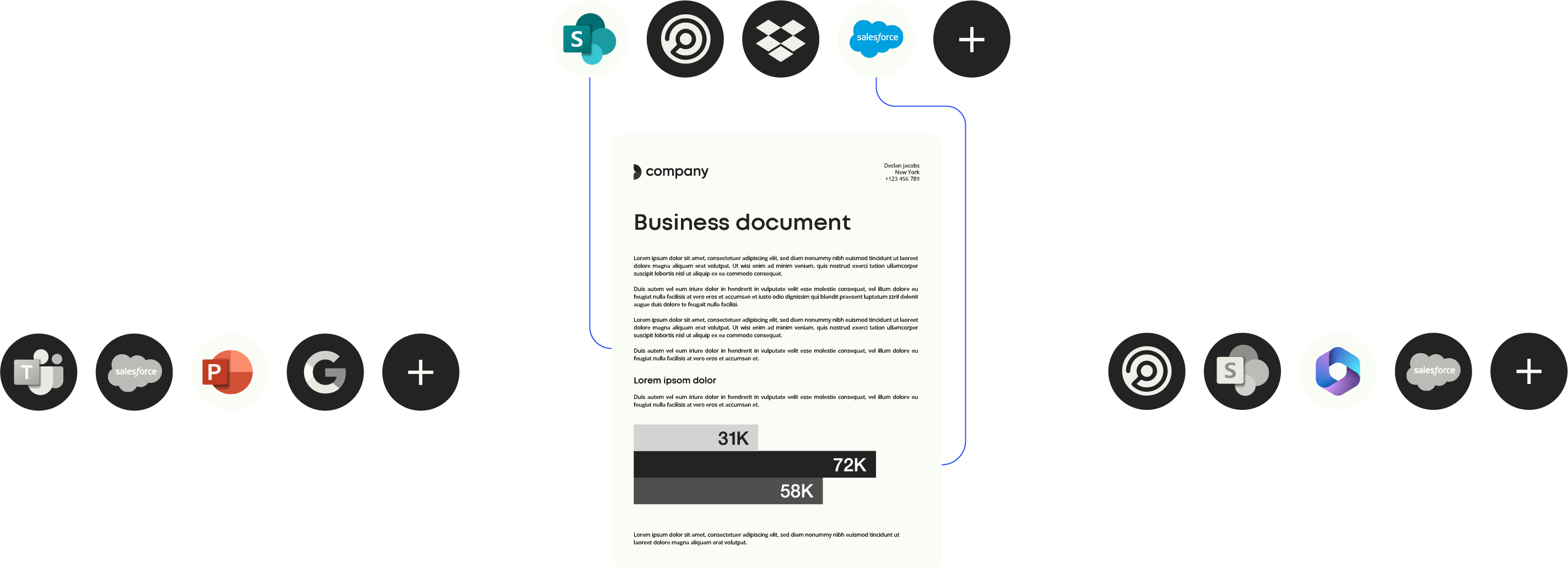
Templafy is an AI-powered document generation platform that enables enterprises to create accurate, on-brand, and compliant documents across their organization. It connects approved content, enterprise knowledge, and business data to generate documents in Microsoft Office formats, PowerPoint, Word, Excel, and PDF. Templafy integrates with popular AI assistants like ChatGPT, Claude, Copilot, and Gemini, allowing users to generate polished presentations and documents directly from conversations or prompts. The platform emphasizes brand consistency, content governance, and security, with certifications such as SOC 2, ISO 27001, and GDPR compliance. Templafy offers a range of features including AI document generation, template libraries, document editing, and workflow automation, designed to reduce manual work and speed up document creation. With over 800 customers and millions of users, Templafy helps teams in marketing, sales, consulting, and other departments improve productivity and ensure brand integrity. Through AiDOOS, Templafy can be deployed and adopted with enhanced support, customized to meet specific organizational needs, ensuring seamless integration and maximal ROI.

Challenges It Solves

  • Inconsistent document branding across the organization
  • Slow and error-prone manual document creation workflows
  • Lack of compliance and governance over business documents
  • Difficulty integrating AI tools with trusted enterprise content

Screenshots

Templafy screenshot 1
Templafy screenshot 1 Templafy screenshot 2 Templafy screenshot 3 Templafy screenshot 4 Templafy screenshot 5 Templafy screenshot 6 Templafy screenshot 7 Templafy screenshot 8

Use Cases

Sales Proposals

Generate personalized, on-brand sales proposals quickly.

Marketing Presentations

Create professional, brand-compliant presentations for marketing campaigns.

Consulting Reports

Produce client-ready reports and engagement letters with minimal effort.

Human Resources Documents

Automate generation of offer letters and other HR documents.

Pricing

Custom pricing — built for your team

Templafy pricing is tailored to your organisation's size, integrations, and requirements. AiDOOS generates your proposal instantly — scoped & ready in seconds.

Individual Team Enterprise
Schedule a Meeting
30-day free trial available — No credit card required. Full access to all features.
💡 Pricing insight from reviewers: Templafy is a premium-priced solution, with per-user pricing that scales with enterprise features, often perceived as expensive for small teams.

Key Features

AI Document Generation

Generate presentations and documents from prompts or conversations with AI.

Content Template Library

Centralized repository of approved templates and brand assets.

AI Document Editing

Edit slides and documents using natural language commands.

Document Agents

Customizable AI agents that learn brand, knowledge, and data to generate on-brand documents.

Integration with MCP/Third-party AI

Connect ChatGPT, Claude, Copilot, and Gemini to generate documents with approved content.

Document Generation API

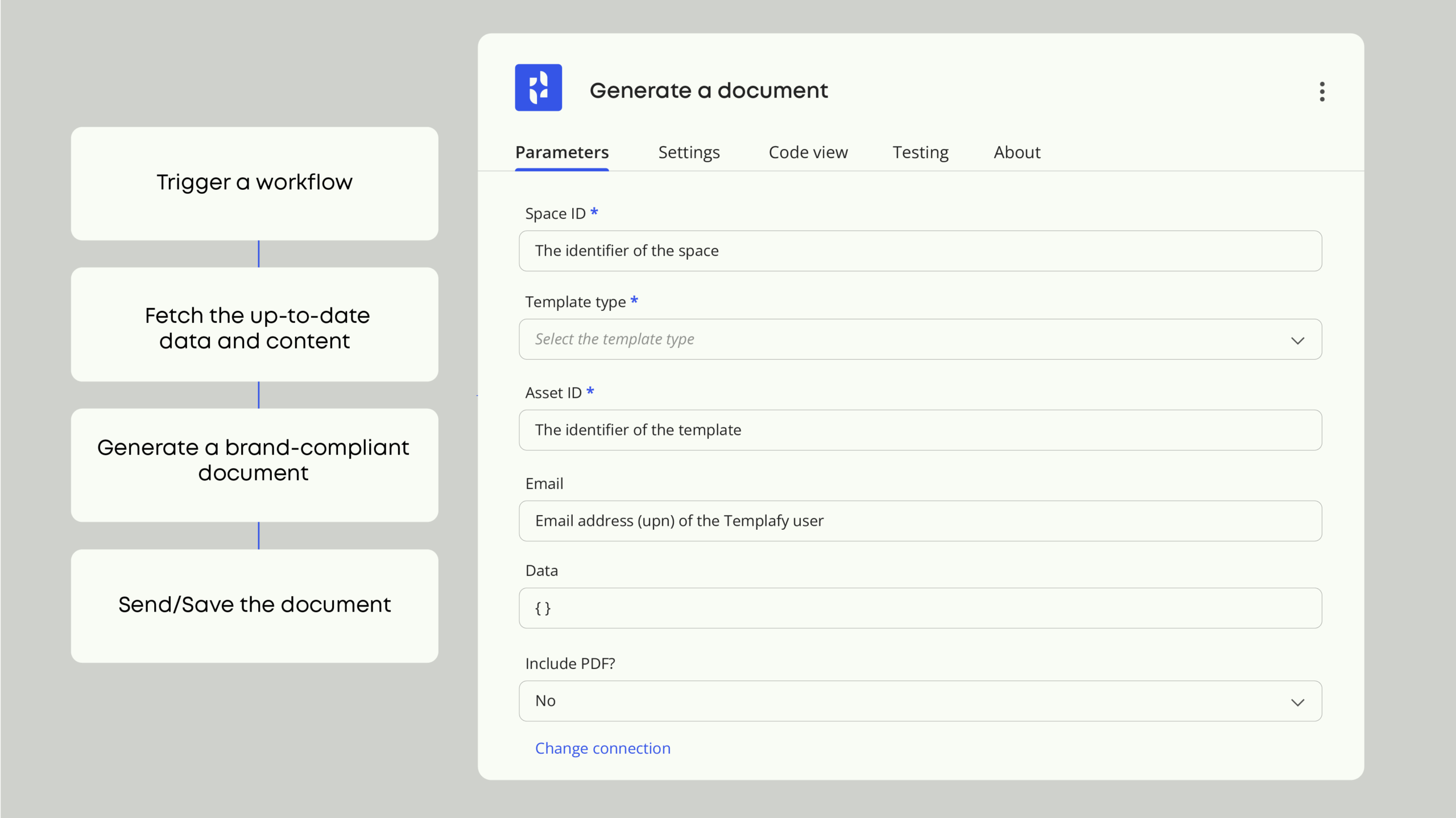
Programmatically generate documents in Word, PowerPoint, PDF, Excel via API.

What Reviewers Say AI-synthesized from 59 reviews

What works well

  • Ensures brand consistency across documents and presentations
  • Integrates seamlessly with Microsoft Office and popular AI tools
  • Saves significant time by automating document creation
  • Strong security and compliance certifications

Common concerns

  • Pricing can be complex for enterprise plans
  • May have a learning curve for new users

Reviews

59 verified reviews
4.3
★★★★☆
out of 5 · 59 reviews
By segment
Enterprise53%
Mid-Market47%
M
Marketing Director Latin America
"All your branding in one spot"
It allows for efficient distribution of presentation decks and documents across the entire organization, making it agile for both specific needs and large-scale updates or launches. It requires users to visit the library regularly, so keeping them engaged with new features and updates is important. Maintain a consistent brand identity by providing a large number of users with a variety of editable templates that can be adapted to their needs.
G
Global Vice President Business Applications
"Templafy - O365 in-app help for professional and consistent presentations and documents"
The in-app experience is convenient because you don't need to log into another app to import images or templates. I think the app would benefit from having more AI-powered features integrated into its search function. Templafy helps in building consistency and introducing professionalism in documents produced. I haven't used the AI features much yet.
M
Marketing Specialist
"Templafy is okay"
I like the launch form the most, and it's easy to use. Most of what Templafy offers can already be done directly in Word, except for the launch form feature. I also find it quite pricey. Additionally, it can be confusing to use at times. Templafy has been helpful in keeping us organized, making templates easily accessible to everyone on our team.
M
Mid-Market (51-1000 emp.)
"Useful for PowerPoint Consistency"
From an admin perspective, I like that I can upload our company's templates and branding into Templafy, giving everyone easy access within PowerPoint. It ensures everyone uses the correct, up-to-date assets without needing to send files or worry about version control. Since Templafy is a plug-in directly in PowerPoint, some features aren't fully available on Mac. For example, the new toolbar functionality doesn't appear, making the experience feel limited compared to Windows. Previously, employees often used outdated templates, wrong logos, or off-brand colors in their decks. With Templafy, I can upload and manage the latest templates and brand assets so the entire company has direct access in PowerPoint. This saves me time from policing brand usage or fixing decks afterward. Instead, I know teams are starting with the right materials, which keeps our brand consistent and lets me focus on higher-value design work.
S
Senior Digital Workplace Consultant
"Effective for brand enforcement across multiple brands and apps"
Templafy is crucial for unifying our brand across many digital interactions, especially in Word documents and PowerPoint presentations. I know our Brand Management team appreciates the approach and the ability to make updated resources available for selection, such as slide layouts, images, icons, and more. We ran an email signature pilot in a smaller business unit and are now expanding it company-wide, though we need to establish a regional/country community for mail banner ads first. We've been very pleased with the implementation and support we've received. My role is technical owner, while Brand Management handles content and communications. I personally also really like it and create many documents, presentations, and spreadsheets in my job. There are some limitations we'd like fixed, like not being able to have a multi-brand experience behind the 'File > New Presentation' option in PowerPoint's fixed UI. Additionally, color palettes for charts in PowerPoint and Excel could be improved; we have an extensive set of brand colors for residential, commercial, etc., as seen on our brand guide. Brand enforcement across multiple digital touchpoints and applications.
R
RFT CCO Supervisor
"Easy Email Signatures and Professional Document Creation"
It allows me to apply my signature to all emails and lets me create PowerPoint presentations and documents using layouts and images that are approved for work. On occasion, it loads the wrong signature, forcing me to delete and reassign the correct one. Developing a standardized format for certain document submissions would help resolve existing issues. Clear guidelines would ensure consistency and make the submission process smoother for everyone involved.
P
Proposal Coordinator
"Our go-to proposal builder"
I've been using Templafy for over two years now, and I honestly can't imagine putting together a proposal without it. Our team relies on it daily for various tasks, including Word and PowerPoint proposal template creation. Once you've set up your library of boilerplate content, it's straightforward to use and update when information becomes outdated. We also connect Templafy with other services to simplify adding images and other elements. The least helpful aspect is probably building the base template itself; there are a few lingering bugs with some of our templates that have been hard to resolve. Additionally, the AI implementation isn't great, and the organization and integration of employee datasets could be improved. Quickly and efficiently building documents is the main problem Templafy helps us solve. We create sometimes hundreds each week across multiple teams, and with all our content, maintaining consistency can be tough, but Templafy helps us stay as consistent as possible.
S
Senior M365 Support Analyst
"Templafy Boogie: Grooving with Document Automation"
What I value most about Templafy is how it simplifies document creation, ensuring consistency and compliance throughout. It saves me time, reduces errors, and lets me uphold brand standards without needing technical skills. The interface is straightforward, and the automation tools are smart enough to handle complex workflows with ease. There are occasional hiccups during deployment and integration. For instance, PowerPoint metadata only injects correctly when the file is reopened, which can be inconvenient. Also, setting up custom ribbons or replacing Office extensions might cause crashes if not done carefully. While the tool is undeniably robust, it sometimes feels like it needs constant oversight. Templafy solves the issue of inconsistent and off-brand documents by automating creation within the tools you already use. By linking to company data and enforcing brand guidelines, it streamlines workflows and can cut proposal time from hours to minutes. This leads to fewer manual edits, better templates, and more free time—so you can spend less time formatting slides and more time chatting with co-workers.
S
Senior Manager Operations & Strategy
"Dependable solution for brand consistency and automated docs"
The template library and brand asset management make it effortless to maintain uniformity across all documents, presentations, and emails. Its integration with Microsoft 365 and Google Workspace allows me to operate within the apps I already use, eliminating the need to switch between different platforms. Automated document generation and dynamic content cut down on repetitive tasks and save considerable time. The brand governance checks, such as detecting off-brand colors or fonts, ensure that external documents appear polished and professional. However, upload limits and certain UI constraints can be annoying when handling large files. Templafy enables our organization to enforce brand and document compliance at scale. By centralizing approved templates, assets, and email signatures, it removes the risk of using outdated or off-brand materials. Document generation and presentation management features save significant time by automating repetitive formatting, letting staff focus on content rather than layout. The digital governance layer provides reassurance that every client-facing document complies with legal, regulatory, and brand standards. Overall, it boosts efficiency, reduces errors, and ensures consistency across all business communications.
A
Associate Director
"Seamless AI Integration with a Unified, Intuitive Platform"
This is the top solution for boosting efficiency and rolling out AI across the company, leading to better productivity and ROI. The onboarding is simple with plug-and-play setup, and it acts as a central hub for all connections like SharePoint and other MS tools, integrating widely with Microsoft platforms. The interface is also highly intuitive and user-friendly. Everything is fantastic. However, accelerating the release of performance-enhancing tools such as DOC Agent would be even better. AI implementation, change management becomes much easier, and execution speed is improved through productivity tools.

Reviewer Demographics

Top Industries

No data available

Company Size

No data available

Enterprise Readiness

SOC 2
ISO 27001
ISO 27017
GDPR
Microsoft 365 App Certified

Identity & Access

SSO Okta, Azure AD, SAML 2.0, OneLogin, PingIdentity
RBAC Roles and permissions based on user groups and profiles
Audit Logs

Data Security

At restAES-256
In transitTLS 1.2+
Key mgmtVendor-managed

SLA & Availability

Uptime SLA99.9%
RPO
RTO
Pen test

Compliance & Portability

Data residencyEU, US
Data export
Right to erasure✓ Supported

Integrations

Microsoft 365 Copilot

Generate on-brand, compliant documents directly within Microsoft 365 apps.

Native < 1 hour

Claude

Use Claude to research and generate presentations with approved templates and brand assets.

Native < 1 hour

ChatGPT

Convert ChatGPT conversations into structured, business-ready presentations.

Third_Party < 1 hour

Salesforce

Pull customer data from Salesforce to dynamically populate documents and templates.

Third_Party 1-2 days ⇄ Bi-directional

Okta

Use Okta for authentication, provisioning, and access control.

Third_Party 1-2 days ⇄ Bi-directional

Azure AD

Use Microsoft Entra ID (Azure AD) as an authenticator provider for data and content targeting.

Third_Party 1-2 days ⇄ Bi-directional

Frontify

Integrate Frontify DAM assets directly into Templafy to drive on-brand content.

Third_Party 1-2 days ⇄ Bi-directional

Getty Images

Access Getty Images directly within Templafy for brand-compliant visual content.

Third_Party < 1 hour

Governance & Compliance

EU AI Act

No data available

Data Processing Agreement

No data available

Sub-processors

No data available

Right to Erasure

✓ Supported

Change Notifications

No data available

NIST AI RMF

No data available

AiDOOS Managed Deployment

Deploy Templafy in 72 hours

AiDOOS handles setup, CRM integration, SSO config, and user provisioning. Your team goes live — not your IT department.

12
Deployments
94%
Adoption rate
4.8/5
Post-deploy sat.
2-4 weeks
Time to value

Prerequisites

  • Microsoft 365 subscription
  • Active directory or SSO provider
  • Content templates and brand assets ready
  • IT admin access for setup

Configuration Options

  • Single sign-on (SSO) integration
  • Content template library setup
  • CRM integration (e.g., Salesforce)
  • AI assistant configuration (Claude, ChatGPT, Copilot)

How Templafy Compares

Product AI & Analytics Ease of Use Enterprise Features Pricing Integrations Mobile Experience Quick Setup Customer Support Rating Price/mo
Templafy This product
Good Excellent Excellent Fair Good Poor Good Good ★ 4.3 $40/user
Qatalog
Fair Good Good Fair Good Good Good Good $Custom/user
DocuSign CLM
Good Good Excellent Fair Excellent Fair Good Good $Custom/user
String
Good Good Good Fair Good Fair Good Good $Custom/user
Virtual Delivery Center · A new delivery category

A Virtual Delivery Center for Templafy

Pre-vetted experts and AI agents in the loop, assembled as a delivery pod. Pay in Delivery Units — universal pricing across roles, seniority, and tech stacks. No hiring, no contracting, no procurement cycle.

  • Plans from $2,000 — Starter Pack, 10 Delivery Units, 90 days
  • Refundable on unused Delivery Units, anytime — no questions asked
  • Re-delivery guarantee on acceptance miss
  • Pre-flight delivery sizing — you see the plan before you commit

How a Virtual Delivery Center delivers Templafy

Outcome-based delivery via AiDOOS’s VDC model.  Why VDC vs traditional consulting? →

Outcome-Based

Pay for results, not hours

Milestone-Driven

Clear deliverables at each phase

Expert Network

Access to certified specialists

Implementation Timeline

1
Discover
Requirements & assessment
2
Integrate
Setup & data migration
3
Validate
Testing & security audit
4
Rollout
Deployment & training
5
Optimize
Performance tuning
Schedule a Meeting

Frequently Asked Questions

What is Templafy?
Templafy is an agentic document generation platform that helps enterprises create accurate, compliant business documents using AI, integrated with tools like Microsoft Office and third-party AI assistants.
Does Templafy integrate with Microsoft 365?
Yes, Templafy has native integration with Microsoft 365, including Word, PowerPoint, and Excel, allowing users to access templates and create documents directly within these apps.
What are the pricing plans?
Templafy offers a free Individual plan, a Teams plan at $40 per user/month, and an Enterprise plan with custom pricing based on scale and needs.
Is Templafy secure?
Templafy holds SOC 2, ISO 27001, and GDPR certifications, and uses AES-256 encryption at rest and TLS 1.2+ in transit, ensuring enterprise-grade security.
Can Templafy integrate with AI assistants like ChatGPT?
Yes, Templafy connects with ChatGPT, Claude, and Copilot through MCP enterprise integrations, enabling AI-powered document generation using approved content.
Does Templafy provide customer support?
Yes, Templafy offers customer support, and through AiDOOS, you get dedicated deployment assistance and ongoing management.

Quick Stats

★ 4.3
Rating
12
Deployments
72 hours
Live in
99.9%
Uptime SLA
Deployment Complexity
Moderate (3/5)
Schedule a Meeting

Vendor

Templafy
Founded 2014 · New York, USA
Verified Vendor

Get an Instant Proposal

You'll get a structured implementation plan — scope, timeline, and cost — in seconds.