Pricing For Talent
Login Free Trial Book a Demo
Planning Pod ★ 4.0 · 18 reviews
Schedule Meeting
Marketplace › Marketing › Planning Pod  · Planning Pod alternatives

Planning Pod

Run your venue on one platform.

AiDOOS Verified SAAS Marketing
4.0 ★★★★☆ 18 reviews · 70,000+
Live in 72 hours
Pricing
Tailored to you
AiDOOS generates your proposal instantly — scoped & ready in seconds
Schedule Meeting
Category
Marketing
Deployment
Cloud (SaaS)
AiDOOS Deploy
72 hours

About Planning Pod

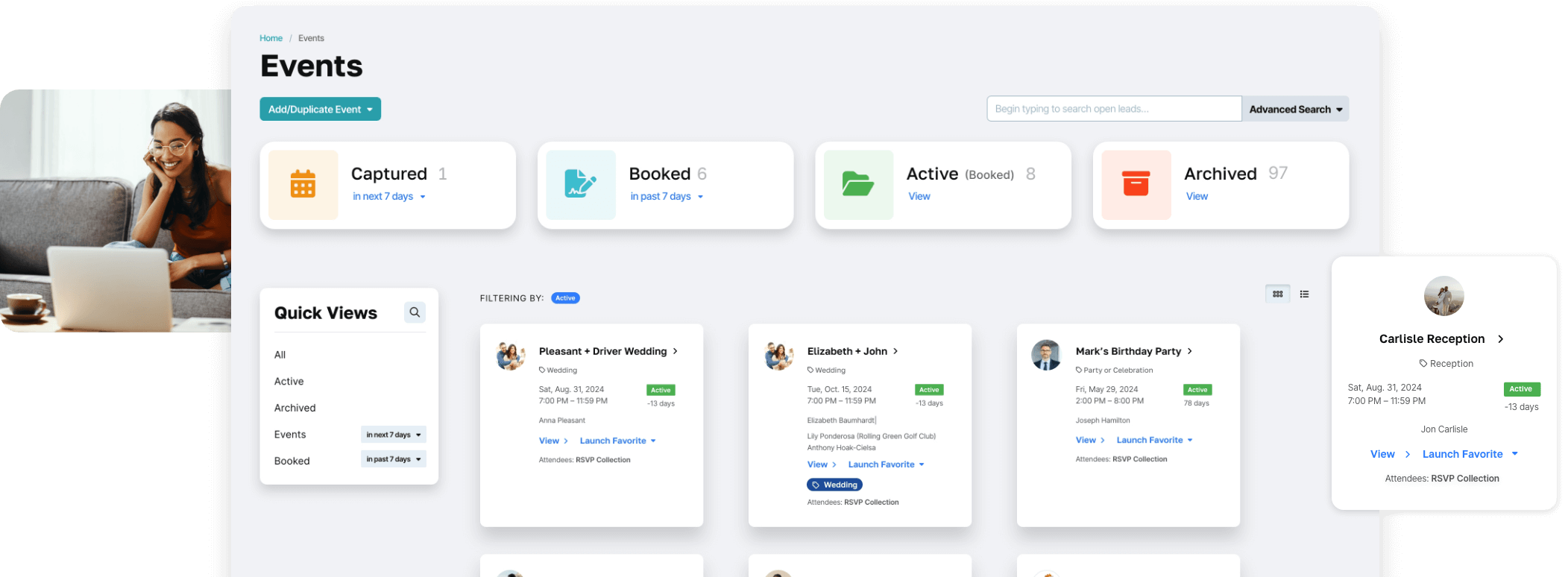
Planning Pod is a comprehensive venue management and event planning software designed to replace patchwork apps with a unified platform. It offers a suite of 40+ time-tested tools covering venue and catering management, customer management (CRM), business operations, automation and insights, event planning and management, communications and collaboration, and team productivity. Key features include a booking/reservation calendar, floor plans and space layouts, food and beverage management, equipment management, banquet event orders (BEOs), tour scheduling, lead capture forms, pipeline automation, proposals and eSignatures, contact manager, contracts and eSignatures, integrated payments, invoices and installments, embedded event insurance, workflows and triggers, custom reporting, dashboards, reminders, timelines, registration and ticketing, attendee management, vendor management, and client collaboration. Planning Pod is tailored for various industries including corporate event planning, event and wedding venues, event planning firms, golf and country clubs, hotels, nonprofits, and more. The platform helps venues grow bookings by an average of 64%, increase revenue by 230% in the first year, and save 62 hours per month of busywork. With AiDOOS, deployment and adoption are enhanced through streamlined setup, integration support, and training, ensuring that venues can quickly transition from legacy systems and fully leverage Planning Pod's capabilities. Planning Pod integrates with tools like QuickBooks, Wedding Pro, and offers a customer support team and onboarding assistance to ensure smooth migration.

Challenges It Solves

  • Managing event bookings, schedules, and availability in one place
  • Streamlining communication with clients and vendors
  • Tracking leads and converting them to bookings efficiently
  • Automating administrative tasks like invoicing and reporting

Screenshots

Planning Pod screenshot 1
Planning Pod screenshot 1 Planning Pod screenshot 2 Planning Pod screenshot 3 Planning Pod screenshot 4 Planning Pod screenshot 5 Planning Pod screenshot 6 Planning Pod screenshot 7 Planning Pod screenshot 8

Use Cases

Venue Management

Manage bookings, schedules, floor plans, and BEOs for event venues.

Event Planning

Plan and coordinate events with tools for timelines, vendors, and clients.

Catering Management

Handle food and beverage orders, equipment, and tours for catering operations.

CRM and Sales

Track leads, automate pipeline, and close deals with proposals and eSignatures.

Pricing

Custom pricing — built for your team

Planning Pod pricing is tailored to your organisation's size, integrations, and requirements. AiDOOS generates your proposal instantly — scoped & ready in seconds.

Starter Business Enterprise
Schedule a Meeting
💡 Pricing insight from reviewers: Pricing is custom and based on venue size and features needed; not publicly listed.

Key Features

Booking Calendar

Manage event bookings and availability with a visual calendar.

Floor Plans and Space Layouts

Create and manage floor plans for events and venues.

Banquet Event Orders (BEOs)

Generate and manage detailed event orders for catering and setup.

Lead Capture and CRM

Capture leads from webforms and manage them through the sales pipeline.

Proposals and eSignatures

Send professional proposals and collect digital signatures.

Integrated Payments

Process payments and manage invoices directly within the platform.

What Reviewers Say AI-synthesized from 18 reviews

What works well

  • Comprehensive all-in-one platform replacing multiple tools.
  • User-friendly and flexible, praised for ease of use.
  • Helps venues grow bookings and save time.

Common concerns

  • Pricing not publicly disclosed.
  • May have a learning curve for advanced features.

Reviews

18 verified reviews
4.0
★★★★☆
out of 5 · 18 reviews
By segment
Enterprise33%
Mid-Market67%
S
Small-Business (50 or fewer emp.)
"Planning Pod aids a busy wedding and event planner"
I like that I can create events by name and date. I can add images to each event and assign vendors and users. It also lets me assign different permission levels to each user, so if I assign an event to a client, they only see their event and nothing else. There aren't many drawbacks, but a few I've found: the floorplan dimensions are slightly off. Twice I've mapped out a room, and when we tried to set it up, we didn't have enough space. Also, in the old version, you could label vendors by category and find them easily, but now you have to tag them, and sometimes we forget. Previously, I had to write everything out in the customer file, making it hard to communicate with all vendors. Something always slipped through the cracks. Not anymore, because with sharing, everyone is on the same page.
S
Small-Business (50 or fewer emp.)
"Intuitive Event Planning Tool"
I've been impressed with how easy it is for our whole team and clients to use. Clients find it very straightforward to make payments online (compared to checks or clunky payment processors), and we integrated two entities under the same roof into this system. I wish they had a mobile app; it would be extremely helpful to access client info on the go. We're solving the issue of double booking between private events and student programs. It's great to have everything in one place, including color-coding by event type!
F
Full Stack
"The finest planning suite available"
What stands out most about Planning Pod is the flexibility of actions and communication from a single dashboard. I love how it has evolved over the years, having been a subscriber for over a decade. It also lets me assign different permission levels to each user. I appreciate that. There aren't many downsides, but the few I've encountered include managing large-scale task delegation that may require several people to handle. Improvements and new features are constantly being added to make it more user-friendly. If you want to keep employee data on a single platform, this is the only software you need. I love it; it may take time to set up initially, but once done, it's easy and clients love it. The itinerary and floor plan tools are shared with other departments inside and outside my organization. There's a place for all information. We've resolved double booking issues between our private events and student programs. It truly has a place for everything.
S
Small-Business (50 or fewer emp.)
"Planing pod"
It was user-friendly and had budget-friendly plans. However, it lacked inventory management when I used it. I needed CRM software and a way to manage events by client.
S
Small-Business (50 or fewer emp.)
"Feels Outdated"
The interface was straightforward to navigate, and there were many handy features. However, there were too many features we didn't use that cluttered event booking. Basic suggestions for improvement were ignored. While it helps event staff coordinate and organize events, it wasn't useful for us, and we switched to Perfect Venue.
M
Mid-Market (51-1000 emp.)
"A Game Changer"
They are open to adapting, adding, and changing features based on user feedback. They make sure we have every tool we need to succeed. The initial setup and training were lacking, but they've been responsive whenever we needed assistance. Key features include lead management, calendar management, automated payments, and communications. Multiple and adjustable event orders. Multiple user levels from owner to setup staff for comprehensive communication.
W
Wedding Venue Owner
"The Backbone of Our Business"
I appreciate having a dependable, easy-to-use booking software that multiple team members can use. From invoices and proposals to floor plans and communications, we rely on Planning Pod in so many ways to organize events. Ensuring we get paid and contracts signed is crucial, and PP makes this process easy for our customers. I wish we had found it sooner! Transferring all your data to a new system is a big task. We've done it three times, taking weeks each time. But switching to Planning Pod was the best decision we've made. We used to have client info scattered across multiple places. Now Planning Pod consolidates all our documents, notes, floor plans, timelines, proposals, signed contracts, rental inventory, and invoices into one spot. We have hard files and Planning Pod files, that's it. We also use Dropbox, but aside from that, we've eliminated several other programs: a floor plan tool, timeline software, and a workflow/lead organizer. All gone since we implemented Planning Pod.
D
Director of Event Services
"Massive Time Saver for Us"
Planning Pod has saved us a ton of time. The contracting and billing features have professionalized our client interactions and cut down on manual record-keeping. It's user-friendly, but like any new system, there's a learning curve. Even after a year, we're still discovering new features. You can set up to-do list reminders that keep us organized and help manage each event from lead to post-event survey. It also gives us real-time visibility into overdue payments, so we can stay on top of finances.
C
Catering Director
"The ultimate answer for your food truck catering needs!"
As a food truck caterer specializing in Wood Fired Pizza for events across Western Washington, we grew quickly and needed a better way to manage our events. Since adopting this software in March, we've doubled our volume. One person can now handle all events on the calendar, which would have been impossible in previous years at this scale. The platform simplifies our entire catering workflow, connecting our whole team and clients in one place. Our clients appreciate how we've automated and streamlined their experiences. Our drivers and staff can access all contacts and details for each event, making day-of operations smooth. We can track our inquiry conversion rate. There's nothing we dislike about this product; it's been a game-changer. When we first started, they didn't have QuickBooks integration, but they've since added it, which is fantastic.
O
Owner & Founder
"I'd rather gnaw off my own limb"
The BEO function works fine if you input everything as food and beverage items, which is a pain when you're dealing with internal rentals. Invoicing is okay. It has the potential to be a great tool, but so many small quirks quickly overshadow any positives. Customer support is terrible, the interface is extremely awkward, and they promise customization that turns out to be a falsehood. They constantly repeat, in a way that becomes weird, 'You'll love PP, just give it time,' which makes it clear the employees are trying hard to sell a product they don't even seem to like. Line items don't appear on the BEO because they messed up the backend design. The calendar has glitches and major limitations. They push you to integrate your email into their platform, but don't do it—it's awful. Messages from one client's portal sometimes show up in another client's portal, which is unprofessional and they don't seem to care. I got the impression this is a known issue they try to ignore by blaming the user. It's somehow the end user's fault. Invoices are viewable by only one person, which is problematic because often in our industry, parents pay for their kid's wedding. I have to remove the bride from the invoice, add the mother, then once she pays, remove her and add the bride back. That's extra work, and PP's solution was for the bride to share her login credentials. That's absurd—how is that a proper answer? They don't care. We also constantly face timeouts and random logouts while working on proposals. When we mentioned it, they blamed our WiFi. It happens at home, at the office, and another venue nearby says they have the same persistent issue. They downplay it and keep finding excuses. Actually, it's not solving anything; it's making things worse. It's like pointing at a burning house and the firefighter says it's not on fire. I'm shocked they have no clue about their own product. They just stick to the company line instead of acknowledging issues and fixing them. It's infuriating. I've thrown my laptop three or four times because of these problems. Every day I log in, I feel defeated and wonder what new issue I'll face with PP.

Reviewer Demographics

Top Industries

No data available

Enterprise Readiness

SOC 2 Type II
GDPR

Identity & Access

SSO Google, Microsoft
RBAC Role-based permission controls
Audit Logs

Data Security

At restAES-256
In transitTLS 1.2+
Key mgmtVendor-managed

SLA & Availability

Uptime SLA99.9%
RPO
RTO
Pen test

Compliance & Portability

Data residencyUS, EU
Data export CSV
Right to erasure✓ Supported

Integrations

QuickBooks Online

Sync invoices and payments to QuickBooks Online for accounting.

Native 1-2 hours ⇄ Bi-directional ⚡ AiDOOS Pre-wired

Stripe

Process credit card payments and manage transactions within Planning Pod.

Native < 1 hour ⇄ Bi-directional ⚡ AiDOOS Pre-wired

PayPal

Accept payments via PayPal for invoices and deposits.

Native < 1 hour

Wedding Pro

Import leads directly from Wedding Pro into Planning Pod's CRM.

Native < 1 hour ⇄ Bi-directional ⚡ AiDOOS Pre-wired

Gmail

Connect business email to send and track communications from Planning Pod.

Native < 1 hour ⇄ Bi-directional

Google Calendar

Sync event schedules and calendars with Google Calendar.

Native < 1 hour ⇄ Bi-directional

Embedded Insurance

Offer liability and cancellation insurance directly within proposals and contracts.

Native < 1 hour

Microsoft Outlook

Integrate with Outlook for email management and calendar sync.

Native < 1 hour ⇄ Bi-directional

Governance & Compliance

EU AI Act

No data available

Data Processing Agreement

Dpa DPA available

View DPA →

Sub-processors

Fully disclosed

View list →

Right to Erasure

✓ Supported

Change Notifications

Policy available

NIST AI RMF

No data available

AiDOOS Managed Deployment

Deploy Planning Pod in 72 hours

AiDOOS handles setup, CRM integration, SSO config, and user provisioning. Your team goes live — not your IT department.

12
Deployments
94%
Adoption rate
4.8/5
Post-deploy sat.
1-2 weeks
Time to value

Prerequisites

  • Active Planning Pod subscription
  • Administrator access to configure integrations
  • Business email account for synchronization

Configuration Options

  • Customize role-based permissions
  • Set up payment gateways (Stripe/PayPal)
  • Configure lead capture forms and pipelines
  • Enable QuickBooks Online sync

How Planning Pod Compares

Product AI & Analytics Ease of Use Enterprise Features Pricing Integrations Mobile Experience Quick Setup Customer Support Rating Price/mo
Planning Pod This product
Good Excellent Fair Good Good Fair Excellent Good ★ 4.0 $Custom/user
Tripleseat
Good Good Excellent Fair Excellent Good Good Good $Custom/user
HoneyBook
Good Excellent Fair Good Good Good Excellent Good $Custom/user
Aisle Planner
Fair Good Fair Fair Fair Good Good Good $Custom/user
Virtual Delivery Center · A new delivery category

A Virtual Delivery Center for Planning Pod

Pre-vetted experts and AI agents in the loop, assembled as a delivery pod. Pay in Delivery Units — universal pricing across roles, seniority, and tech stacks. No hiring, no contracting, no procurement cycle.

  • Plans from $2,000 — Starter Pack, 10 Delivery Units, 90 days
  • Refundable on unused Delivery Units, anytime — no questions asked
  • Re-delivery guarantee on acceptance miss
  • Pre-flight delivery sizing — you see the plan before you commit

How a Virtual Delivery Center delivers Planning Pod

Outcome-based delivery via AiDOOS’s VDC model.  Why VDC vs traditional consulting? →

Outcome-Based

Pay for results, not hours

Milestone-Driven

Clear deliverables at each phase

Expert Network

Access to certified specialists

Implementation Timeline

1
Discover
Requirements & assessment
2
Integrate
Setup & data migration
3
Validate
Testing & security audit
4
Rollout
Deployment & training
5
Optimize
Performance tuning
Schedule a Meeting

Frequently Asked Questions

Does Planning Pod integrate with QuickBooks?
Yes, Planning Pod offers a native integration with QuickBooks Online, allowing you to sync invoices and payments for streamlined accounting. AiDOOS can assist with setup and configuration.
Can I import leads from Wedding Wire and The Knot?
Planning Pod provides lead capture through webforms and integrations with Wedding Pro, but does not directly integrate with Wedding Wire or The Knot. However, you can create automated workflows to manage leads from these platforms.
What payment processing options are available?
Planning Pod supports integrated payments via Stripe and PayPal, allowing you to accept credit card payments and manage invoices directly within the platform.
Is Planning Pod suitable for both venues and event planners?
Yes, Planning Pod is designed for both venue and catering management as well as event planning firms, offering tools for booking, BEOs, customer management, and more.
Does Planning Pod offer data migration assistance?
Yes, Planning Pod provides data migration support to help you transition from other tools like Tripleseat or HoneyBook with a clean and efficient process.

Quick Stats

★ 4.0
Rating
12
Deployments
72 hours
Live in
99.9%
Uptime SLA
Deployment Complexity
Easy (2/5)
Schedule a Meeting

Vendor

Planning Pod
Founded 2011 · Highlands Ranch, US
Verified Vendor

Get an Instant Proposal

You'll get a structured implementation plan — scope, timeline, and cost — in seconds.