Pricing For Talent
Login Free Trial Book a Demo
Parse.ly ★ 4.5 · 149 reviews
Schedule Meeting
Marketplace › Marketing › Parse.ly  · Parse.ly alternatives

Parse.ly

Content Analytics Made Easy

AiDOOS Verified SAAS Marketing
4.5 ★★★★☆ 149 reviews · 400+ enterprises
Live in 72 hours
Pricing
Tailored to you
AiDOOS generates your proposal instantly — scoped & ready in seconds
Schedule Meeting
Category
Marketing
Deployment
Cloud (SaaS)
API Access
Yes
AiDOOS Deploy
72 hours

About Parse.ly

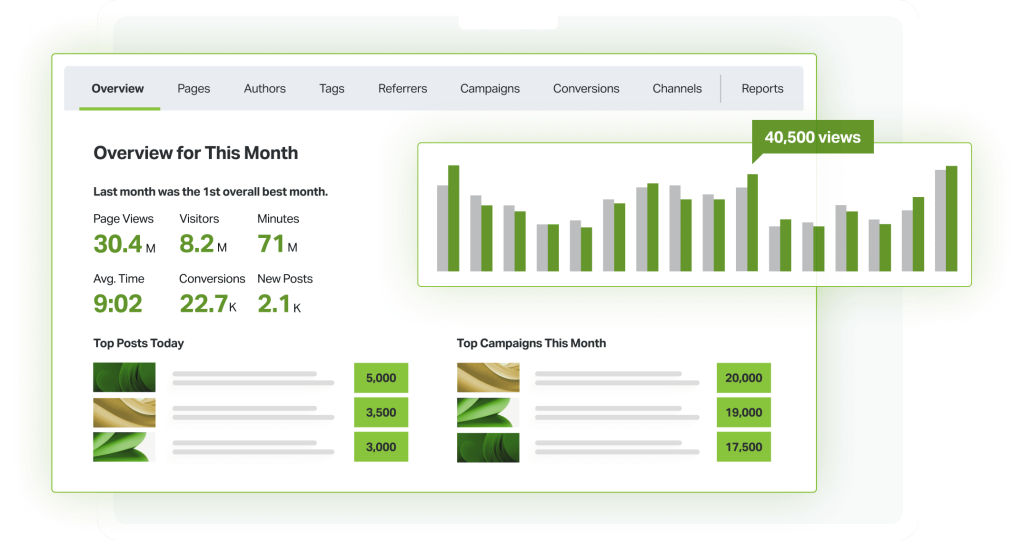
Parse.ly is a content analytics platform designed to help digital publishers and marketers understand how their content performs and how audiences engage with it. It provides real-time analytics on content performance, audience behavior, and engagement metrics such as engaged time and conversions. Parse.ly offers a dashboard that is accessible to all team members, enabling data-driven content strategies without the need for data analysts. Key features include Metadata Extraction, 30+ audience-centric metrics, real-time analytics, marketing campaign tracking, and historical data for up to 13 months. Parse.ly also offers a Content API for personalized content recommendations and a Data Pipeline for sending raw event-level data to data warehouses. The platform integrates deeply with WordPress VIP, enhancing its capabilities for enterprise users. AiDOOS can enhance deployment and adoption by providing a tailored integration environment, streamlined rollout processes, and continuous support, ensuring Parse.ly's analytics insights are readily leveraged across teams. With over 400 enterprises and 12,000+ websites using Parse.ly, it is trusted by major publications like Bloomberg, Slate, and USA Today.

Challenges It Solves

  • Lack of real-time insights into content performance and audience behavior
  • Difficulty in proving ROI of content marketing efforts
  • Inefficient content strategy due to reliance on outdated or static analytics
  • Inability to deliver personalized content experiences at scale

Screenshots

Parse.ly screenshot 1
Parse.ly screenshot 1 Parse.ly screenshot 2 Parse.ly screenshot 3 Parse.ly screenshot 4

Use Cases

Content Performance Tracking

Monitor how content is performing in real-time to optimize strategies.

Audience Engagement Analysis

Understand audience behavior with metrics like engaged time and social referrals.

Content Recommendation

Deliver personalized content to audiences using the Content API.

Pricing

Custom pricing — built for your team

Parse.ly pricing is tailored to your organisation's size, integrations, and requirements. AiDOOS generates your proposal instantly — scoped & ready in seconds.

Content Performance Content Value Content Advocacy
Schedule a Meeting
💡 Pricing insight from reviewers: Parse.ly offers tiered plans based on features and number of sites tracked, with custom pricing for enterprise.

Key Features

Real-Time Analytics Dashboard

Accessible real-time data on content performance and audience engagement.

Content API

API to serve personalized content recommendations and aggregate data.

Data Pipeline

Send raw event-level data to data warehouses for custom analysis.

AI Insights

Turn audience data into actionable insights with plain-English questions.

Headline Testing

Test headlines live to optimize content performance.

Conversion Reporting

Track conversions and attribute them to content across campaigns.

What Reviewers Say AI-synthesized from 149 reviews

What works well

  • Real-time analytics dashboard is intuitive and provides immediate insights into content performance.
  • Seamless integration with WordPress and other CMS platforms simplifies tracking setup.
  • Content personalization via API helps increase audience engagement and loyalty.
  • Part of WordPress VIP offers strong enterprise-level scalability and support.

Common concerns

  • Pricing is not publicly disclosed, requiring sales contact for quotes.
  • Limited integration options compared to more comprehensive analytics suites.
  • May be overkill for small websites with basic analytics needs.

Reviews

149 verified reviews
4.5
★★★★☆
out of 5 · 149 reviews
By segment
Enterprise35%
Mid-Market65%
M
Mid-Market (51-1000 emp.)
"Parrse.ly review"
It's highly accurate and simple to use, with everything accessible in just a few seconds. The best part is the overall experience I have access to. It's the top product on the market. I have no complaints or negative feedback. It provides accurate numbers for my stories and helps me compare how my newspaper is performing relative to others in the company.
S
Senior Supervising Producer
"How I like Parse.ly"
I appreciate that it's easy to view and user-friendly. Sometimes there are bugs, and at times I have to navigate more to locate the data I need. It helps me prioritize my daily work by allowing me to focus on important trending stories and obtain data about them simultaneously.
S
Small-Business (50 or fewer emp.)
"Solid choice, especially for real-time analytics"
The platform excels at showing real-time traffic reports in various increments, and it's very easy to comprehend and explore further if desired. Some analytics, like referral click data, remain somewhat unclear. Also, obtaining reports for specific categories or tags is challenging when content has multiple tags or categories. Overall, it makes analytics more accessible to a broader audience, and in our case, it makes basic real-time and historical analytics easy to grasp for both editorial and advertising staff.
S
Senior Consumer Reporter
"Great trend monitoring with Parsley"
It lets you compare previous weeks and months to see what performs and what doesn't. I would like a feature to view stories by publication date, which would help understand how stories perform on specific days. Parsley is fantastic for traffic monitoring and analyzing what's effective and what needs ongoing work.
S
Small-Business (50 or fewer emp.)
"Invaluable for understanding traffic drivers"
Beyond displaying view counts and unique visitors for each article, Parse.ly also breaks down traffic sources by social platform. I wish there was a simple way to see the total lifetime views for an article. On mobile, you can access six months of historical data, but on desktop, you can only view page views month by month. Parse.ly is excellent for identifying which story types attract the most traffic and which don't, allowing you to concentrate on what works while tracking experiments when trying new approaches.
M
Mid-Market (51-1000 emp.)
"My go-to easy-to-use content analytics tool"
Parse.ly is the simplest content analytics tool I've encountered, making it quick to train editors and empower them to make data-driven decisions. The scheduled reports and user-friendly interface have made it a daily habit for most of our editors. Although slightly technical, Parse.ly collects a wealth of helpful user-level information that customers can't access. While I understand why sharing this might be challenging, it would be immensely valuable from a data standpoint. Obtaining real-time readership data and historical data in a user-friendly, digestible format has always been difficult for newsrooms. Parse.ly makes it straightforward to contextualize data and derive insights.
M
Mid-Market (51-1000 emp.)
"Parse.ly stands out among analytics tools"
With Parse.ly, you can monitor various data points including minutes spent, time on page, unique entrances, and raw page views. The most valuable feature for me is reviewing historical data and filtering by traffic source. I'd like to be able to go back more than two years for longer-term analysis. Additionally, I wish Parse.ly could provide more actionable recommendations based on traffic sources to enhance our content. Knowing our performance is fundamental to journalism and media, but it's also vital for connecting with our audience as their behaviors evolve. It guides us on where to focus our attention.
M
Mid-Market (51-1000 emp.)
"Nearly daily user for six years, strongly recommend"
The interface is incredibly user-friendly and intuitive, so new team members need minimal, if any, training. It only monitors article views, meaning it doesn't track additional clicks within an article like gallery images, so we still rely on Google Analytics for total page views versus article views—but that's not a major concern for us. Parse.ly is far easier to navigate compared to Google Analytics. It enables every team member to access and understand key performance metrics at the individual, team, and overall levels, helping us assess efficiency by easily seeing which content is performing well and which isn't, thereby facilitating informed decisions about resource allocation.
C
Creador de contenido y redactor SEO
"Platform usage insights"
I appreciate having real-time data about the site's performance, as it helps spot problems before they impact my audience. The collected information also reveals trends we can leverage ahead of competitors. One suggestion would be to add more advanced filtering options, since certain tags are currently excluded. Also, the viewing history is limited to just one year, which could be extended. The increase in traffic helps us identify which topics are gaining traction and allows us to replicate that success over a longer timeframe. By adopting a more precise editorial calendar that aligns with user preferences and timing, we've seen benefits.
C
Content Writer
"An essential tool for content creators seeking to maximize article performance"
Keeping tabs on site traffic in real time is crucial for gauging how well our blog or website is doing and shaping the right content approach for optimal results. With Parse.ly's live audience tracking, I can see not just how many readers are currently engaging with my posts, but also compare that live number against my typical visitor count. This keeps me informed about the status of my existing content and highlights where improvements are needed. The in-depth reports give me a clear picture of which stories are performing best, helping me understand what my audience prefers and guiding me to serve them better next time while also steering my blog in the right direction. The periodic summaries also reveal when certain types of content do better, such as during festive periods. The dashboard automatically resetting can be somewhat irritating when I'm trying to quickly access all my important options. I feel this should be addressed promptly to improve the user experience. As a blogger, my success hinges on how my readers respond to my work. With Parse.ly's comprehensive reports and insights, I can easily check live traffic and compare it to past performance, helping me determine if I'm on the right track or need to adjust my approach. Additionally, the historical data allows me to replicate successes from specific months like the holiday season by following similar strategies.

Reviewer Demographics

Top Industries

No data available

Company Size

No data available

Enterprise Readiness

SOC 2 Type II

Identity & Access

SSO SAML
RBAC role-based permissions for dashboards and reports
Audit Logs

Data Security

At restAES-256
In transitTLS 1.2+
Key mgmtVendor-managed

SLA & Availability

Uptime SLA99.9%
RPO
RTO
Pen test

Compliance & Portability

Data residencyUnited States
Data export CSV, JSON
Right to erasure✓ Supported

Integrations

WordPress

Parse.ly offers a WordPress plugin that automatically installs tracking code and supports integration with WordPress VIP.

Native < 1 hour ⇄ Bi-directional ⚡ AiDOOS Pre-wired

Google Analytics

Parse.ly can be used alongside Google Analytics, although Parse.ly emphasizes its own real-time analytics capabilities.

Third_Party 2-4 hours

Drupal

Parse.ly provides integration modules for Drupal to enable content tracking and analytics.

Native 2-4 hours ⇄ Bi-directional ⚡ AiDOOS Pre-wired

Snowflake

Parse.ly's Data Pipeline can send raw event data to Snowflake for advanced analytics.

Native 2-4 hours ⇄ Bi-directional ⚡ AiDOOS Pre-wired

Amazon S3

Parse.ly Data Pipeline can export raw event data to Amazon S3 for storage and processing.

Native 2-4 hours ⇄ Bi-directional ⚡ AiDOOS Pre-wired

Content API

Parse.ly's Content API allows retrieval of analytics data and content recommendations programmatically.

Native 2-4 hours ⇄ Bi-directional

Governance & Compliance

EU AI Act

No data available

Data Processing Agreement

Data Processing Agreement DPA available

Sub-processors

No data available

Right to Erasure

✓ Supported

Change Notifications

No data available

NIST AI RMF

No data available

AiDOOS Managed Deployment

Deploy Parse.ly in 72 hours

AiDOOS handles setup, CRM integration, SSO config, and user provisioning. Your team goes live — not your IT department.

12
Deployments
94%
Adoption rate
4.8/5
Post-deploy sat.
2-4 weeks
Time to value

Prerequisites

  • Valid Parse.ly subscription
  • Access to website or content platform for tracking code installation
  • Admin access to configure metadata and integrations

Configuration Options

  • Dashboard customization
  • Integration with WordPress, Drupal, or other CMS
  • Data Pipeline setup to send data to cloud storage

How Parse.ly Compares

Product AI & Analytics Ease of Use Enterprise Features Pricing Integrations Mobile Experience Quick Setup Customer Support Rating Price/mo
Parse.ly This product
Excellent Good Good Fair Good Fair Good Good ★ 4.5 $Custom/user
Google Analytics
Excellent Good Good Excellent Excellent Good Excellent Fair $Free/user
Adobe Analytics
Excellent Fair Excellent Poor Excellent Good Fair Good $Custom/user
Chartbeat
Good Excellent Fair Fair Good Good Excellent Excellent $Custom/user
Virtual Delivery Center · A new delivery category

A Virtual Delivery Center for Parse.ly

Pre-vetted experts and AI agents in the loop, assembled as a delivery pod. Pay in Delivery Units — universal pricing across roles, seniority, and tech stacks. No hiring, no contracting, no procurement cycle.

  • Plans from $2,000 — Starter Pack, 10 Delivery Units, 90 days
  • Refundable on unused Delivery Units, anytime — no questions asked
  • Re-delivery guarantee on acceptance miss
  • Pre-flight delivery sizing — you see the plan before you commit

How a Virtual Delivery Center delivers Parse.ly

Outcome-based delivery via AiDOOS’s VDC model.  Why VDC vs traditional consulting? →

Outcome-Based

Pay for results, not hours

Milestone-Driven

Clear deliverables at each phase

Expert Network

Access to certified specialists

Implementation Timeline

1
Discover
Requirements & assessment
2
Integrate
Setup & data migration
3
Validate
Testing & security audit
4
Rollout
Deployment & training
5
Optimize
Performance tuning
Schedule a Meeting

Frequently Asked Questions

Does Parse.ly integrate with WordPress?
Yes, Parse.ly has a native WordPress plugin that installs tracking code and automatically collects metadata. It also powers WordPress VIP's analytics.
Can Parse.ly send data to my data warehouse?
Yes, Parse.ly offers a Data Pipeline that can export raw event-level data to platforms like Snowflake, Amazon S3, and others.
What are the main differences between Parse.ly plans?
The plans differ in features: Content Performance includes core analytics, Content Value adds conversion reporting and audience segmentation, and Content Advocacy adds geographic segmentation, video tracking, and SSO.
Is Parse.ly suitable for small organizations?
Parse.ly has a Content Performance plan marketed as a good option for small organizations getting started, but pricing is custom and not publicly disclosed.
Does Parse.ly offer real-time analytics?
Yes, Parse.ly provides real-time analytics, allowing you to see audience behavior as it happens.
How does Parse.ly help with content recommendations?
Parse.ly's Content API provides personalized content recommendations that can be served on your site to increase engaged time and reader loyalty.

Quick Stats

★ 4.5
Rating
12
Deployments
72 hours
Live in
99.9%
Uptime SLA
Deployment Complexity
Moderate (3/5)
Schedule a Meeting

Vendor

Parse.ly
New York
Verified Vendor

Get an Instant Proposal

You'll get a structured implementation plan — scope, timeline, and cost — in seconds.