Pricing For Talent RAMP
Login Free Trial
MergeMail ★ 4.5 · 11 reviews
Schedule Meeting
Marketplace › Marketing › MergeMail  · MergeMail alternatives

MergeMail

Send bulk emails in Gmail

AiDOOS Verified SAAS Marketing
4.5 ★★★★☆ 11 reviews
Live in 72 hours
Starting from
$12
per user / month
Schedule Meeting
Category
Marketing
Deployment
Cloud (SaaS)
Integrations
1500++ Apps
API Access
Yes
AiDOOS Deploy
72 hours

About MergeMail

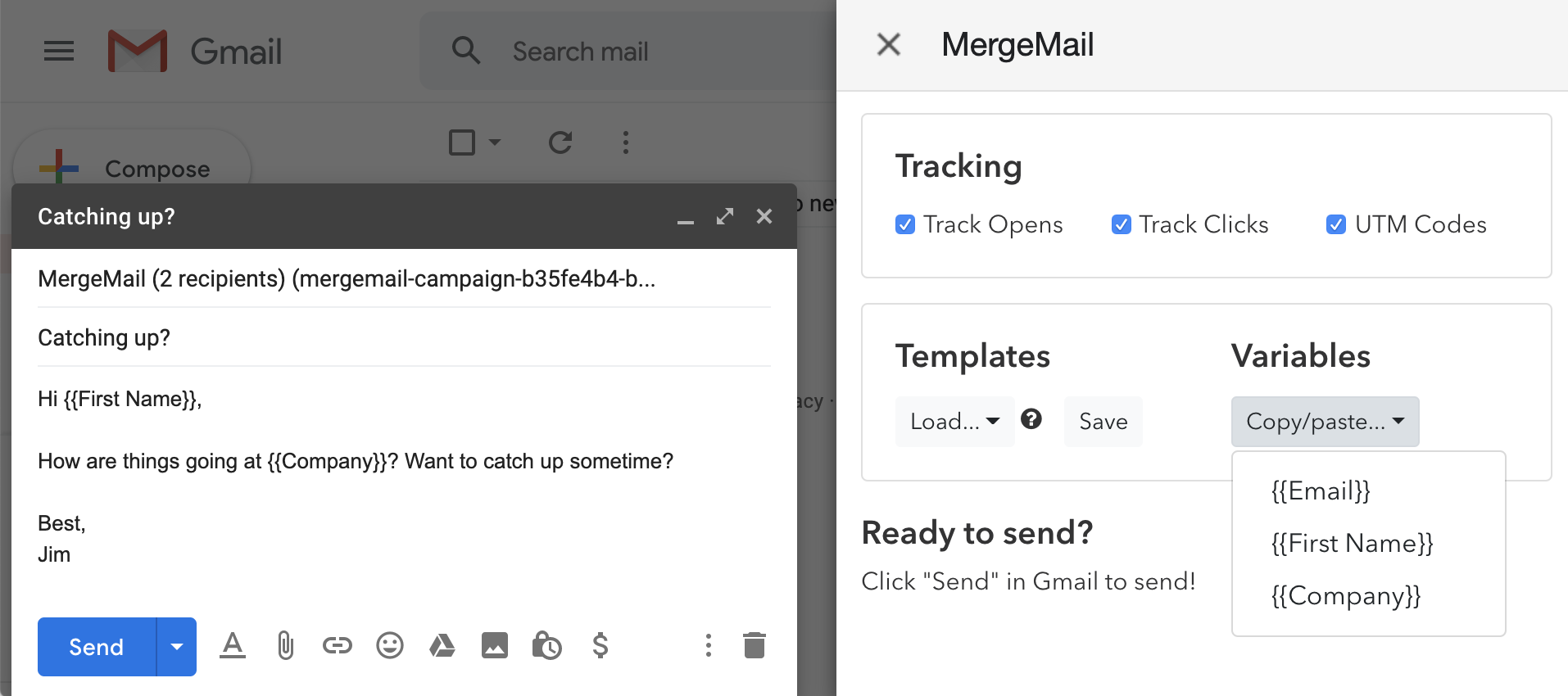
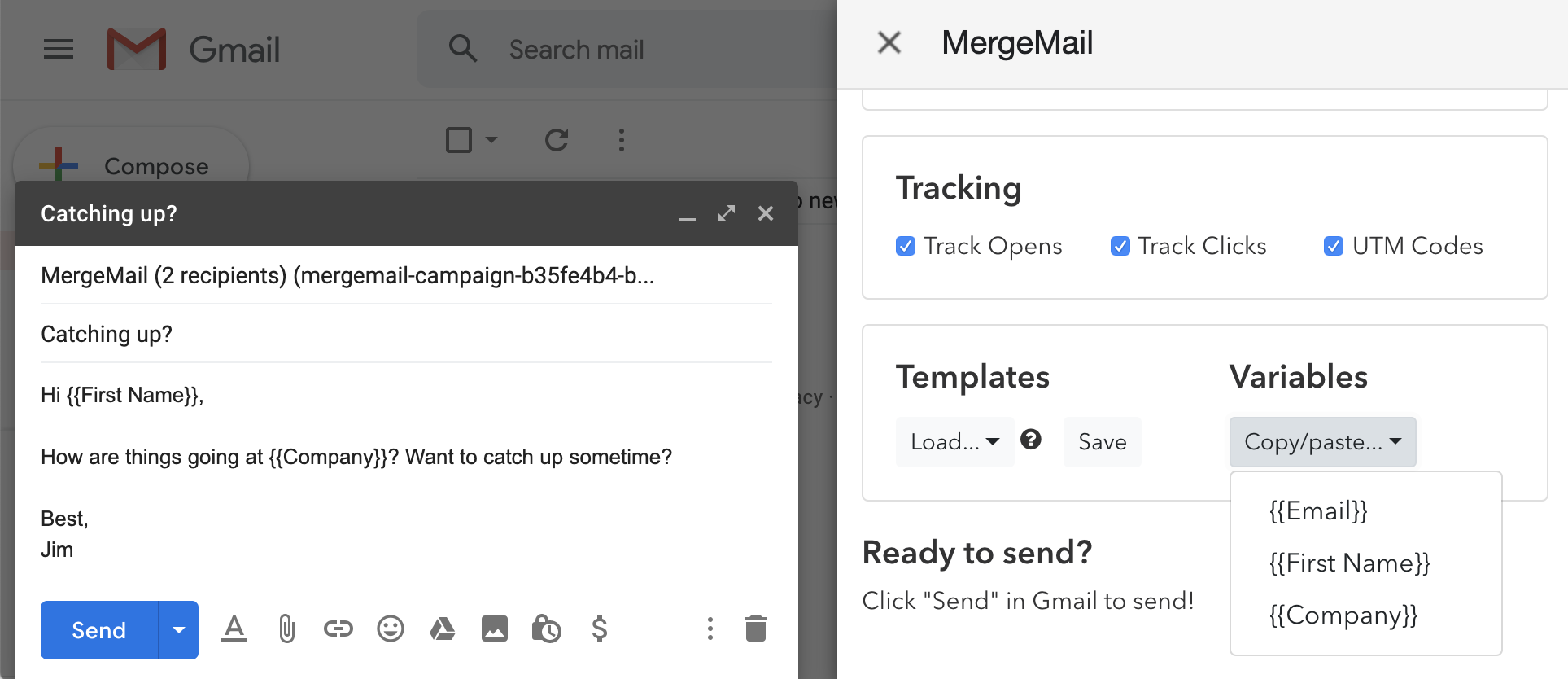
MergeMail is a Chrome extension and web service that allows users to send personalized bulk emails directly from Gmail using Google Sheets as the data source. With MergeMail, users can create email campaigns, personalize fields like name and company, track email opens and link clicks, use pre-designed templates or create custom ones, and schedule emails for optimal send times. The tool integrates with over 1,500 other applications via Zapier, enabling automated workflows with Salesforce, HubSpot, Google Sheets, Slack, and more. MergeMail offers a free plan that allows sending 50 emails per day, with premium plans providing higher limits and additional features. It emphasizes privacy by not requiring access to the entire Gmail inbox, letting users choose permissions. AiDOOS enhances deployment and adoption by providing a platform to manage and monitor such email campaigns efficiently, offering analytics and collaborative tools to improve outreach effectiveness.

Challenges It Solves

  • Sending bulk personalized emails manually is time-consuming and error-prone.
  • Tracking email engagement (opens, clicks) requires complex tools.
  • Creating professional email templates without coding skills is difficult.
  • Integrating email campaigns with other business tools (CRM, Sheets) is challenging.

Screenshots
MergeMail screenshot 1
MergeMail screenshot 1 MergeMail screenshot 2 MergeMail screenshot 3 MergeMail screenshot 4 MergeMail screenshot 5 MergeMail screenshot 6 MergeMail screenshot 7 MergeMail screenshot 8

Use Cases

Email Marketing Campaigns

Send personalized newsletters and promotional emails to a large audience directly from Gmail.

Sales Outreach

Personalize outreach emails for prospects using data from a Google Sheet, and track engagement.

Event Invitations

Send personalized invitations to an event and track who opens the email or clicks the RSVP link.

Pricing

Custom pricing — built for your team

MergeMail pricing is tailored to your organisation's size, integrations, and requirements. AiDOOS generates your proposal instantly — scoped & ready in seconds.

Free Pro Premium Team
Schedule a Meeting
💡 Pricing insight from reviewers: MergeMail offers a free tier with 50 emails per day, and paid plans starting at $16/month (Pro) and $65/month (Premium) with a yearly discount of approximately 25%.

Key Features

Mail Merge

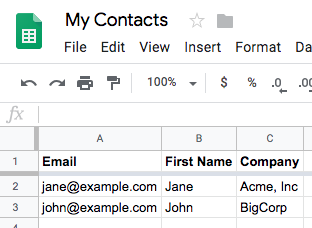
Personalize emails using variables from Google Sheets columns.

Email Tracking

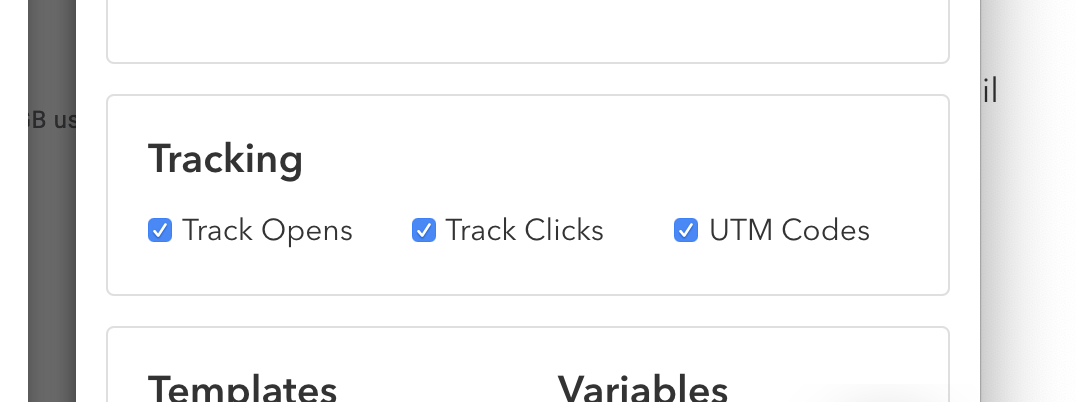
Track opens and clicks on links within sent emails.

Templates

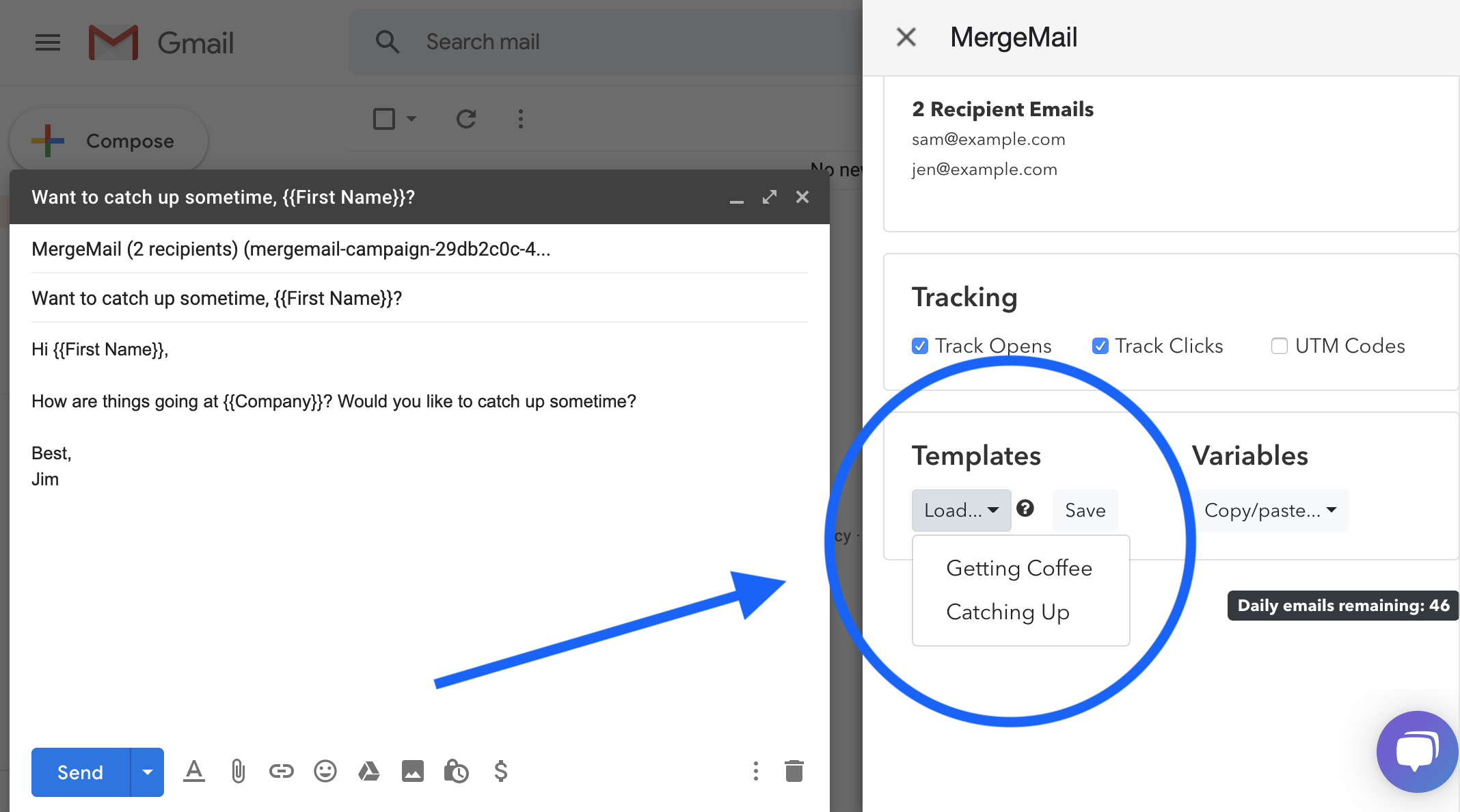
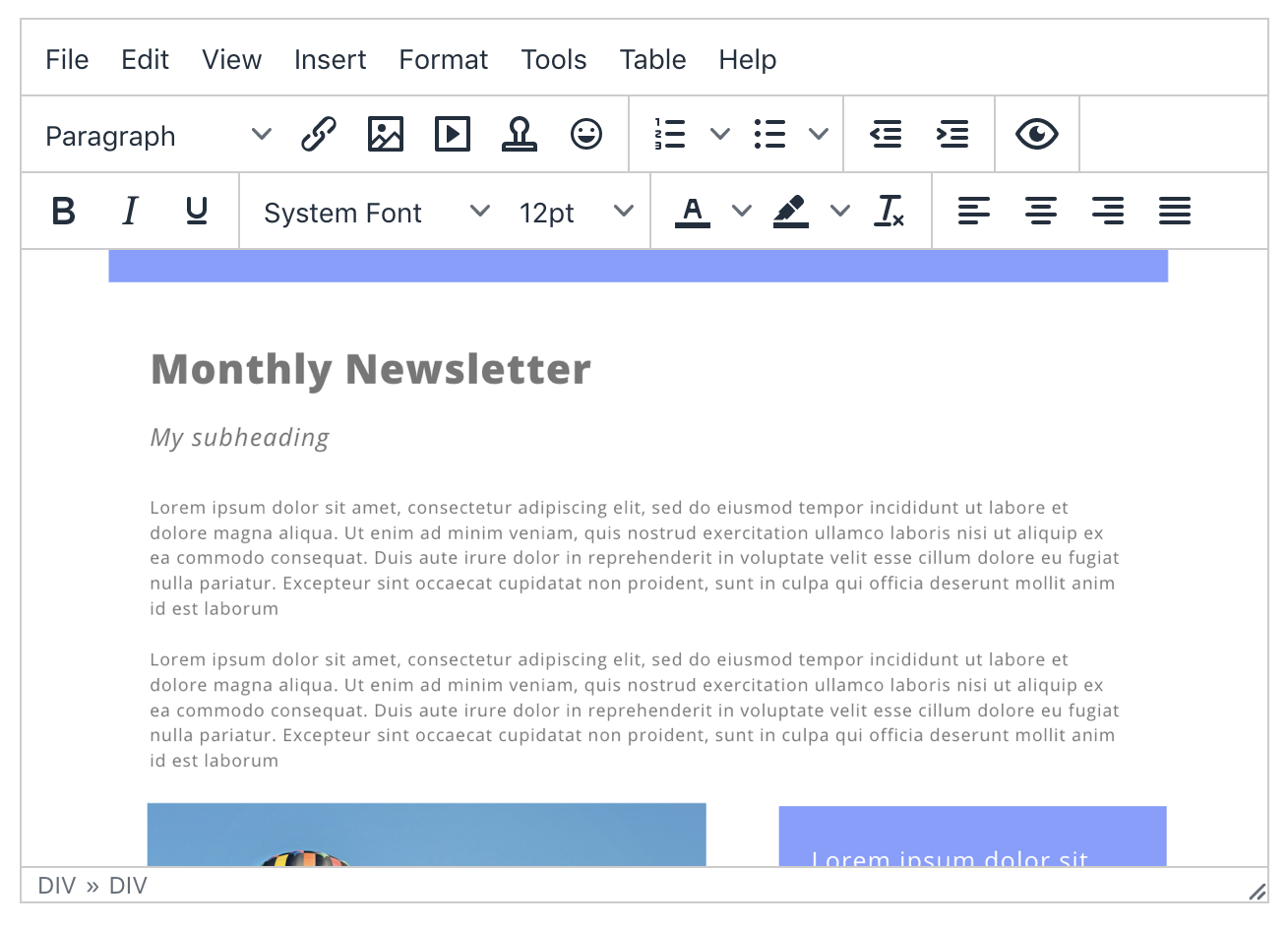
Create reusable email templates directly within Gmail.

Template Editor

Build beautiful newsletters and emails with a drag-and-drop editor.

Scheduled Emails

Schedule emails to be sent at a specific time for better open rates.

Integrations

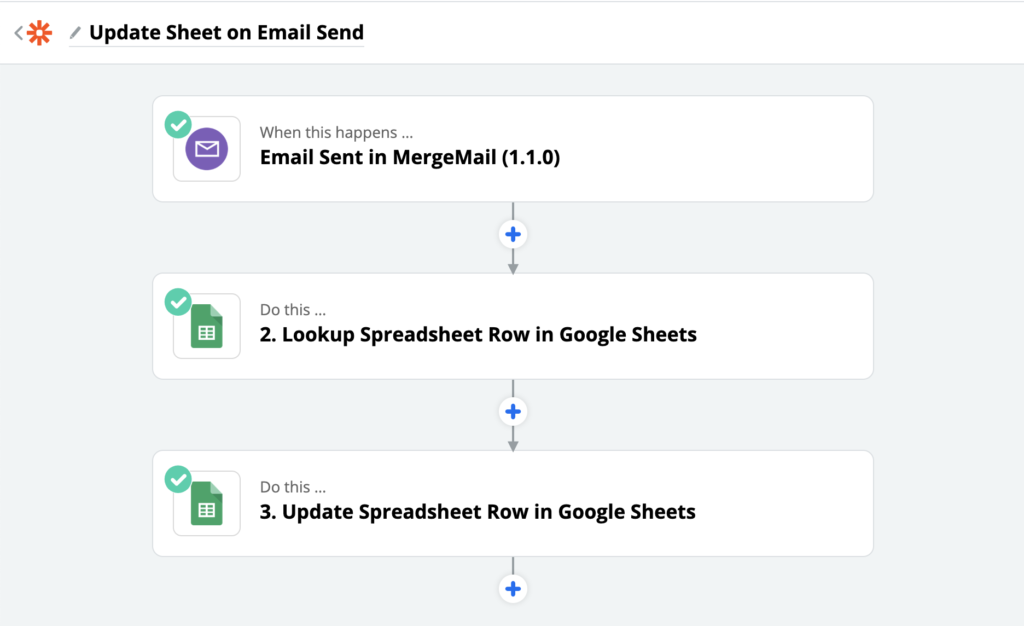
Connect with over 1,500 tools using Zapier for automated workflows.

What Reviewers Say AI-synthesized from 11 reviews

What works well

  • Seamless integration with Gmail and Google Sheets
  • User-friendly interface
  • Personalization options using spreadsheet data

Common concerns

  • Email sending limits on lower plans
  • Limited advanced features compared to dedicated email marketing platforms

Reviews

11 verified reviews
4.5
★★★★☆
out of 5 · 11 reviews
By segment
Enterprise25%
Mid-Market75%
S
Small-Business (50 or fewer emp.)
"Perfect for Combining with Gmail"
The best feature is its integration with Gmail to send mail merges, track opens, and create templates. I dislike that the templates aren't very modern or easy to use. It's easy to use, great for small businesses, and customer service is excellent. In a small marketing team, it's great for collaboration and working together on email campaigns.
M
Mid-Market (51-1000 emp.)
"Advanced Marketing Tool Integrated with Gmail for Bulk Emails"
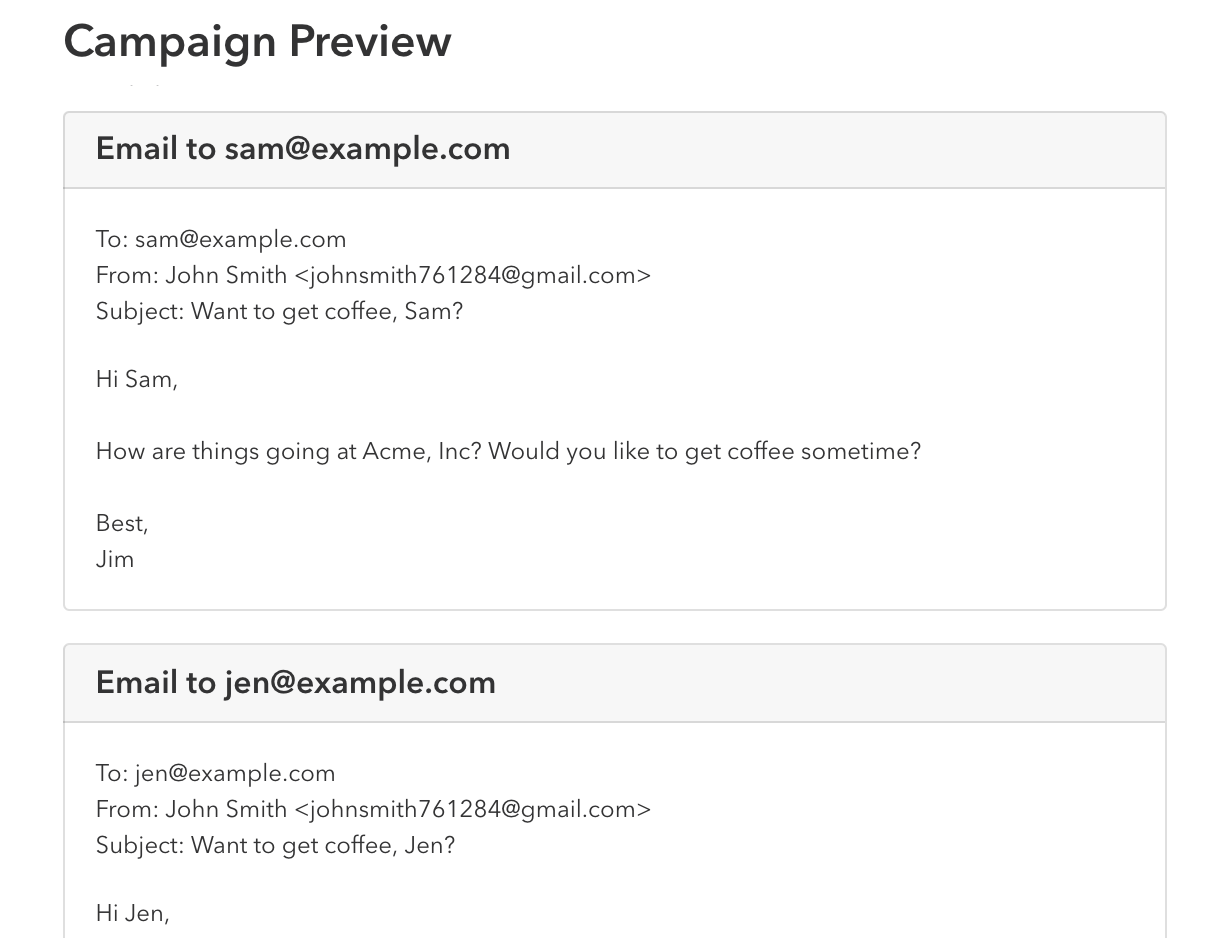
You can add email templates using Gmail and easily customize them. The MergeMail template editor is user-friendly and allows quick personalization. You can integrate MergeMail with other tools and send bulk emails with a single click. Before sending, it shows a preview to recheck the campaign and avoid errors. The reporting is good for analyzing campaign performance, and you can schedule emails for specific time zones. MergeMail is one of the best email marketing tools; we've had no issues working with Gmail. We recommend MergeMail for your business. It's a great tool for sending emails. You can test the free plan before buying the pro. Hiring a digital marketing company is expensive, so we decided to do email marketing internally. We chose MergeMail to send bulk emails and connect with clients easily. It's simple to connect with Gmail and customize templates as needed. Without MergeMail, we didn't have tracking or customization capabilities. Now we can see how many hits our emails get and track clicks.
M
Mid-Market (51-1000 emp.)
"Send and Track Email Campaigns, Integrate with Many Tools"
MergeMail is a secure lead generation tool for business marketing via email. You can use different software to edit, create, and manage emails and send to multiple customers easily. It's a secure way to handle marketing campaigns. With MergeMail, you can preview your email template before sending. You can personalize emails using Google Sheets and import contact lists to send bulk emails. There are many functions to manage the entire campaign and create custom reports for management to show your work and leads. MergeMail is not a bad tool for lead generation. Compared to other email tools, its prices are very low, and you can easily set up your business campaign without needing customer service. Based on our experience, MergeMail is the best for marketing and generating business leads. You can add it directly to Gmail and use it independently. Try it for your promotional activities. MergeMail is the cheapest resource for online email marketing. It helps create email campaigns within Gmail and easily access all functions to build campaigns. In our basement renovation work, we need to set up multiple campaigns to showcase our skills and experience to generate leads. MergeMail is perfect for our construction business. We can create custom templates or use existing ones. The email editor is great for adding content, headings, and newsletters. You can integrate with multiple tools and easily increase your customer base.
A
Advertising Consultant
"Too Much Trouble to Get Working"
Nothing yet. I haven't been able to open the product. They ask you to download a Chrome add-on, and once you do, you get stuck in a frustrating cycle of trying to log in. It's not worth the effort so far. As I mentioned, the screenshot I provided shows how far I got – click a button, attempt to log in (which keeps sending you to a permissions page that says everything is granted), and then back to the start. It's frustrating and annoying, and the troubleshooter only offers one solution that doesn't address my problem. I'm not solving anything because after the trial, I decided not to continue. Maybe they're still fixing bugs and will eventually get it running, but I was disappointed because the product they described sounded useful.
C
Customer Relations Operations Manager
"Useful Tracking Insights"
I gained valuable insights into the best times to follow up because I could see if someone had reviewed the email or not. The signature at the bottom indicating the mail was controlled – I didn't really get any benefits from that. I don't use it anymore.
O
Office Manager
"A Real Time-Saver"
I love being able to automate frequent email responses. Nothing. Merge Mail saves our office time. It is saving us time.
M
Mid-Market (51-1000 emp.)
"MergeMail Is the Best Email Solution Around"
This is a very user-friendly tool. I've been using it for the past three to four years. You can also personalize your emails. It's the best solution I've come across. There's nothing to dislike because you can use customized plans for emailing. At first, we couldn't send multiple emails or run campaigns, but with this tool, it's so easy: just upload a sheet, hit send, and you're done.
P
Project incharge
"A Smart Way to Send Bulk Emails"
1) It's one of the simplest and most innovative ways to send personalized bulk emails. Just put variable data in a Google Sheet, create a template, and insert it into Gmail. 2) It also lets you track opens and link clicks. 3) You can add an unsubscribe link to allow recipients to opt out of future emails. 4) It makes template design easy and its use in emails simple. 5) You can preview the email before sending. I've never had any issues with it so far. 1) It enabled us to send personalized bulk emails to our customers effortlessly. Its excellent interface saved us a lot of time on drafting and sending emails. 2) We were able to send pre-alerts and order status updates to customers easily.
C
Customer support
"MergeMail: A Helpful Tool for Professionals"
The features are great. I can easily send multiple emails on a daily basis with minimal effort. It's definitely useful for working professionals and business owners. So far, my experience has been positive. But I do have a concern about the privacy policy since it requires access to our daily emails. I just hope it doesn't fall into the wrong hands or get misused. It saves time and effort. You don't have to repeat the same work over and over. You can easily send bulk emails. By saving time, I can work on other projects.
S
Small-Business (50 or fewer emp.)
"A Unified Inbox That Changed My Workflow"
The feature I appreciate most is the single inbox that pools emails from all my accounts. Before, handling multiple personal and work email addresses across Gmail, Yahoo, Outlook, etc., meant constantly clicking between inboxes and losing track of conversations. MergeMail brings everything into one clean, easy-to-navigate interface. I no longer have to hunt through different accounts for a particular message since all emails are organized in neat threads where I can quickly sort by sender, date, attachments, and other filters. This has saved me hours and reduced mental clutter. With a complete view of all my correspondence in one place, I reply faster, keep an eye on important emails, and never let things slip through the cracks. The unified inbox is intuitive and has completely changed how I manage my productivity. This unique feature is why I prefer MergeMail over other email clients. Honestly, there is nothing I dislike about MergeMail, except for one area that could use work: contact management. Because MergeMail pulls contacts from various providers, it sometimes fails to merge duplicates correctly. For example, if I have a Gmail contact named "John Smith" and an Outlook entry for "J. Smith," MergeMail doesn't always recognize they represent the same person. This mostly causes minor annoyance when I'm trying to quickly find the right recipient. I've had to manually combine duplicate contacts, and it would be helpful if the tool could more intelligently identify and link related contacts. Additionally, the contact interface feels a bit basic and could offer more control over how contacts are organized and displayed. But this minor gripe pales in comparison to the robust overall email experience. I don't have any negative comments about MergeMail other than contacts. It has solved two major problems for me: email overload and scattered inboxes. Before, my inboxes were chaotic since I juggled many personal and work accounts. Unread emails piled up across Gmail, Outlook, iCloud, and more, and I couldn't keep pace. MergeMail consolidates all my emails into one manageable platform. No more rushing to check messages across different accounts. I now have a single, complete view of all my sent and received messages, which helps me control email overwhelm. Features like snooze, Smart Inbox categorization, and quick search make it easy to prioritize, find what I need, and follow threads regardless of originating inbox. The second major problem MergeMail solves is scattered contacts. I no longer search multiple address books for an email address. The Contact Manager syncs all my contacts. MergeMail has greatly simplified my email routine by bringing everything together. Its integrated platform and tools for inbox mastery have helped me regain control and engage with messages far more efficiently.

Enterprise Readiness

GDPR

Identity & Access

SSO✗ Not supported
RBAC
Audit Logs

Data Security

At restAES-256
In transitTLS 1.2+
Key mgmtVendor-managed

SLA & Availability

Uptime SLA99.9%
RPO
RTO
Pen test

Compliance & Portability

Data residency
Data export
Right to erasure

Integrations

Zapier

Connect MergeMail to 1,500+ other tools via Zapier for automated workflows.

Third_Party < 1 hour ⚡ AiDOOS Pre-wired

Salesforce

Update contact records in Salesforce based on MergeMail email activities.

Third_Party 1-2 hours ⇄ Bi-directional

HubSpot

Sync email activity and personalized campaigns with HubSpot CRM.

Third_Party 1-2 hours ⇄ Bi-directional

Google Sheets

Use Google Sheets to manage recipients and personalize email campaigns.

Native < 1 hour ⇄ Bi-directional ⚡ AiDOOS Pre-wired

Slack

Receive notifications in Slack when campaigns are sent or recipients interact.

Third_Party < 1 hour

Gmail

Core email client integrated for sending and tracking bulk emails.

Native < 1 hour ⚡ AiDOOS Pre-wired

Governance & Compliance

EU AI Act

No data available

Data Processing Agreement

No data available

Sub-processors

No data available

Right to Erasure

No data available

Change Notifications

No data available

NIST AI RMF

No data available

AiDOOS Managed Deployment

Deploy MergeMail in 72 hours

AiDOOS handles setup, CRM integration, SSO config, and user provisioning. Your team goes live — not your IT department.

12
Deployments
94%
Adoption rate
4.8/5
Post-deploy sat.
1-2 weeks
Time to value

Prerequisites

  • Active Gmail account
  • Google Sheet with recipient data
  • AiDOOS subscription

Configuration Options

  • Integration with Zapier for 1,500+ apps
  • Customize email templates with variable fields
  • Set up team collaboration and shared templates

How MergeMail Compares

Product AI & Analytics Ease of Use Enterprise Features Pricing Integrations Mobile Experience Quick Setup Customer Support Rating Price/mo
MergeMail This product
Poor Excellent Fair Good Good Poor Excellent Good ★ 4.5 $12/user
Mailchimp
Excellent Excellent Good Fair Excellent Good Excellent Good $10.00/user
HubSpot Marketing Hub
Excellent Good Excellent Fair Excellent Good Good Excellent $45.00/user
Referral Rocket
Good Good Fair Good Fair Poor Excellent Good $Custom/user
Virtual Delivery Center · A new delivery category

A Virtual Delivery Center for MergeMail

Pre-vetted experts and AI agents in the loop, assembled as a delivery pod. Pay in Delivery Units — universal pricing across roles, seniority, and tech stacks. No hiring, no contracting, no procurement cycle.

  • Plans from $2,000 — Starter Pack, 10 Delivery Units, 90 days
  • Refundable on unused Delivery Units, anytime — no questions asked
  • Re-delivery guarantee on acceptance miss
  • Pre-flight delivery sizing — you see the plan before you commit

How a Virtual Delivery Center delivers MergeMail

Outcome-based delivery via AiDOOS’s VDC model.  Why VDC vs traditional consulting? →

Outcome-Based

Pay for results, not hours

Milestone-Driven

Clear deliverables at each phase

Expert Network

Access to certified specialists

Implementation Timeline

1
Discover
Requirements & assessment
2
Integrate
Setup & data migration
3
Validate
Testing & security audit
4
Rollout
Deployment & training
5
Optimize
Performance tuning
Schedule a Meeting

Frequently Asked Questions

Does MergeMail require full access to my Gmail inbox?
No, MergeMail lets you choose the permissions you are comfortable granting, unlike some other mail merge tools that require full inbox access.
Can I schedule emails to be sent at a specific time?
Yes, MergeMail includes a Scheduled Emails feature that allows you to send emails at a specified time to optimize open rates.
How does the Team plan work?
The Team plan allows you to add multiple users (seats) under the same domain, with a per-user monthly cost and volume discounts. You can manage seats and users at any time.
Can I use MergeMail with other tools?
Yes, MergeMail integrates with 1,500+ other tools via Zapier, including Salesforce, HubSpot, Google Sheets, and Slack.
Is there a free plan available?
Yes, MergeMail offers a free plan that allows you to send up to 50 emails per day.

Quick Stats

★ 4.5
Rating
12
Deployments
72 hours
Live in
99.9%
Uptime SLA
Deployment Complexity
Easy (2/5)
Schedule a Meeting

Vendor

MergeMail
N/A
Verified Vendor

Get an Instant Proposal

You'll get a structured implementation plan — scope, timeline, and cost — in seconds.