 · 0 reviews
Liqvid Live
Your Go-To Digital Signage Platform
About Liqvid Live
Liqvid Live is a cloud-based digital signage platform designed for small businesses and enterprises alike. It allows users to manage content on TVs and digital screens from a central dashboard, supporting a wide range of devices including Android TV, Chromecast, Amazon Fire, and Xiaomi. The platform offers an intuitive editor, enabling users to create and schedule content such as menus, promotions, and announcements in minutes. With features like remote screen management, unlimited media storage on premium plans, and compatibility with a variety of streaming devices, Liqvid simplifies digital signage operations. The platform is built for speed and ease of use, with a setup time of approximately 15 minutes and no technical expertise required. AiDOOS enhances deployment and adoption by providing a streamlined integration process, allowing businesses to quickly connect their screens and start broadcasting. AiDOOS also offers additional services such as content creation and system monitoring, ensuring a seamless experience.
Challenges It Solves
- Managing content across multiple screens in different locations is time-consuming
- Updating digital signage often requires physically accessing each screen with USB drives
- Creating professional-looking content without design skills is difficult
- Ensuring screens are always online and showing up-to-date content is challenging
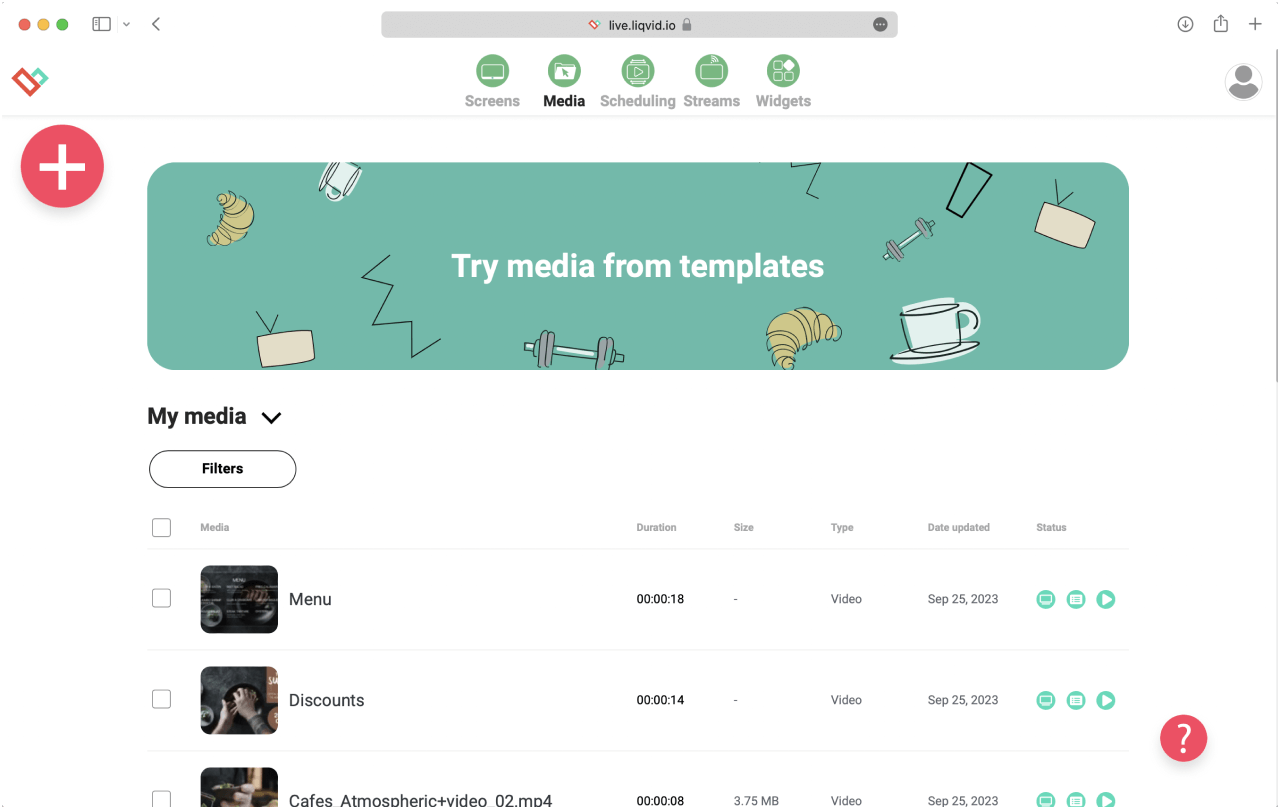
Screenshots


Use Cases
Cafes and Restaurants
Show menus, promotions, and special offers on TV screens to attract customers.
Retail Stores
Display advertisements, product info, and announcements to enhance customer experience.
Gyms and Fitness Centers
Share class schedules, motivational content, and promotions with members.
Clinics and Medical Offices
Educate patients with health tips, service information, and wait times.
Pricing
Custom pricing — built for your team
Liqvid Live pricing is tailored to your organisation's size, integrations, and requirements. AiDOOS generates your proposal instantly — scoped & ready in seconds.
Key Features
Manage all your screens from a single web dashboard
Create and edit content directly in the platform with easy-to-use tools
Control your screens from anywhere, push content instantly
Schedule content by hour, day, week, or season
Works with Android TV, Chromecast, Amazon Fire, and Xiaomi devices
Upload as many videos and images as you need on premium plans
What Reviewers Say
What works well
- Very easy to set up and use, even for non-technical users
- Supports a wide range of devices including Android TV, Fire Stick, Chromecast
- Free plan available with basic features, making it accessible for small businesses
Common concerns
- Limited storage on the free plan (10Mb)
- Advanced features require a paid subscription
Reviews
Enterprise Readiness
Identity & Access
Data Security
SLA & Availability
Compliance & Portability
Integrations
Android TV
Liqvid app runs natively on Android TV devices, allowing digital signage playback without extra hardware.
Amazon Fire TV
Liqvid app is available on Amazon Fire TV devices, enabling digital signage on Fire TV sticks and TVs.
Chromecast
Liqvid supports Google Chromecast devices, allowing content casting from the Liqvid platform.
Xiaomi
Liqvid is compatible with Xiaomi Android-based TVs and media boxes, allowing digital signage on these devices.
YouTube
Liqvid allows users to stream YouTube videos directly to their screens from the Liqvid dashboard.
Google Play
Liqvid app can be installed from Google Play Store on Android TV and other Android devices.
Amazon Appstore
Liqvid app is available on Amazon Appstore for Fire TV devices.
REST API
Liqvid offers a REST API for integrating and managing screens programmatically (as indicated on their platform).
Governance & Compliance
EU AI Act
No data available
Data Processing Agreement
No data available
Sub-processors
No data available
Right to Erasure
No data available
Change Notifications
No data available
NIST AI RMF
No data available
AiDOOS Managed Deployment
Deploy Liqvid Live in 72 hours
AiDOOS handles setup, CRM integration, SSO config, and user provisioning. Your team goes live — not your IT department.
Prerequisites
- Liqvid account
- Internet-connected TV with Android TV / Fire TV / Chromecast
- Email address
- Content to display
Configuration Options
- Connect unlimited screens to dashboard
- Customize content templates
- Set scheduling and playlists
- Configure IPTV channels
How Liqvid Live Compares
| Product | AI & Analytics | Ease of Use | Enterprise Features | Pricing | Integrations | Mobile Experience | Quick Setup | Customer Support | Rating | Price/mo |
|---|---|---|---|---|---|---|---|---|---|---|
|
L
Liqvid Live This product
|
Poor | Excellent | Good | Excellent | Fair | Good | Excellent | Excellent | — | $Custom/user |
|
OC
Octopus
|
Fair | Good | Good | Good | Good | Good | Good | Good | — | $Custom/user |
|
SC
ScreenCloud
|
Good | Good | Good | Good | Good | Good | Good | Good | — | $Custom/user |
|
CS
Chrome Sign Builder
|
Poor | Good | Good | Good | Good | Good | Good | Good | — | $Custom/user |
A Virtual Delivery Center for Liqvid Live
Pre-vetted experts and AI agents in the loop, assembled as a delivery pod. Pay in Delivery Units — universal pricing across roles, seniority, and tech stacks. No hiring, no contracting, no procurement cycle.
- Plans from $2,000 — Starter Pack, 10 Delivery Units, 90 days
- Refundable on unused Delivery Units, anytime — no questions asked
- Re-delivery guarantee on acceptance miss
- Pre-flight delivery sizing — you see the plan before you commit
How a Virtual Delivery Center delivers Liqvid Live
Outcome-based delivery via AiDOOS’s VDC model. Why VDC vs traditional consulting? →
Outcome-Based
Pay for results, not hours
Milestone-Driven
Clear deliverables at each phase
Expert Network
Access to certified specialists