Pricing For Talent
Login Free Trial Book a Demo
LeadCRM ★ 4.8 · 57 reviews
Schedule Meeting
Marketplace › Marketing › LeadCRM  · LeadCRM alternatives

LeadCRM

One-Click LinkedIn: CRM Sync & Auto-Enrichment

AiDOOS Verified SAAS Marketing
4.8 ★★★★★ 57 reviews
Live in 72 hours Free trial
Pricing
Tailored to you
AiDOOS generates your proposal instantly — scoped & ready in seconds
Schedule Meeting

Free trial · No credit card required

Category
Marketing
Deployment
Cloud (SaaS)
API Access
Yes
AiDOOS Deploy
72 hours

About LeadCRM

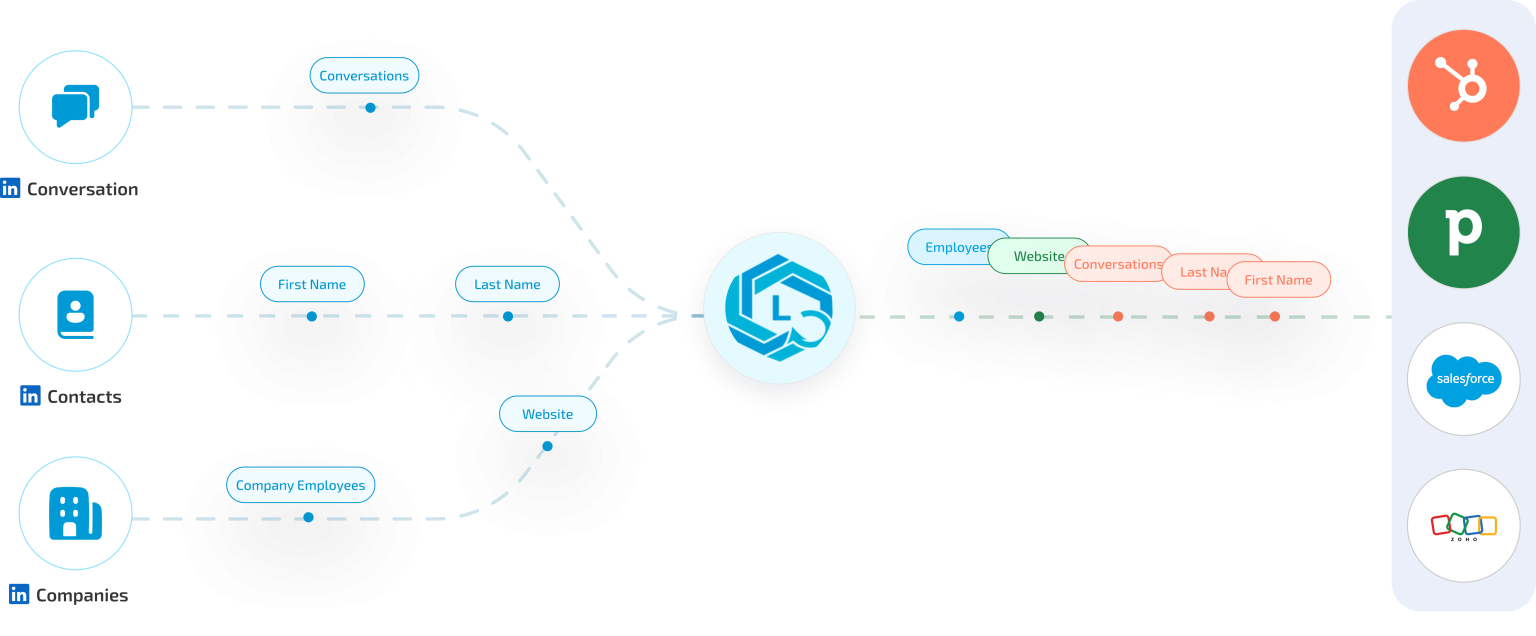
LeadCRM is a browser extension that seamlessly connects LinkedIn with popular CRMs such as HubSpot, Salesforce, Pipedrive, and Zoho. It automates lead capture by allowing users to export and enrich LinkedIn Sales Navigator leads with one click. The tool syncs contact data, including emails and phone numbers, directly into CRM records, eliminating manual data entry. LeadCRM also offers AI-assisted commenting and response generation to help sales professionals engage with prospects efficiently while maintaining a personal touch. With access to over 700 million prospects, waterfall enrichment, and bulk export capabilities, LeadCRM streamlines the entire lead management process. Its features include custom field mapping, advanced search filters, and support for nine languages. Built for sales teams and individual sellers, LeadCRM enhances productivity by reducing time spent on data entry and enabling faster, more personalized outreach. AiDOOS enhances deployment and adoption by providing managed services that customize integration workflows, ensure data security, and offer ongoing support, maximizing the ROI for marketing and sales teams.

Challenges It Solves

  • Manual data entry from LinkedIn to CRM wastes hours daily
  • Incomplete prospect data leads to poor sales decisions
  • Lack of CRM visibility on LinkedIn reduces context during outreach
  • Slow response times due to repetitive messaging

Screenshots
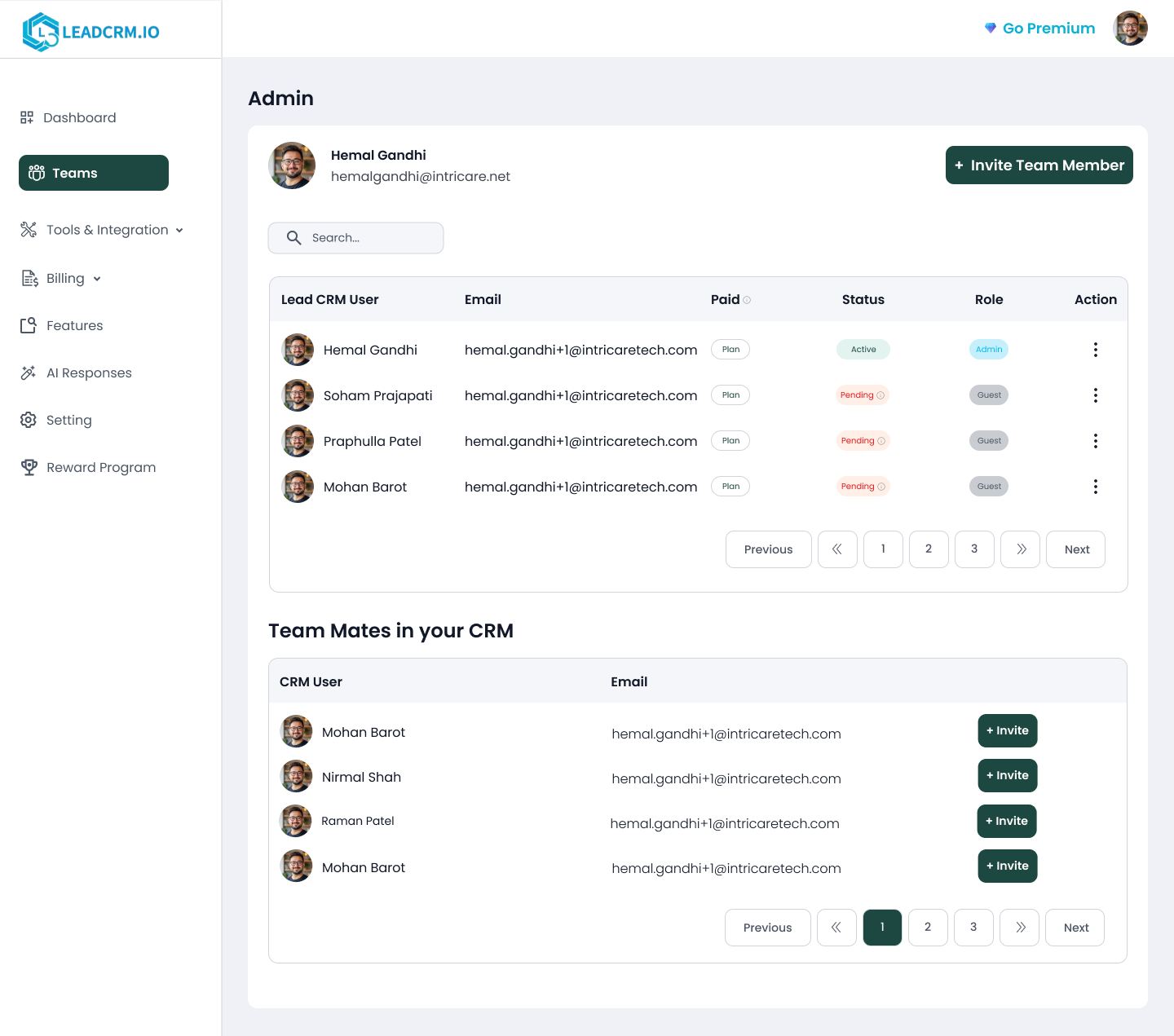
LeadCRM screenshot 1
LeadCRM screenshot 1 LeadCRM screenshot 2

Use Cases

Lead Generation

Sales reps use LeadCRM to capture and enrich leads directly from LinkedIn Sales Navigator, then sync them to their CRM in one click.

CRM Data Enrichment

Automatically fill missing fields in CRM records by enriching LinkedIn profile data with email and phone numbers.

Sales Engagement

Use AI commenting and response tools to engage with prospects on LinkedIn posts and messages, saving time while maintaining a personal touch.

Team Sales Collaboration

Sales teams can share leads, templates, and performance data within LeadCRM to align efforts and close deals faster.

Pricing

Custom pricing — built for your team

LeadCRM pricing is tailored to your organisation's size, integrations, and requirements. AiDOOS generates your proposal instantly — scoped & ready in seconds.

Free Professional Grow
Schedule a Meeting
Free trial available — No credit card required. Full access to all features.

Key Features

CRM Data Sync

One-click sync of LinkedIn profiles to HubSpot, Salesforce, Pipedrive, and more

AI Commenting

Generate human-like comments on LinkedIn posts to boost engagement

Bulk Export & Enrichment

Export and enrich up to 250 Sales Navigator profiles in 60 seconds

Templates & Shortcuts

Create reusable message templates with personalization and analytics

AI Response Assistant

Generate personalized replies within LinkedIn using AI trained on your data

Team Collaboration

Add team members, assign roles, and share resources for unified sales efforts

What Reviewers Say AI-synthesized from 57 reviews

What works well

  • Seamless integration with LinkedIn and major CRMs like HubSpot and Pipedrive
  • Automated lead capture and data enrichment save significant time
  • AI-powered commenting and responses maintain authenticity while accelerating engagement

Common concerns

  • Free tier has limited credits (30 sync credits/month, 10 AI credits/month)
  • Relies on browser extension; no native mobile app mentioned
  • Pricing can become expensive for teams requiring high-volume sync or AI usage

Reviews

57 verified reviews
4.8
★★★★★
out of 5 · 57 reviews
By segment
Enterprise7%
Mid-Market93%
S
SEO Analyst
"Great Tool for Syncing LinkedIn Leads Directly to GoHighLevel"
The GoHighLevel integration is really helpful for our agency work. We can now sync LinkedIn profiles straight into GHL with just one click, saving a lot of time compared to manual data entry. Contact information gets enriched automatically with emails and phone numbers, so our pipeline stays updated with quality leads. It's very convenient for managing multiple clients since we use GoHighLevel for everything. The Chrome extension works smoothly on LinkedIn, and the setup was quite straightforward. The good thing is LeadCRM lets you buy additional enrichment credits separately without needing to upgrade your main plan, which makes it flexible for growing campaign needs. The interface could be a bit more modern looking, but functionality-wise it does the job well. Overall, there isn't much to complain about. Before using LeadCRM, our team was manually copying LinkedIn profile data into GoHighLevel, which was very time-consuming and prone to errors. Now we can build our prospect lists on LinkedIn and sync them directly to GHL with enriched contact details. This has improved our outreach workflow significantly. We're able to get campaigns running faster, and the data quality is much better. For an SEO agency doing client outreach, this integration has made prospecting much more efficient. The time saved allows us to focus more on actual engagement rather than data entry work.
C
CEO
"A Simple but Powerful Tool That Keeps Our LinkedIn Leads Organized"
What I appreciate most is how seamless it feels inside LinkedIn. The Chrome extension makes it very easy to save contacts while browsing profiles. The CRM sync (with tools like HubSpot, Pipedrive, Zoho, etc.) works smoothly, and the enrichment improves overall data quality. It saves our team real time every week. There's a small learning curve when you first explore the advanced features, but once you get used to the workflow, it becomes very intuitive. More tutorial content inside the product would make onboarding even faster. Before LeadCRM, valuable LinkedIn leads were getting lost in messages or spreadsheets. Now everything is captured automatically, properly formatted, and easy to track. It has improved follow-up consistency and visibility across the team.
S
Sales Specialist
"Effortless LinkedIn Integration for CRM"
I like that I can use LeadCRM directly within LinkedIn without needing to open another page. This integration is valuable because when I'm working in my CRM, I get updates on contacts and all necessary information is readily available. I also appreciate that it syncs LinkedIn messages into my CRM, so I can see all my communications—LinkedIn, phone calls, and emails—in one place. Additionally, the initial setup was very easy; within a minute or two, I was up and running. I think it's spread within LinkedIn. And also writing messages when I'm writing, having a template to work with. It doesn't work as well as it does with Sophie, for example. But it is still available, and I would use it if it was the only program I had. LeadCRM simplifies entering information from LinkedIn into my CRM and syncs messages, so I see all communication in one place. I can work within LinkedIn without opening another page.
C
CEO
"The Cleanest LinkedIn to CRM Workflow We've Found – Huge Boost for Outbound"
LeadCRM is one of those tools that feels small until you realize how much time it saves across the entire sales workflow. At Oneleet, we sell security and compliance software (SOC 2, ISO 27001, HIPAA, etc.) to fast-growing companies, and LinkedIn is one of our most important channels for identifying decision makers. LeadCRM makes it incredibly easy to capture leads directly from LinkedIn and sync them into CRMs like HubSpot, Pipedrive, and Zoho without manual work. What impressed me most is how clean the data stays. The enrichment quality is consistently strong, especially for job titles, company details, and filling missing information. That directly improves outreach quality and reduces the amount of time our team spends cleaning CRM records. The only minor downside is that you'll want to spend a bit of time upfront getting field mapping and workflows set correctly if you have a very structured CRM. Once that's done, it runs smoothly. LeadCRM solves a few major issues for us: eliminates manual LinkedIn lead entry, improves CRM hygiene and reduces duplicates, and helps our outbound team move faster without sacrificing data quality. The net impact is faster prospecting, better follow-up, and a cleaner CRM—a real advantage when scaling outbound.
C
CEO
"The Fastest Way We've Found to Move LinkedIn Leads into Our CRM Cleanly"
As the CEO of NinjaCat, I'm always looking to cut down on manual work that slows outreach and clutters CRM data. LeadCRM has been a surprisingly strong tool because it makes LinkedIn prospecting feel effortless. The Chrome extension workflow is simple, and the biggest value is capturing LinkedIn leads and pushing them into our CRM without the usual copy-paste and field cleanup. We work with agencies, media companies, and brands, so we're constantly connecting with new stakeholders. Having LeadCRM automatically pull in the right details (job title, company, profile info) has helped us keep our pipeline organized and consistent. It's one of those tools that doesn't try to do too much—it just does a core workflow extremely well. The setup is straightforward, but the initial field mapping can take a little time depending on how your CRM is structured. Once configured, it runs smoothly, but the first 30–60 minutes requires careful attention to ensure data lands exactly where you want it. LeadCRM solves a problem that almost every sales or growth team faces: LinkedIn is where many of the best leads live, but getting data into a CRM cleanly is usually painful and time-consuming. For us, the biggest benefit has been time savings and better CRM hygiene. We've reduced the manual admin work involved in prospecting and improved consistency in our records, which matters a lot when tracking relationships across multiple accounts and teams. Overall, it helped us move faster, stay organized, and spend more time on real conversations instead of data entry.
M
Marketing
"Solid LinkedIn to Pipedrive Integration"
I use LeadCRM to capture and enrich leads, and the enrichment is accurate, ensuring every lead has complete and reliable contact details. This improves our targeting and follow-ups. The sync with Pipedrive is seamless and reliable, keeping our pipeline automatically updated in real time and saving us time by reducing manual effort and errors. I like that it eliminates manual data entry, improves contact quality in our pipeline, and the founder actually listens to suggestions and is always happy to help, which enhances the overall experience. The initial setup could be smoother, especially around mapping fields between data and Pipedrive. It required some manual effort to align data correctly. This could be improved with guided onboarding, default mapping templates, and clearer in-app instructions to make the setup faster and more intuitive for new users. Reducing the number of manual steps in setting up sync rules would also improve the overall experience. I use LeadCRM to capture and enrich leads, automatically sync data with Pipedrive, eliminating manual entry, ensuring accurate contacts, and saving time, which keeps our pipeline updated and organized.
S
SEO
"Centralized LinkedIn Outreach with Clear Pipeline Visibility"
Before using LeadCRM, managing LinkedIn conversations and follow-ups across many prospects was chaotic. Important replies were easily missed, and manually tracking outreach progress consumed a lot of time. What impressed us most after switching to LeadCRM was how naturally everything became centralized in one workflow. The Chrome extension, pipeline tracking, reminders, and LinkedIn integration work together seamlessly, so our team spends less time on outreach management and more on building conversations. The biggest advantage is transparency—everyone on the team can clearly see where leads are in the pipeline without constantly switching between spreadsheets, LinkedIn tabs, and notes. Initially, it took some time to adapt our old workflow since we were used to manual LinkedIn outreach. Once the team got used to the system and automation, daily lead management became much easier and more structured. The main issue before was not generating leads but keeping outreach organized consistently as conversations scaled. LeadCRM solved that by centralizing LinkedIn lead tracking, follow-ups, notes, and pipeline management. That reduced manual work and improved follow-up consistency across campaigns. As a result, our outreach process is now much more streamlined, response handling is faster, and the team focuses more on closing opportunities instead of operational tasks.
C
Content Manager
"Efficient Platform for LinkedIn Outreach and Lead Tracking"
LeadCRM simplifies managing our LinkedIn outreach pipeline, reducing our reliance on spreadsheets and manual tracking. The CRM sync is a major plus, automatically updating every lead and conversation. We also appreciate how prospecting, follow-ups, and pipeline management are all integrated into one workflow, saving our team a lot of time. The platform has many features, which can be overwhelming for new users. It takes some extra time to figure out workflow setup and automation options, but once configured properly, it becomes very efficient. Before LeadCRM, we often missed leads or had inconsistent follow-ups because everything was manual. It helped centralize outreach tracking and automate parts of the workflow, leading to more consistent responses and a more organized, reliable sales process.
C
Co-Founder, Chief Operating Officer (COO) & Head of Product Innovation
"Streamlined CRM Updates Save Us Hours Weekly"
The biggest advantage for us is how well it syncs with our CRM. Before adopting LeadCRM, we constantly had to toggle between LinkedIn and our CRM to manually update records. Now, most of that task is automated. The ability to push contacts straight into the CRM and see existing info while prospecting saves a surprising amount of time each week. The initial setup needed a bit of trial and error because we had specific field mapping preferences. Once we had everything configured, though, it became very straightforward. Our main challenge was keeping prospect information current. When you’re reaching out to many people, records easily become outdated or information gets missed. LeadCRM eliminated much of that manual labor and helped us maintain better records without adding extra administrative tasks.
U
Ux/Ui Designer
"A Clean and Intuitive Interface That's Great for Client Work"
The interface is straightforward, tidy, and not at all cluttered. It’s easy to pull precise contact and company details without leaving LinkedIn. This gives me a better grasp of our audience, helping me design more tailored visuals and campaigns. It integrates smoothly with how our team operates. A few buttons might benefit from hover hints to improve interaction feedback. As a designer closely collaborating with marketing and sales, LeadCRM has become a surprisingly seamless part of our process. The minimal, clean design is something I really value, and the way it enhances LinkedIn data helps me understand who we’re designing for. Finding tools that are both powerful and uncluttered is rare.

Reviewer Demographics

Top Industries

No data available

Enterprise Readiness

GDPR

Identity & Access

SSO✗ Not supported
RBAC
Audit Logs

Data Security

At restAES-256
In transitTLS 1.2+
Key mgmtVendor-managed

SLA & Availability

Uptime SLA99.9%
RPO
RTO
Pen test

Compliance & Portability

Data residencyUS, EU
Data export
Right to erasure

Integrations

HubSpot

Sync LinkedIn leads and data to HubSpot CRM automatically.

Native < 1 hour ⇄ Bi-directional

Pipedrive

Automatically push LinkedIn contacts to Pipedrive.

Native < 1 hour ⇄ Bi-directional

Salesforce

Sync LinkedIn leads and data to Salesforce CRM.

Native 1-2 hours ⇄ Bi-directional

Zoho CRM

Integrate LinkedIn data with Zoho CRM automatically.

Native < 1 hour ⇄ Bi-directional

Copper

Sync LinkedIn contacts to Copper CRM.

Native < 1 hour ⇄ Bi-directional

GoHighLevel

Push LinkedIn leads to GoHighLevel CRM.

Native 1-2 hours ⇄ Bi-directional

Google Sheets

Export and sync LinkedIn data to Google Sheets.

Native < 1 hour

Governance & Compliance

EU AI Act

No data available

Data Processing Agreement

No data available

Sub-processors

No data available

Right to Erasure

No data available

Change Notifications

No data available

NIST AI RMF

No data available

AiDOOS Managed Deployment

Deploy LeadCRM in 72 hours

AiDOOS handles setup, CRM integration, SSO config, and user provisioning. Your team goes live — not your IT department.

12
Deployments
94%
Adoption rate
4.8/5
Post-deploy sat.
1-2 weeks
Time to value

Prerequisites

  • Chrome browser installed
  • Active LeadCRM account
  • CRM API keys (HubSpot, etc.)

Configuration Options

  • Sync frequency
  • Field mapping
  • AI commenting style

How LeadCRM Compares

Product AI & Analytics Ease of Use Enterprise Features Pricing Integrations Mobile Experience Quick Setup Customer Support Rating Price/mo
LeadCRM This product
Good Excellent Fair Good Good Fair Excellent Good ★ 4.8 $Custom/user
LinkedIn Sales Navigator
Good Excellent Excellent Poor Good Excellent Excellent Good $99.99/user
HubSpot Sales Hub
Excellent Excellent Excellent Fair Excellent Excellent Good Excellent $50/user
Lusha
Fair Excellent Fair Good Good Poor Excellent Good $36/user
Virtual Delivery Center · A new delivery category

A Virtual Delivery Center for LeadCRM

Pre-vetted experts and AI agents in the loop, assembled as a delivery pod. Pay in Delivery Units — universal pricing across roles, seniority, and tech stacks. No hiring, no contracting, no procurement cycle.

  • Plans from $2,000 — Starter Pack, 10 Delivery Units, 90 days
  • Refundable on unused Delivery Units, anytime — no questions asked
  • Re-delivery guarantee on acceptance miss
  • Pre-flight delivery sizing — you see the plan before you commit

How a Virtual Delivery Center delivers LeadCRM

Outcome-based delivery via AiDOOS’s VDC model.  Why VDC vs traditional consulting? →

Outcome-Based

Pay for results, not hours

Milestone-Driven

Clear deliverables at each phase

Expert Network

Access to certified specialists

Implementation Timeline

1
Discover
Requirements & assessment
2
Integrate
Setup & data migration
3
Validate
Testing & security audit
4
Rollout
Deployment & training
5
Optimize
Performance tuning
Schedule a Meeting

Frequently Asked Questions

What is LeadCRM?
LeadCRM is a Chrome extension that integrates LinkedIn with popular CRMs like HubSpot, Pipedrive, and Salesforce, enabling one-click lead capture, enrichment, and sync.
Which CRMs does LeadCRM support?
LeadCRM supports HubSpot, Pipedrive, Salesforce, Zoho CRM, Copper, and GoHighLevel, as well as Google Sheets.
Does LeadCRM offer AI features?
Yes, LeadCRM includes an AI Comment Assistant and AI Response Assistant to help generate personalized comments and replies on LinkedIn.
Is LeadCRM free to use?
LeadCRM offers a free plan with limited credits, and paid plans starting at $23.96 per month when billed yearly.
Can LeadCRM be deployed via AiDOOS?
Yes, LeadCRM can be deployed through AiDOOS with a typical setup time of 72 hours and full integration support.

Quick Stats

★ 4.8
Rating
12
Deployments
72 hours
Live in
99.9%
Uptime SLA
Deployment Complexity
Easy (2/5)
Schedule a Meeting

Vendor

LeadCRM.IO
N/A
Verified Vendor

Get an Instant Proposal

You'll get a structured implementation plan — scope, timeline, and cost — in seconds.