R
Review Freelancer(Specialist)
"Low-Code Analytics Platform with Robust Automation and AI Features"
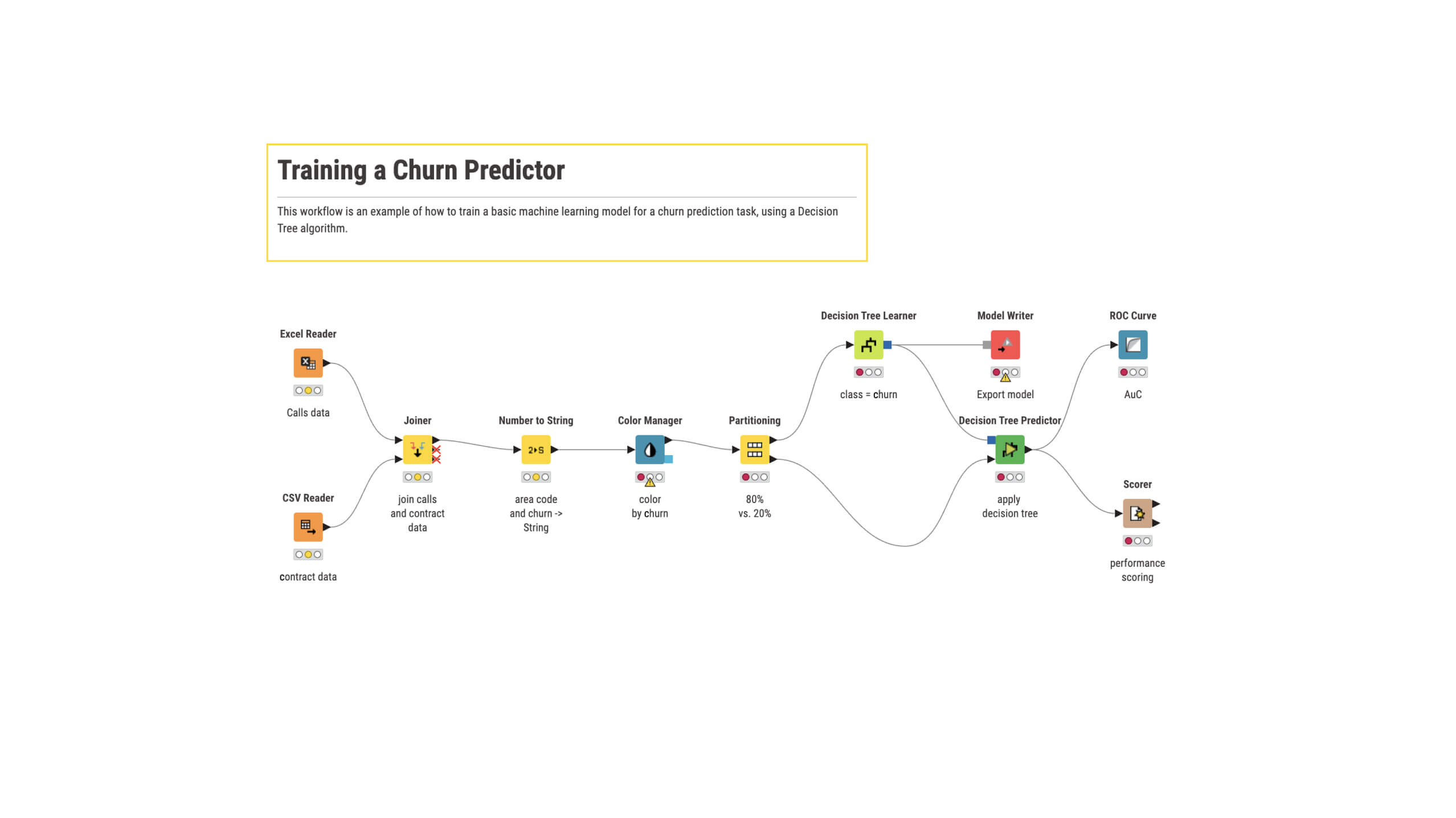
KNIME stands out for its intuitive visual interface that makes building data workflows straightforward, even for users with limited coding experience. The drag-and-drop UI is clean, well-organized, and easy to navigate, reducing the learning curve while supporting advanced users through Python, R, SQL, and other integrations. The platform performs reliably with large datasets and complex workflows, and its automation saves significant time on repetitive tasks. I also appreciate the growing AI and machine learning features, which make it easier to build predictive models and integrate intelligent data processing. From a value perspective, KNIME offers excellent return on investment, especially considering the capabilities in the free version and scalability of enterprise offerings. The documentation, tutorials, and community resources make onboarding smooth, and the support ecosystem helps resolve issues and learn best practices. Overall, KNIME is a flexible, powerful, and cost-effective platform for data analytics, automation, and AI-driven workflows. However, the interface can feel overwhelming for new users due to the large number of nodes and configuration options. Some complex workflows may become difficult to manage visually as they grow. Performance can slow with very large datasets or highly complex workflows, especially on limited resources. While it integrates well with many tools, configuring certain enterprise or third-party integrations may require extra technical knowledge. I'd like to see more AI-assisted workflow creation, smarter recommendations during development, and a more modern interface in some areas. Improving these would make it even more accessible and efficient. KNIME helps solve the challenge of preparing, analyzing, and automating data workflows without heavy reliance on manual processes or extensive coding. Instead of using multiple tools for cleaning, transformation, analysis, and reporting, everything can be managed in one workflow, improving consistency and reducing errors. Its automation saves time, and integrations with Python, R, SQL, and AI tools provide flexibility for advanced use cases. The visual workflow design makes complex processes easier to understand, review, and maintain, improving collaboration. Overall, KNIME increases productivity, streamlines data-driven decision-making, and lets users focus on analysis rather than repetitive manual work.
S
Senior IT Infrastructure & Cloud Solutions Manager
"KNIME Transformed Our Data Workflows, But German Compliance Needs Work"
I value KNIME's flexible no-code visual workflow builder, which lets our Hamburg IT team build complex data pipelines without advanced coding skills. This lowers the barrier for our infrastructure engineers to process monitoring data independently. KNIME significantly reduces heavy scripting and manual data-processing work, making it easier to assemble visual workflows and aggregate multi-cloud monitoring data without deep Python expertise. The switch from custom scripts was worthwhile due to KNIME's drag-and-drop visual workflows. However, KNIME falls short on native German regulatory support for compliance tasks. It lacks pre-configured nodes aligned with BSI IT-Grundschutz and GDPR audit requirements; for example, generating immutable compliance logs for client cloud environments requires heavy manual workflow tweaks. Enterprise-grade SSO integration can also feel clunky. I use KNIME to build no-code data workflows, reducing manual scripting and processing infrastructure logs to generate GDPR-compliant reports. It allows assembling workflows for monitoring data without deep Python expertise, significantly cutting down scripting work.
"An Intuitive and Scalable Platform for Data Science and AI"
KNIME is a truly versatile open-source platform that lets users perform complex data analysis and develop AI solutions without coding. Its visual workflow interface greatly lowers the barrier for non-programmers while still offering advanced extensibility for experts. It integrates well with Python, R, and popular machine learning libraries, enabling seamless end-to-end development from data preparation to model deployment. The community, extensible ecosystem, and commitment to openness make it invaluable for data professionals across industries. While KNIME is powerful, the initial learning curve can be tough for those unfamiliar with data science concepts or visual programming. Some integrations, especially with external APIs or cloud services, may require extra configuration or third-party extensions. However, the documentation and community support mitigate these limitations. KNIME bridges the gap between data and actionable insights by providing a low-code/no-code environment for users of all skill levels to perform advanced analytics, machine learning, and AI-driven workflows. It addresses the challenge of accessibility in data science, empowering business analysts, educators, and researchers to analyze, visualize, and automate data processes without complex programming. Personally, KNIME has enabled me to democratize data and AI in education, government, and industry. I've built solutions for customer segmentation, churn prediction, marketing automation, and text/image analytics, helping organizations make faster, data-driven decisions. Its intuitive interface, scalability, and strong integration with open-source tools have made it a cornerstone of my daily work.
C
CEE BI Systems & Tools Manager
"KNIME Business Hub Enables Business Users to Execute Workflows Effectively"
I find KNIME Business Hub to be the best tool for troubleshooting workflows. You can see your workflow in the web browser just like in the desktop app, including errors and warnings from execution, which is incredibly easy. One minor issue: Variable Loop End had a quirk with the order of flow variables that caused some head-scratching, but it's not a big deal. I've built a standard model for external data processing that business users can use themselves, and it's been implemented around 15 times. Our KAMs upload customer sell-out data to our database without complaints, thanks to Business Hub features. This frees up my time and the BI team's time for new projects and deeper business analysis.
"KNIME's Visual Workflows Are Excellent for Auditing and Finance"
As an experienced Internal Audit Manager, contributor to regional data analytics communities, and data analytics trainer, I consider KNIME one of the best tools for professionals in Auditing, Accounting & Finance, Risk, and Compliance. The most valuable feature is its visual workflow approach, offering a clear end-to-end view of the analytical process, making analyses transparent, easy to review, and highly auditable. Key advantages include the ability to analyze multiple subgroups efficiently using looping nodes and to identify anomalies with outlier detection techniques. KNIME requires little to no coding to start, letting professionals focus on insights rather than programming. In my experience, KNIME has greatly enhanced the efficiency and effectiveness of my audit projects, enabling broader testing, better risk identification, and higher productivity. I haven't encountered any significant downsides. KNIME provides strong value through visual workflows, automation, flexibility, and improved analytical efficiency. It helps me solve key business problems in audit analytics and data analysis: managing large data volumes beyond Excel limits, building repeatable workflows to reduce manual effort, applying machine learning for deeper analysis and risk identification, enabling broader or full-population analysis for stronger audit coverage, handling complex segmentation across branches or risk groups, and detecting anomalies and supporting data-driven decisions. Overall, KNIME improves audit efficiency, coverage, and the quality of insights.
A
Analytics and Data Management Trainer
"KNIME Offers Free No-Code Analytics from Basic to Advanced AI"
What I appreciate most is KNIME's no-code, drag-and-drop approach, making it accessible to anyone interested in analytics regardless of coding skills. It also spans the entire analytics maturity spectrum, from simple descriptive analytics to advanced and agentic AI, all within one tool. This means there's only one platform to learn, and it's easy to pick up and completely free, significantly lowering the barrier to entry for individuals and organizations. However, building visually polished data apps isn't very intuitive and takes more effort than it should. KNIME addresses the challenge of making analytics accessible across skill levels and industries. Because no coding is needed, I can use it to teach both technical and non-technical audiences from any background. This directly benefits me as a trainer: I have one tool that adapts to any audience, simplifying my curriculum design and making analytics concepts approachable for those who might be intimidated by code-based tools.
D
Director of Data & Research
"Free and Powerful ETL Tool with Intuitive Visual Workflows"
KNIME is open source and free to use, available on both Mac and PC, and capable of managing large volumes of data from diverse sources. I previously used Alteryx when working in corporate consulting that could afford it, but after moving to a Mac-based non-profit, KNIME let me leverage my skills without the organization paying high fees or subscriptions for data management, analysis, and visualization. I used KNIME to pull data from Google Drive, local CSV files, and APIs, all through a simple drag-and-drop interface. Seeing data flows visually, especially when checking for drops or duplicates during joins, was extremely useful. Moreover, the visual aspect allowed me to explain the data process to non-technical audiences, showing transformations and identifying errors in real time. The AI feature is a nice addition, particularly for learning, as it helps with syntax issues and simple workflow building. One drawback is that KNIME's nodes are quite prescriptive; for instance, in Alteryx, a single 'Select' tool could rename fields, drop them, and change types in one step, but KNIME requires separate nodes for each action (column renamer, column filter, string to number, etc.), which increases steps and workflow length. Additionally, the modern UI lacks an 'autosave' feature that was in the classic version, and occasional freezes can cause painful rework. Despite these issues, KNIME is my go-to for data transformation and basic analysis. Its key strengths are quickly ingesting data from multiple sources and allowing rapid combination and manipulation for modeling, visualization, or simple analyses like mean comparisons and descriptive statistics.
"KNIME Streamlines Data Analysis with Speed and Simplicity"
The standout aspect of KNIME is how it simplifies data analysis. It lets me set up workflows with minimal coding, connects and processes data from various sources, and offers helpful tools for cleaning and analyzing data. Creating charts and reports is also straightforward. Additionally, it helps me keep complex data tasks together in one place. KNIME saves time and boosts my efficiency when working with data. On the downside, KNIME can seem a bit overwhelming initially. Some workflows become hard to manage as they grow large, and it might take time to learn all the available tools. Figuring out the right node for a specific task can occasionally be confusing. Overall, it's useful, but beginners might need some time to get used to it. KNIME helps me tackle data analysis and processing issues by making it easier to clean, organize, and analyze data. It reduces the need for extensive coding, automates repetitive tasks, saves time, and simplifies connecting data from different sources. I can also create reusable workflows for similar tasks. In summary, KNIME makes my work easier, faster, and more efficient.
"KNIME Brings Order to Data Workflows, Though Complex Projects Can Be Tricky"
As someone who works as a Data Engineer, I appreciate that KNIME streamlines data workflows through its drag-and-drop interface. I rely on it for pulling in data, cleaning, transforming, merging, and analyzing from various sources like CSV files, databases, and APIs. The visual nature of the workflows makes it straightforward to trace how data moves and spot problems such as duplicate entries or missing values. Another plus is the ability to incorporate SQL or Python when required, all while keeping everything organized in a single workflow. Overall, KNIME cuts down on time and simplifies data engineering tasks. That said, managing very large workflows with numerous nodes can get unwieldy. KNIME assists me in handling typical data engineering challenges like merging data from multiple sources, cleaning and reshaping datasets, and handling repetitive workflows. Its visual approach aids in quickly identifying data issues and following data progression through each step. Consequently, I save time, cut manual effort, and find that complex data processes become easier to handle and explain.
 ★ 4.5 · 118 reviews