Pricing For Talent RAMP
Login Free Trial
Kaspersky Security for Microsoft Office 365 ★ 4.8 · 15 reviews
Schedule Meeting
Marketplace › Security › Kaspersky Security for Microsoft Office 365  · Kaspersky Security for Microsoft Office 365 alternatives

Kaspersky Security for Microsoft Office 365

Kaspersky Security for Microsoft Office 365 – Dedicated protection for your cloud collaboration suite

AiDOOS Verified SAAS Security
4.8 ★★★★★ 15 reviews
Live in 72 hours 30-day free trial
Pricing
Tailored to you
AiDOOS generates your proposal instantly — scoped & ready in seconds
Schedule Meeting

30-day free trial · No credit card required

Category
Security
Deployment
Cloud
API Access
Yes
AiDOOS Deploy
72 hours

About Kaspersky Security for Microsoft Office 365

Kaspersky Security for Microsoft Office 365 is a cloud-based security solution that adds an extra layer of protection to Microsoft's built-in security for Exchange Online, SharePoint, OneDrive, and Teams. It is designed to detect and block sophisticated threats such as phishing, malware, ransomware, and spam that can bypass native Office 365 security. The solution offers comprehensive protection against both known and unknown threats using Kaspersky's advanced threat intelligence and machine learning. It helps organizations enforce consistent security policies across their cloud environment, ensuring that critical business data remains secure and compliant. With a centralized management console, IT teams can easily deploy, configure, and monitor protection across all Office 365 workloads. As a trusted cybersecurity provider, Kaspersky leverages its extensive experience in fighting cyber threats to deliver robust defense-in-depth for Microsoft 365. AiDOOS enhances deployment and adoption by providing a streamlined management interface, automated onboarding, and integration with existing IT workflows, enabling organizations to quickly realize the full value of their investment.

Challenges It Solves

  • Protecting against advanced email threats like phishing and spear-phishing that bypass native Office 365 security.
  • Detecting and blocking malware and ransomware in cloud file storage like SharePoint and OneDrive.
  • Preventing data leakage and ensuring compliance with security policies across Office 365 applications.
  • Managing security centrally across multiple Office 365 environments and user endpoints.

Screenshots
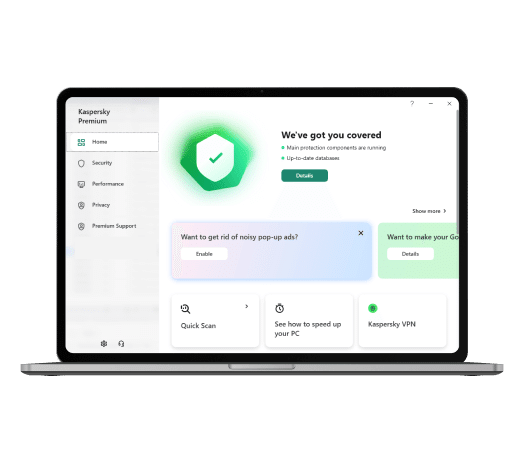
Kaspersky Security for Microsoft Office 365 screenshot 1
Kaspersky Security for Microsoft Office 365 screenshot 1 Kaspersky Security for Microsoft Office 365 screenshot 2

Use Cases

Email Security

Protects Exchange Online from phishing, spam, and malicious attachments.

Cloud File Protection

Scans files in SharePoint and OneDrive for malware and suspicious activity.

Collaboration Security

Monitors Microsoft Teams for shared links and files for potential threats.

Pricing

Pricing available on request

Kaspersky Security for Microsoft Office 365 pricing is customized based on your team size, integrations, and requirements. AiDOOS will get you a scoped proposal — for free.

Schedule a Meeting
30-day free trial available — No credit card required. Full access to all features.

Key Features

Advanced Threat Protection

AI-powered detection of advanced malware, ransomware, and unknown threats.

Anti-Phishing Protection

Blocks phishing URLs in emails and links scanned in real-time.

Anti-Spam Filtering

Filters spam and junk mail with low false-positive rates.

File Reputation

Crowdsourced file reputation check for uploaded documents.

Centralized Management Console

Single console to manage security across Office 365 workloads and endpoints.

What Reviewers Say AI-synthesized from 15 reviews

What works well

  • Easy to deploy and manage through a centralized console.
  • Effective in blocking phishing and malware threats in Microsoft 365.
  • Integrates seamlessly with Microsoft 365 infrastructure.

Common concerns

  • Limited advanced features compared to dedicated email security platforms.
  • Requires additional license for each user, increasing cost.

Reviews

15 verified reviews
4.8
★★★★★
out of 5 · 15 reviews
By segment
Enterprise38%
Mid-Market62%
S
Sr. Vice President - Product Design
"Top-notch Spam and Phishing Detection"
It integrates seamlessly with Microsoft Office 365. All documents created by Office are thoroughly scanned, giving me peace of mind. Trust in Kaspersky Security is unmatched. There is nothing to dislike about Kaspersky Security. Spamming and phishing are the biggest issues, and safeguarding my documents from them like a pro is excellent.
T
Technical Team Member
"Kaspersky Security for Office 365: An Overview"
Kaspersky is one of the best security solutions for Microsoft 365 because it protects Exchange, Teams, SharePoint Online, and OneDrive. For Exchange, it includes spam detection, mail filtering, phishing detection, and other security features that simplify management and security. It doesn't require advanced technology, so it's effective for everyone. Since most documents are created in MS Word and stored in Excel spreadsheets, protecting this data from phishing and malware is crucial. The Kaspersky Anti-Virus engine with signature-based protection automatically detects advanced threats in applications like Teams and Exchange Online. I liked that I could do the same with one disk. As most of my documents are shared and stored via OneDrive, it became an excellent feature. With a busy schedule, I had no time to learn software, but Kaspersky Security for MS Office 365 needed no learning because it worked without user knowledge or experience. There aren't many bad things to say about this platform. However, it had an annoying effect on my computer's performance, especially at startup. Because of the program loading, it takes a few minutes for the computer to resume normal operation. Aside from this minor issue, I found no other significant concerns. Highly recommended for large and small teams using MS Office 365. The main problem it solves is protecting MS Word and Excel documents. It also protected my OneDrive documents from malware. The software working well without user intervention was excellent because I previously had to spend time with other programs, and Kaspersky Security for MS Office 365 solved that problem.
S
Senior Vice President
"Best Protection for Microsoft 365"
It's extremely easy to use and the most secure way to work with Microsoft Teams, SharePoint, Exchange, etc. It gives you peace of mind and lets you concentrate on actual work. There's nothing I dislike in particular. It scans all files and keeps them secure at all times.
S
Senior Software Engineer
"Top-tier Security Protection in the Industry!"
Kaspersky is a well-designed product for Microsoft 365 that ensures seamless security. I appreciate features like phishing detection, spam detection, and cloud file protection, which work excellently. It shields us from all malware attacks on Microsoft 365; overall, it's highly recommended. There's nothing to dislike about Kaspersky, and they provide good customer support. It's perfect for cloud file security and safeguarding organizational emails from all malware attacks.
m
monitoreo
"Prioritize Safety"
The security provided by the Microsoft platform interface and its files allows you to save and be confident that they won't be infected by viruses, although it doesn't protect much against specific office software viruses. Corrupted files from other machines are not disinfected, nor does it trigger alerts about them. It's an effective tool within the platform, preventing phishing within the organization and avoiding the leakage of very important information.
W
Web Developer
"One of the Finest and Most Affordable Security Applications"
I've been using it for some time and am quite impressed. It includes VPN and Password Manager as well. (Premium) I liked almost everything about the software. There's no downside to using a security system. Moreover, it's easy to use. The only issue was malware when downloading files, but Kaspersky protects against it.
R
Recruitment Manager
"Kaspersky Security for Microsoft Office 365"
Kaspersky prevents unwanted phishing and malware emails. It's very simple to integrate with Microsoft Office 365 by just logging in and connecting Microsoft. It protects everything and shields my system from any kind of attack and trojan viruses. On occasion, it falsely flags non-threatening items as harmful, requiring me to temporarily disable it to work on those files. Kaspersky connects easily with Microsoft accounts and has helped me secure emails and files received from various sources.
M
Mid-Market (51-1000 emp.)
"Kaspersky Provides Solid Security"
Kaspersky is among the top antivirus and threat protection services available, and its security for Microsoft 365 is one of the best. Connecting the service to your account is straightforward. The anti-malware feature prevents potentially harmful files from entering your system and protects you from attacks. The application uses a significant amount of memory on my PC and sometimes causes it to hang, slowing it down; it consumes nearly half of the memory for its operation. Microsoft 365 lacks built-in anti-malware and anti-phishing features, so Kaspersky Security is a valuable service that offers extensive threat protection and keeps you safe from various dangers.
S
Small-Business (50 or fewer emp.)
"A Robust Security Tool That Instills Confidence and Satisfaction in the Company"
It's unquestionably the most powerful and comprehensive security solution we've encountered, leaving no gaps. Everyone in our organization is happy with the various tools and options that ensure everything remains protected. So far, we've found nothing negative. The real-time pop-ups are helpful because they prompt you to decide what to do. The interface is also quite friendly. We handle diverse types of data, including client information, our own private details, and numerous URLs, making it challenging to guarantee protection. That's why we're delighted that Kaspersky does an exceptional job for us.
G
Graduate Apprentice
"Protection for Communications in Microsoft Office 365"
It guards against ransomware, phishing, and various online dangers. Being cloud-based, it updates continuously, shielding me from emerging threats. The price is reasonable and offers excellent value. Detailed threat and activity reports help you monitor and enhance security. The interface is user-friendly and easy to master. However, it can occasionally slow down the computer and cause lag because it consumes RAM while active. Customer support is not easily accessible, as responses take time. It effectively filters out threats, and features like anti-phishing and anti-malware are valuable for preventing losses, as stopping threats is simpler and cheaper than dealing with damage at an affordable cost.

Enterprise Readiness

ISO 27001
SOC 2

Identity & Access

SSO✗ Not supported
RBAC
Audit Logs

Data Security

At restAES-256
In transitTLS 1.2+
Key mgmtVendor-managed

SLA & Availability

Uptime SLA99.9%
RPO
RTO
Pen test

Compliance & Portability

Data residencyUS, EU
Data export
Right to erasure

Integrations

Microsoft 365

Native integration with Microsoft 365 for real-time protection of Exchange Online, SharePoint Online, and OneDrive for Business.

Native < 1 hour

Microsoft Defender for Office 365

Integrates with Microsoft Defender for Office 365 to enhance threat detection and response capabilities.

Third_Party 1-3 hours

Microsoft Sentinel

Sends alerts and event data to Microsoft Sentinel for centralized security monitoring and incident response.

Third_Party 1-3 hours

Azure Active Directory

Uses Azure AD for single sign-on and user provisioning to streamline deployment and management.

Third_Party < 1 hour

Splunk

Feeds threat intelligence and security logs to Splunk for advanced analytics and alerting.

Third_Party 1-3 hours

ServiceNow

Integrates with ServiceNow to create and manage incidents automatically from detected threats.

Third_Party 1-3 hours

Kaspersky Security Center

Central management of Office 365 security policies and deployment through Kaspersky Security Center console.

Native < 1 hour

Microsoft Graph API

Uses Microsoft Graph to retrieve and manage Office 365 data programmatically for custom integrations.

Third_Party 3-8 hours

Governance & Compliance

EU AI Act

No data available

Data Processing Agreement

No data available

Sub-processors

No data available

Right to Erasure

No data available

Change Notifications

No data available

NIST AI RMF

No data available

AiDOOS Managed Deployment

Deploy Kaspersky Security for Microsoft Office 365 in 72 hours

AiDOOS handles setup, CRM integration, SSO config, and user provisioning. Your team goes live — not your IT department.

12
Deployments
94%
Adoption rate
4.8/5
Post-deploy sat.
1-2 weeks
Time to value

Prerequisites

  • Microsoft 365 subscription
  • Admin credentials for Microsoft 365
  • Network connectivity to Kaspersky update servers

Configuration Options

  • Policy templates for ransomware protection
  • Anti-phishing and anti-spam settings
  • Integration with SIEM tools

How Kaspersky Security for Microsoft Office 365 Compares

Product AI & Analytics Ease of Use Enterprise Features Pricing Integrations Mobile Experience Quick Setup Customer Support Rating Price/mo
Kaspersky Security for Microsoft Office 365 This product
Good Excellent Good Fair Good Fair Excellent Good ★ 4.8 $Custom/user
Microsoft Defender for Office 365
Excellent Excellent Excellent Good Excellent Good Excellent Good $Custom/user
Barracuda Email Security
Good Good Good Fair Good Fair Excellent Good $Custom/user
Mimecast
Excellent Good Excellent Fair Good Good Good Good $Custom/user
Virtual Delivery Center · A new delivery category

A Virtual Delivery Center for Kaspersky Security for Microsoft Office 365

Pre-vetted experts and AI agents in the loop, assembled as a delivery pod. Pay in Delivery Units — universal pricing across roles, seniority, and tech stacks. No hiring, no contracting, no procurement cycle.

  • Plans from $2,000 — Starter Pack, 10 Delivery Units, 90 days
  • Refundable on unused Delivery Units, anytime — no questions asked
  • Re-delivery guarantee on acceptance miss
  • Pre-flight delivery sizing — you see the plan before you commit

How a Virtual Delivery Center delivers Kaspersky Security for Microsoft Office 365

Outcome-based delivery via AiDOOS’s VDC model.  Why VDC vs traditional consulting? →

Outcome-Based

Pay for results, not hours

Milestone-Driven

Clear deliverables at each phase

Expert Network

Access to certified specialists

Implementation Timeline

1
Discover
Requirements & assessment
2
Integrate
Setup & data migration
3
Validate
Testing & security audit
4
Rollout
Deployment & training
5
Optimize
Performance tuning
Schedule a Meeting

Frequently Asked Questions

What does Kaspersky Security for Microsoft Office 365 protect?
It provides advanced protection against phishing, ransomware, malware, and other cyber threats in Exchange Online, SharePoint Online, and OneDrive for Business, complementing Microsoft's native security.
How long does deployment take?
With AiDOOS, deployment typically takes about 72 hours, and organizations can expect to see value within 1-2 weeks.
Does it support single sign-on?
Yes, it can integrate with Azure Active Directory for single sign-on, enabling seamless user authentication.
Can it be centrally managed?
Yes, it can be managed through Kaspersky Security Center, providing centralized policy management and reporting.
Is customer data used for training AI models?
According to Kaspersky's transparency initiative, customer data is processed with strict privacy controls, and data is not used for training without consent.
What are the system requirements?
It requires a Microsoft 365 subscription and a Kaspersky Security Center server for management. Specific hardware requirements are documented in the official guide.

Quick Stats

★ 4.8
Rating
12
Deployments
72 hours
Live in
99.9%
Uptime SLA
Deployment Complexity
Easy (2/5)
Schedule a Meeting

Vendor

Kaspersky
Founded 2007 · 4500-5000 employees · Moscow
Verified Vendor

Get an Instant Proposal

You'll get a structured implementation plan — scope, timeline, and cost — in seconds.