EyeQuant
Predict how people will see your designs before you launch.
About EyeQuant
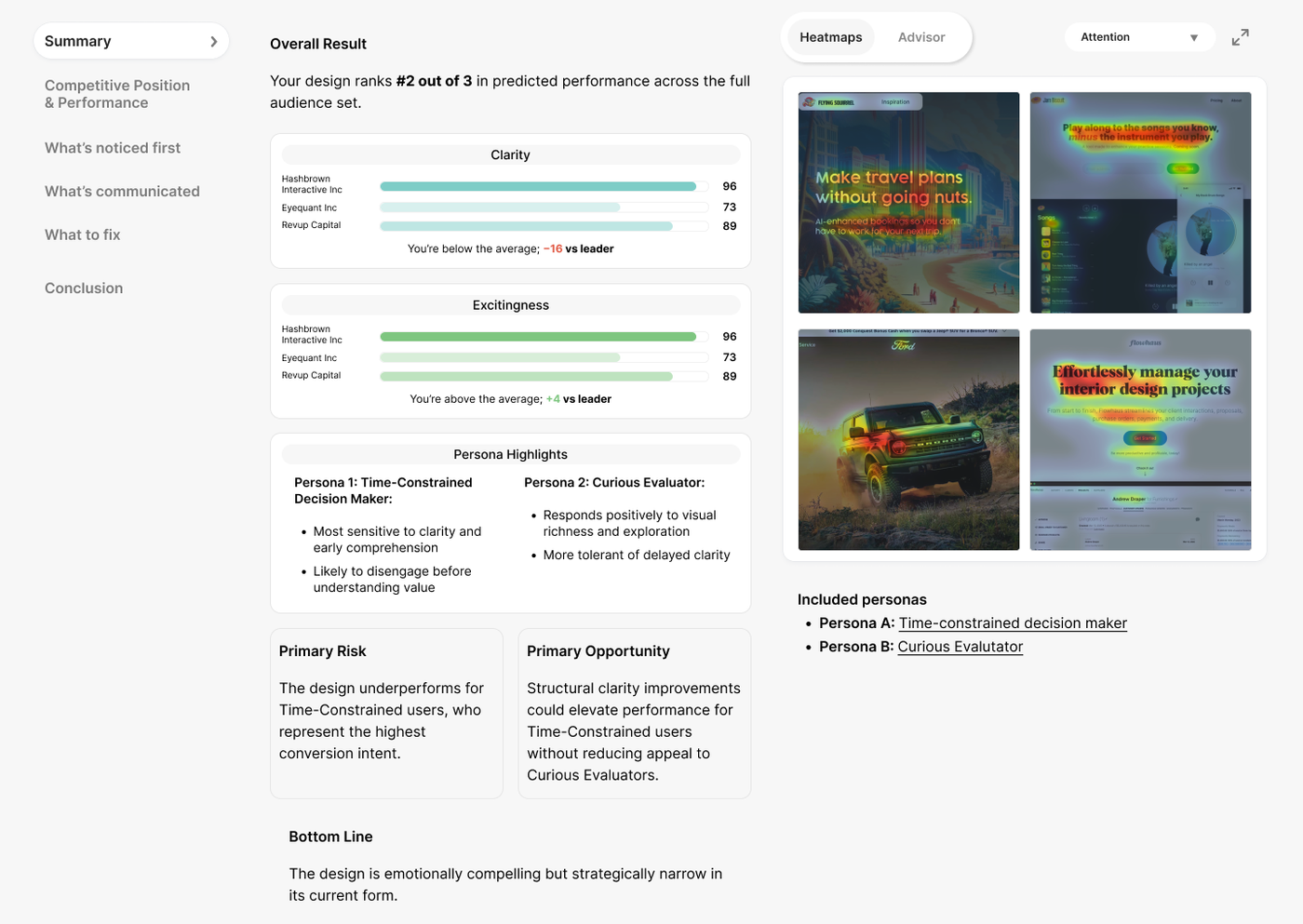
EyeQuant is a predictive artificial intelligence platform that analyzes visual designs—including landing pages, ads, emails, and packaging—to show exactly where attention goes, what gets missed, and how to improve. It uses seven neural models trained on 1.6 million data points from 20,000 eye-tracking experiments, delivering attention maps, clarity scores (1-100), excitingness scores, and ad visibility scores in under five seconds. The platform also provides AI-generated summary explanations and actionable recommendations tailored to the design's intent. EyeQuant integrates with Figma, Adobe Photoshop, and offers a Chrome extension for live website audits. Through its RESTful API, developers can embed visual intelligence into their own products, marketing automation, CMS, or design tools. AiDOOS enhances deployment and adoption by providing managed infrastructure, seamless integration with existing workflows, and AI-driven optimization for scaling EyeQuant's predictive capabilities across enterprise teams, ensuring faster time-to-insight and reduced operational overhead.
Challenges It Solves
- Difficulty predicting how users will visually perceive a design before launching
- High cost and long timelines of traditional eye-tracking studies
- Inefficient design iteration due to lack of data-driven attention insights
- Inability to quantify clarity and visual engagement of design elements
Screenshots

Use Cases
Landing Page Optimization
Analyze landing page designs to identify where attention is drawn, clarity issues, and visual excitement, improving conversion rates before launch.
Ad Creative Testing
Predict how banners or video ads will capture attention in their intended context, using ad visibility scores to optimize creative assets.
Email Design Analysis
Test email layouts to ensure key elements like CTAs and pricing are clearly seen and engaging, reducing bounce and improving click-through.
Video & Motion Content Analysis
Analyze video ads, animations, and scrolling content to understand where viewer focus lands frame-by-frame, optimizing dynamic designs.
Pricing
- Attention maps
- Clarity score
- Excitingness score
- AI summary & recommendations
- Analysis Advisor chat
- Chrome extension
- Everything in Basic
- Full-page analysis
- A/B comparison tools
- Priority support
- Everything in Performance
- Figma plugin
- Photoshop plugin
- Project organization
- Collaboration
- Team onboarding and training
Key Features
Visual heatmap showing where eyes land first in 3 seconds.
Measures how clear and easy to process a design is for first-time viewers (1-100).
Measures the emotional visual impact of the design's composition (1-100).
Measures how likely a creative will stand out in its intended context.
Actionable, contextual suggestions tied directly to the design (e.g., 'Increase contrast on CTA button').
Ask natural-language questions about the analysis and get answers instantly.
What Reviewers Say
What works well
- Provides fast, AI-driven attention predictions (under 5 seconds) based on thousands of real eye-tracking studies.
- Offers a full suite of visual analytics: attention maps, clarity, excitingness, and ad visibility scores.
Common concerns
- Pricing details for higher tiers are not publicly listed; requires contacting sales.
- No on-premise deployment option; purely cloud-based.
Reviews
No reviews yet for EyeQuant
AiDOOS-verified review data is collected after deployment. Deploy this product and be among the first to share your experience.
Enterprise Readiness
Identity & Access
Data Security
SLA & Availability
Compliance & Portability
Integrations
Figma
Analyze designs directly inside Figma with attention maps, scores, and recommendations overlaid on artboards.
Adobe Photoshop
Run EyeQuant analysis inside Photoshop to get attention maps, clarity scores, and AI recommendations.
Chrome Extension
Audit live webpages with one click to see visitor perception, attention gaps, and recommendations.
HubSpot
Embed analysis into HubSpot to validate creative and speed campaigns.
ActiveCampaign
Integrate analysis into ActiveCampaign for campaign creative validation.
Episerver
Embed analysis into Episerver for campaign creative validation.
Governance & Compliance
EU AI Act
No data available
Data Processing Agreement
No data available
Sub-processors
No data available
Right to Erasure
No data available
Change Notifications
No data available
NIST AI RMF
No data available
AiDOOS Managed Deployment
Deploy EyeQuant in 72 hours
AiDOOS handles setup, CRM integration, SSO config, and user provisioning. Your team goes live — not your IT department.
Prerequisites
- Active EyeQuant account and API key
- Admin access to integrate with marketing or design tools
- Basic understanding of REST API endpoints
Configuration Options
- Set API endpoint and authentication
- Define analysis frequency and reports
- Configure SSO if needed
How EyeQuant Compares
| Product | AI & Analytics | Ease of Use | Enterprise Features | Pricing | Integrations | Mobile Experience | Quick Setup | Customer Support | Rating | Price/mo |
|---|---|---|---|---|---|---|---|---|---|---|
|
E
EyeQuant This product
|
Excellent | Good | Good | Fair | Good | Poor | Excellent | Good | — | $97/user |
|
UT
UserTesting
|
Good | Good | Excellent | Fair | Good | Fair | Good | Good | — | Custom |
|
HJ
Hotjar
|
Good | Excellent | Good | Good | Excellent | Good | Excellent | Good | — | Custom |
|
CE
Crazy Egg
|
Fair | Good | Fair | Good | Good | Fair | Excellent | Good | — | Custom |
A Virtual Delivery Center for EyeQuant
Pre-vetted experts and AI agents in the loop, assembled as a delivery pod. Pay in Delivery Units — universal pricing across roles, seniority, and tech stacks. No hiring, no contracting, no procurement cycle.
- Plans from $2,000 — Starter Pack, 10 Delivery Units, 90 days
- Refundable on unused Delivery Units, anytime — no questions asked
- Re-delivery guarantee on acceptance miss
- Pre-flight delivery sizing — you see the plan before you commit
How a Virtual Delivery Center delivers EyeQuant
Outcome-based delivery via AiDOOS’s VDC model. Why VDC vs traditional consulting? →
Outcome-Based
Pay for results, not hours
Milestone-Driven
Clear deliverables at each phase
Expert Network
Access to certified specialists