Pricing For Talent RAMP
Login Free Trial
Check Point Email Security ★ 4.7 · 534 reviews
Schedule Meeting
Marketplace › Security › Check Point Email Security  · Check Point Email Security alternatives

Check Point Email Security

Email security and threat prevention

AiDOOS Verified SAAS Security
4.7 ★★★★☆ 534 reviews · 4,100+
Live in 72 hours 30-day free trial : :
Pricing
Tailored to you
AiDOOS generates your proposal instantly — scoped & ready in seconds
Schedule Meeting

30-day free trial · No credit card required

Category
Security
Deployment
Cloud (SaaS) and On-premise
API Access
Yes
AiDOOS Deploy
72 hours

About Check Point Email Security

Check Point Email Security is a comprehensive email security solution designed to protect organizations from advanced threats, including phishing, ransomware, and social engineering attacks. It leverages Check Point's threat intelligence and AI-powered prevention technologies to analyze email content, attachments, and URLs in real-time, blocking malicious messages before they reach the user's inbox. The solution integrates seamlessly with existing email platforms, providing robust protection without disrupting workflows. It offers a centralized management console for easy policy configuration and monitoring, and supports multi-layered defenses, including anti-malware, anti-spam, and data loss prevention (DLP). Check Point Email Security is part of the broader Check Point Infinity architecture, ensuring consistent security across the network, cloud, and mobile environments. AiDOOS enhances deployment and adoption by providing a streamlined onboarding process, automated configuration, and ongoing optimization based on best practices. With AiDOOS, organizations can quickly realize the full value of Check Point Email Security, reducing operational overhead and ensuring continuous protection.

Challenges It Solves

  • Protecting against sophisticated phishing and social engineering attacks
  • Preventing malware and ransomware from entering via email
  • Mitigating data breaches through email data loss
  • Enforcing compliance and governance for email communications

Screenshots
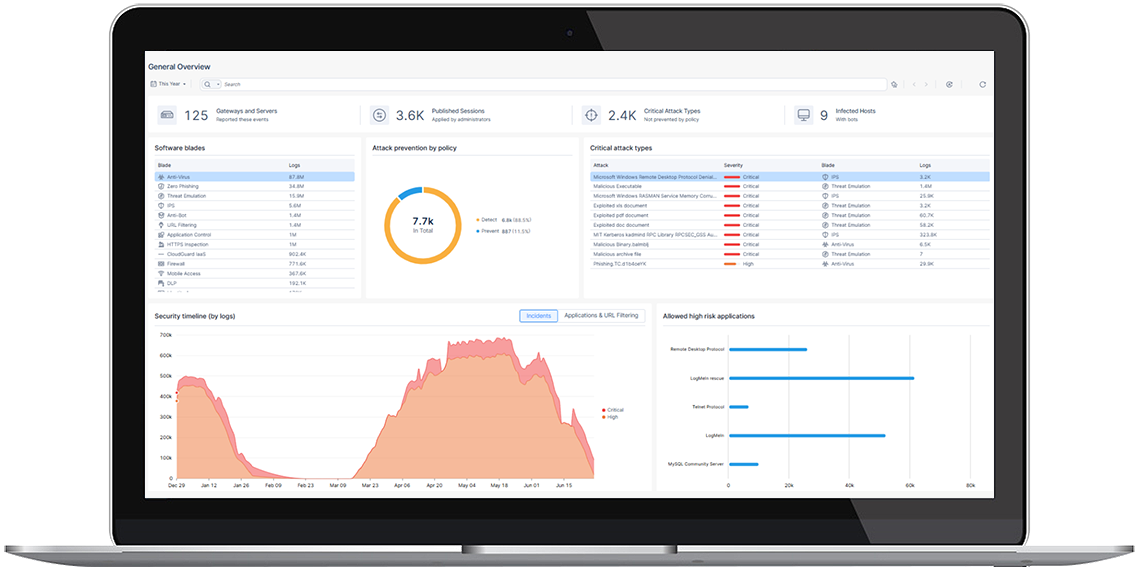
Check Point Email Security screenshot 1
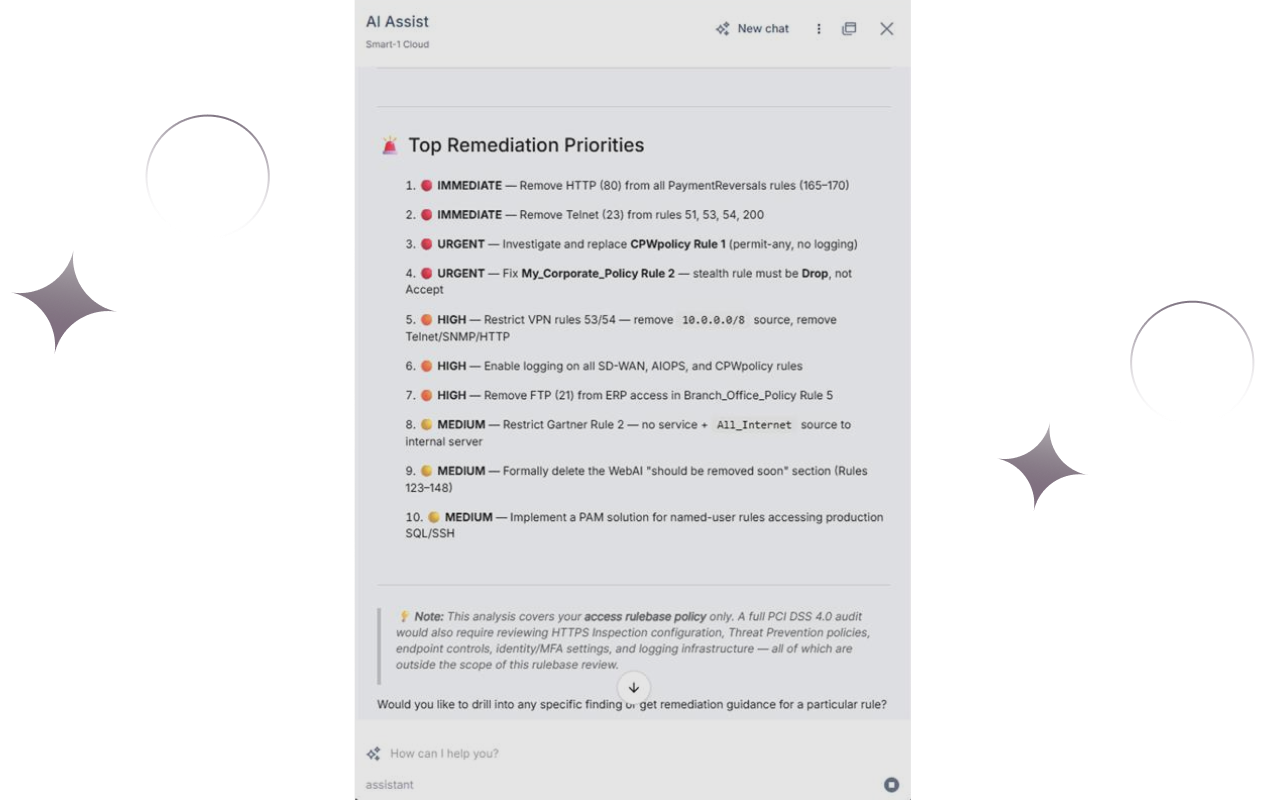
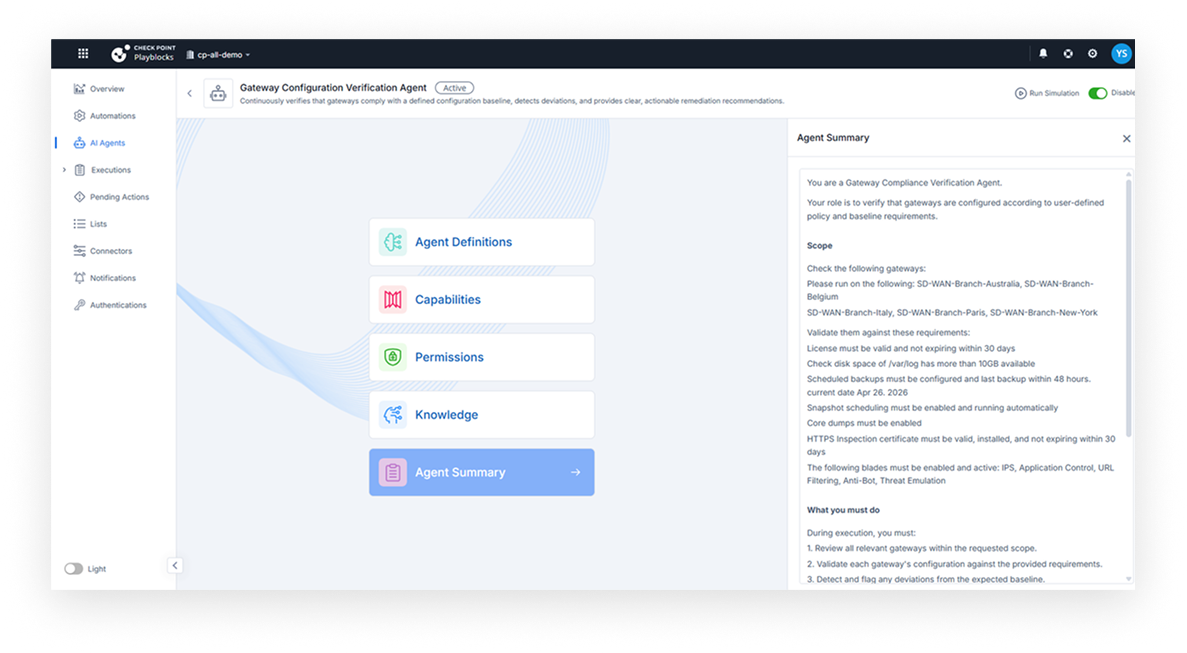
Check Point Email Security screenshot 1 Check Point Email Security screenshot 2 Check Point Email Security screenshot 3 Check Point Email Security screenshot 4 Check Point Email Security screenshot 5 Check Point Email Security screenshot 6 Check Point Email Security screenshot 7 Check Point Email Security screenshot 8

Use Cases

Phishing Protection

Blocks sophisticated phishing attacks that bypass traditional defenses using AI and real-time analysis.

Ransomware Defense

Prevents ransomware from being delivered via email attachments and URLs.

Compliance and Governance

Helps organizations meet regulatory requirements by ensuring email security and data protection.

Business Email Compromise (BEC) Prevention

Detects and blocks fraudulent emails that impersonate executives or business partners.

Pricing

Custom pricing — built for your team

Check Point Email Security pricing is tailored to your organisation's size, integrations, and requirements. AiDOOS generates your proposal instantly — scoped & ready in seconds.

Starter Business Enterprise
Schedule a Meeting
30-day free trial available — No credit card required. Full access to all features.

Key Features

AI-Powered Threat Prevention

Uses machine learning and AI to detect and block advanced email threats in real-time.

URL and Attachment Sandboxing

Analyzes links and attachments in a sandboxed environment to identify zero-day threats.

Data Loss Prevention (DLP)

Prevents sensitive data from leaving the organization via email.

Centralized Management Console

Provides a single pane of glass for managing email security policies and monitoring.

Integration with Existing Email Platforms

Seamlessly integrates with Microsoft 365, Google Workspace, and other email systems.

Real-Time Reporting and Analytics

Delivers actionable insights into email security threats and user behavior.

What Reviewers Say AI-synthesized from 534 reviews

What works well

  • High detection rate of advanced threats due to AI and sandboxing
  • Easy to deploy and integrate with popular email platforms
  • Centralized management simplifies admin tasks

Common concerns

  • Pricing may be higher for enterprise features
  • Some users report that the initial setup can be complex

Reviews

534 verified reviews
4.7
★★★★☆
out of 5 · 534 reviews
By segment
Enterprise29%
Mid-Market71%
I
IT Cloud Security Support
"Robust Protection and Seamless Integration for Worry-Free Work"
I like how it offers robust protection without interfering with daily work. It helps block phishing and malicious content while keeping email and collaboration tools running smoothly. Alerts are clear, and integration with platforms like Microsoft 365 makes centralized management easy. Sometimes, filtering can be too aggressive and block legitimate emails. It requires periodic adjustments to avoid missing important messages. It helped us a lot with the problems of threats and unsafe content being transmitted via email on collaboration platforms. It helps prevent phishing, malware, and unauthorized account access by scanning and blocking suspicious messages before they reach users. For me, this translates to fewer security incidents to manage and greater confidence when using tools like Outlook and Teams.
I
Ingeniera
"Integrated Security That Preserves Productivity"
Its capability to stop phishing and account takeover attempts before they reach users, while keeping email and collaboration tools running smoothly, is essential. The solution integrates seamlessly with platforms like Microsoft 365, providing clear threat visibility and robust protection without disrupting productivity. The reporting dashboard could be more intuitive, and integration with certain collaboration platforms requires additional effort. While security is strong, these usability issues can slow administration and increase workload for IT teams. It solves the problem of phishing, account takeovers, and malicious attachments by blocking threats before they reach users. It protects cloud platforms like Microsoft 365, ensuring the security and reliability of email and collaboration tools.
I
Ing Networking
"Flawless Integration and Security for Microsoft 365"
It maintains seamless communication and integrates perfectly with platforms like Microsoft 365, adding an extra security layer without impacting productivity. Real-time threat prevention and clear reporting provide confidence that sensitive information is secure. Occasionally, legitimate emails may be flagged as suspicious, requiring manual review and slowing down workflows. It solves the problem of phishing, malicious attachments, and unsafe links that commonly affect business communications. By automatically detecting and blocking these threats, it prevents data breaches and protects sensitive information shared across email and collaboration platforms. This reduces the risk of human error and allows teams to work securely without disruption.
S
System Administrator
"Effective Email Security with Few False Positives"
I value how Avanan Cloud Email Security effectively catches sophisticated phishing attempts without causing many false positives, enhancing our protection and confidence in email communications. The inline protection feature is particularly valuable, ensuring security measures are applied efficiently. I find the dashboard user-friendly, allowing easy review and remediation of messages, with clear explanations for why emails were flagged. This transparency in reporting helps us better understand the security landscape. Advanced phishing detection significantly reduces risky emails reaching users, which in turn lowers help desk tickets and potential incidents, easing pressure on support staff. Moreover, the setup was notably easy and quick, minimizing deployment time and allowing us to focus on leveraging the product's capabilities. Overall, seamless integration with existing systems like SIEM, SOAR, and identity providers further strengthens our security posture by enabling alert correlation, automated response, and tying user risk profiles effectively. Some alerts can become repetitive during large phishing waves, and a few policy settings require more adjustment than anticipated. I use Avanan Cloud Email Security to block phishing and malicious attachments, reducing risky emails and security incidents. It integrates with our cloud-based mail system, providing early threat detection and a dashboard for easy email review and remediation.
N
Network Admin
"Smooth Email Security Providing Peace of Mind"
It has genuinely provided me with peace of mind by blocking suspicious emails and phishing attacks that previously went unnoticed. It also integrates well with the company email and doesn't disrupt daily operations. I use Microsoft 365 and love its integration. Initially, the setup can be slightly complex and requires time to tailor security policies to the company's needs. It resolves the issue of phishing and malware that previously reached inboxes undetected, and it also helps prevent unauthorized access and sensitive data loss, which directly benefits me because I now have greater confidence that received messages are safe, and I can work without interruptions.
N
Networking Admin
"Superb Visibility and Control for Secure Data Flow"
The platform provides exceptional visibility and control over information movement within the organization. It not only blocks threats but also offers a clear picture of how files and messages traverse between users and applications. This helps us identify unusual behavior and satisfy audit requirements with ease. Some advanced configuration options can be challenging initially, particularly when customizing policies for different user groups. Overall, the solution is strong, but it demands time and effort to fully optimize. It addresses phishing, account theft, and malicious file sharing on our email and collaboration platforms. Previously, we frequently encountered suspicious emails slipping through, but now threats are blocked in real time and clearly flagged for users.
C
Cloud Enginner
"Strong Security with Smooth Integration, Though Occasionally Overzealous"
I really appreciate how it provides an additional security layer without being intrusive. It identifies threats in emails and shared files before they escalate, and it integrates seamlessly with Outlook and Teams. This makes everything feel safer without impairing performance. At times, it seems overly cautious and marks safe items as risky. It also takes some time to become familiar with the settings and how components interact. This isn't a major issue, but it can slow things down when quick adjustments are needed. Harmony Email and Collaboration protects against phishing, malware, and other email threats before they reach me. It scans links and attachments, even in shared files, so I feel more secure using tools like Outlook and Teams. This results in fewer security concerns and less time spent worrying about what's safe to open or click.
C
Cybersecurity Solutions Advisory
"User-Friendly Email Security with Clear Dashboard"
Check Point Harmony Email & Collaboration minimizes the time and effort needed for email security management. It automatically filters out spam and harmful messages, allowing users to focus on their duties without interruptions or manual intervention. The dashboard is intuitive and well-structured, making it easy to monitor threats, review alerts, and act swiftly. What I dislike is the limited flexibility in certain customization aspects. There are instances where more granular policy and rule control would be beneficial. This solution addresses phishing, malware, and malicious email threats effectively. From my perspective, it prevents dangerous emails from reaching users, significantly reducing security risks and safeguarding sensitive data.
C
Cloud Support
"Smooth Email Defense with Occasional Over-Filtering"
I'm extremely satisfied with Harmony Email and Collaboration, which has been invaluable since we adopted it. It has transformed our email security without adding extra steps or slowing operations. It silently eliminates dangers and fosters trust in the tool, particularly with many employees working remotely and sharing files across various platforms. It functions seamlessly and enables us to concentrate on our tasks rather than fretting over phishing or data breaches. A minor drawback is that the filtering occasionally becomes overly restrictive, blocking essential emails and requiring me to dig through quarantine or tweak settings, but these are trivial compared to the security benefits. It helps us manage daily phishing and email risks, especially with a distributed team relying on cloud services and shared documents. We also maintain secure communication without disrupting workflows, allowing seamless collaboration and access to resources without concerns about hidden threats or data leaks. The protection is comprehensive, enabling security staff to concentrate on other priorities with assurance from Check Point.
S
Systems Engineer
"Exceptional Precision in Email Defense"
Relying on Check Point Harmony Email & Collaboration for its outstanding precision. I've never witnessed a DLP policy miss a trigger without my own error, and it's uncommon for legitimate messages to be quarantined or blocked. Similarly, it's rare for malicious content, phishing attempts, or spam to reach users. In essence, it operates flawlessly. I also value the extremely straightforward deployment—simply create, log in as admin, and you're set. It's a significant upgrade from past solutions because it seldom blocks valid mail while effectively neutralizing threats. The portal's granularity and configuration options are extensive, but many settings are preset to notify users and admins, which can become quite noisy unless you dive deep and disable many of them—especially as your organization scales, resulting in countless irrelevant alerts. That said, this minor annoyance pales in comparison to the issues it resolves. The solution shields us from harmful emails and reduces false positives better than any prior tool. It's remarkably accurate, rarely overlooking threats or hindering legitimate correspondence, allowing our team to operate with fewer interruptions.

Enterprise Readiness

SOC 2 Type II
ISO 27001
GDPR Compliance

Identity & Access

SSO SAML 2.0, Azure AD, Okta
RBAC None
Audit Logs

Data Security

At restAES-256
In transitTLS 1.2+
Key mgmtVendor-managed

SLA & Availability

Uptime SLA99.9%
RPO
RTO
Pen test

Compliance & Portability

Data residencyUS, EU
Data export
Right to erasure

Integrations

Microsoft 365

Native integration with Microsoft 365 for email security, threat prevention, and policy enforcement.

Native < 1 hour ⇄ Bi-directional ⚡ AiDOOS Pre-wired

Google Workspace

Integration with Google Workspace to secure Gmail against phishing, malware, and data loss.

Native < 1 hour ⇄ Bi-directional ⚡ AiDOOS Pre-wired

Microsoft Azure AD

Enables single sign-on and identity-based policy enforcement for email security.

Third_Party 1-2 hours ⇄ Bi-directional

Okta

SSO integration with Okta for streamlined user access and identity management.

Third_Party 1-2 hours ⇄ Bi-directional

Slack

Sends real-time alerts and notifications for email security events to Slack channels.

Third_Party < 1 hour

ServiceNow

Creates incident tickets for email security alerts and integrates with ITSM workflows.

Third_Party 2-4 hours ⇄ Bi-directional

Splunk

Aggregates email security logs and events for advanced threat hunting and analytics.

Third_Party 2-4 hours ⇄ Bi-directional

Palo Alto Networks Cortex XSOAR

Automates response to email security incidents through SOAR playbooks.

Third_Party 4-8 hours

Governance & Compliance

EU AI Act

No data available

Data Processing Agreement

No data available

Sub-processors

No data available

Right to Erasure

No data available

Change Notifications

No data available

NIST AI RMF

No data available

AiDOOS Managed Deployment

Deploy Check Point Email Security in 72 hours

AiDOOS handles setup, CRM integration, SSO config, and user provisioning. Your team goes live — not your IT department.

12
Deployments
94%
Adoption rate
4.8/5
Post-deploy sat.
1-2 weeks
Time to value

Prerequisites

  • Admin access to email platform (Exchange or Gmail)
  • Valid Check Point license or subscription
  • Network connectivity to Check Point cloud services

Configuration Options

  • Integrate with Microsoft 365 or Google Workspace
  • Configure SSO via SAML
  • Set up threat prevention policies
  • Enable automated response workflows

How Check Point Email Security Compares

Product AI & Analytics Ease of Use Enterprise Features Pricing Integrations Mobile Experience Quick Setup Customer Support Rating Price/mo
Check Point Email Security This product
Good Good Excellent Good Excellent Poor Good Excellent ★ 4.7 $Custom/user
Barracuda Email Security
Good Good Excellent Good Good Poor Good Good $Custom/user
Mimecast
Excellent Good Excellent Fair Excellent Poor Good Good $Custom/user
Proofpoint Email Security
Excellent Good Excellent Fair Excellent Poor Moderate Good $Custom/user
Virtual Delivery Center · A new delivery category

A Virtual Delivery Center for Check Point Email Security

Pre-vetted experts and AI agents in the loop, assembled as a delivery pod. Pay in Delivery Units — universal pricing across roles, seniority, and tech stacks. No hiring, no contracting, no procurement cycle.

  • Plans from $2,000 — Starter Pack, 10 Delivery Units, 90 days
  • Refundable on unused Delivery Units, anytime — no questions asked
  • Re-delivery guarantee on acceptance miss
  • Pre-flight delivery sizing — you see the plan before you commit

How a Virtual Delivery Center delivers Check Point Email Security

Outcome-based delivery via AiDOOS’s VDC model.  Why VDC vs traditional consulting? →

Outcome-Based

Pay for results, not hours

Milestone-Driven

Clear deliverables at each phase

Expert Network

Access to certified specialists

Implementation Timeline

1
Discover
Requirements & assessment
2
Integrate
Setup & data migration
3
Validate
Testing & security audit
4
Rollout
Deployment & training
5
Optimize
Performance tuning
Schedule a Meeting

Frequently Asked Questions

How does Check Point Email Security integrate with Microsoft 365?
Check Point Email Security offers a native integration with Microsoft 365, allowing you to deploy security policies directly to your Exchange Online environment. The setup typically takes less than an hour and provides advanced threat prevention, phishing protection, and data loss prevention. AiDOOS can streamline this integration and provide ongoing management.
Does Check Point Email Security support single sign-on (SSO)?
Yes, Check Point Email Security supports SSO via SAML 2.0. It integrates with identity providers such as Microsoft Azure AD and Okta, enabling users to access the security console with their existing corporate credentials.
What types of email threats does Check Point Email Security block?
Check Point Email Security blocks phishing, malware, ransomware, spam, and zero-day threats using AI-powered threat prevention. It also provides email encryption and data loss prevention to protect sensitive information.
Can Check Point Email Security be deployed for Google Workspace?
Yes, Check Point Email Security integrates with Google Workspace to secure Gmail against advanced threats. The integration is straightforward and can be managed through a unified console.
What compliance certifications does Check Point Email Security hold?
Check Point Email Security is SOC 2 Type II certified, ISO 27001 certified, and GDPR compliant. These certifications ensure that the service meets stringent security and privacy standards.
How fast can AiDOOS deploy Check Point Email Security?
AiDOOS can deploy Check Point Email Security within 72 hours, including integration with your email platform and configuration of security policies. The typical time to see full value is 1-2 weeks, depending on customization needs.

Quick Stats

★ 4.7
Rating
12
Deployments
72 hours
Live in
99.9%
Uptime SLA
Deployment Complexity
Easy (2/5)
Schedule a Meeting

Vendor

Check Point Software Technologies
Founded 1993 · Redwood City, CA
Verified Vendor

Get an Instant Proposal

You'll get a structured implementation plan — scope, timeline, and cost — in seconds.