Looking to implement or upgrade Kerlig?
Schedule a Meeting
AI Writing Assistant

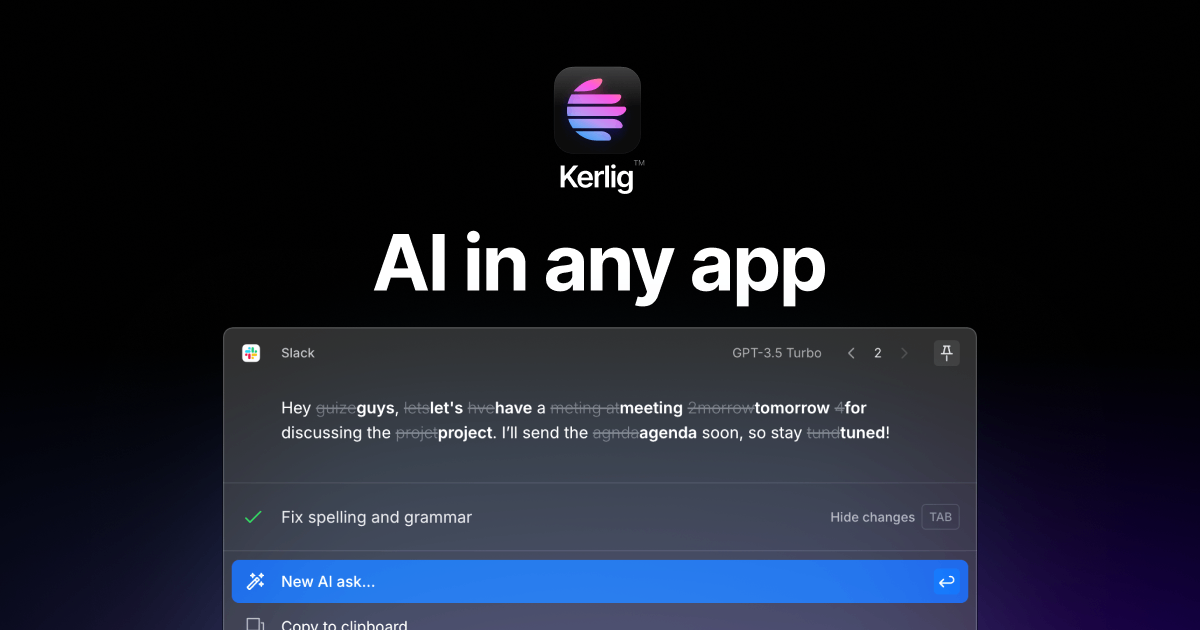
Kerlig

AI-powered writing assistant that elevates productivity across macOS applications

Category
Software
Ideal For
macOS Professionals
Deployment
Cloud
Integrations
7+ Apps
Security
Standard data encryption and secure API connections
API Access
Yes - integration via native macOS support

About Kerlig

Kerlig is an AI writing assistant specifically engineered for macOS users, designed to enhance written communication across professional applications. The tool seamlessly integrates with popular business platforms including Slack, Figma, Gmail, Outlook, LinkedIn, and VSCode, enabling users to access advanced language capabilities directly within their workflow. Kerlig empowers professionals to draft, edit, and refine written content with AI assistance, reducing time spent on composition while maintaining quality and consistency. The platform leverages advanced language models to provide contextual writing suggestions, tone adjustments, and content optimization. By centralizing AI writing assistance across multiple applications, Kerlig eliminates the need to switch between tools, streamlining productivity. AiDOOS enhances Kerlig deployment by providing scalable infrastructure, integration governance, and optimization of cross-platform functionality, ensuring reliable performance across enterprise environments.

Challenges It Solves

  • Time-consuming manual writing and editing across multiple business applications
  • Inconsistent communication tone and quality across different platforms
  • Switching between multiple tools disrupts workflow and reduces productivity
  • Difficulty maintaining professional writing standards under time pressure
  • Lack of contextual writing assistance within native applications

Proven Results

64
Reduction in writing and editing time per message
48
Improved communication consistency across platforms
35
Faster content creation without quality compromise

Key Features

Core capabilities at a glance

Universal macOS Integration

Write seamlessly across all your favorite applications

Access AI assistance without leaving your current workflow

Context-Aware Writing Suggestions

Intelligent recommendations based on application context

Generates platform-specific writing optimized for each tool

Tone and Style Adjustment

Adapt your writing voice for any situation

Transform content from casual to professional in seconds

Real-time Composition Assistance

Get AI suggestions as you type

Enhance clarity and grammar while maintaining natural voice

Multi-Application Support

Unified writing experience across seven major platforms

Consistent AI assistance in Slack, Gmail, Outlook, LinkedIn, Figma, VSCode

Quick Keyboard Activation

Instant access to AI writing capabilities

Trigger assistance with custom keyboard shortcuts anytime

Ready to implement Kerlig for your organization?

Real-World Use Cases

See how organizations drive results

Professional Email Composition
Draft and refine business emails in Gmail and Outlook with AI-powered suggestions, ensuring professional tone and clarity.
72
Compose emails 50% faster with AI assistance
Slack Communication Enhancement
Improve team messaging clarity and professionalism across Slack channels using real-time writing assistance.
58
Increase message clarity and reduce miscommunication
LinkedIn Content Creation
Create engaging LinkedIn posts and professional updates with optimized language for maximum engagement.
64
Generate professional content aligned with brand voice
VSCode Documentation Writing
Write clear technical documentation and code comments with AI assistance for better code clarity.
55
Improve code documentation quality and consistency
Figma Design Collaboration
Enhance design feedback and collaboration messages within Figma using consistent professional language.
60
Streamline design team communication and feedback

Integrations

Seamlessly connect with your tech ecosystem

G

Gmail

Explore

Compose and refine professional emails with AI writing suggestions and tone adjustment

S

Slack

Explore

Enhance team messaging with real-time writing assistance and context-aware suggestions

O

Outlook

Explore

Professional email composition and editing with AI-powered clarity and tone optimization

L

LinkedIn

Explore

Create engaging professional content optimized for LinkedIn's platform dynamics

F

Figma

Explore

Improve design collaboration and feedback communication within design projects

V

VSCode

Explore

Assist with technical documentation, comments, and code-related writing

m

macOS System

Explore

Native macOS integration enabling system-wide availability through keyboard shortcuts

Implementation with AiDOOS

Outcome-based delivery with expert support

Outcome-Based

Pay for results, not hours

Milestone-Driven

Clear deliverables at each phase

Expert Network

Access to certified specialists

Implementation Timeline

1
Discover
Requirements & assessment
2
Integrate
Setup & data migration
3
Validate
Testing & security audit
4
Rollout
Deployment & training
5
Optimize
Performance tuning

See how it works for your team

Alternatives & Comparisons

Find the right fit for your needs

Capability Kerlig Qualifire DecisionTree.jl Copy.ai
Customization Good Excellent Excellent Excellent
Ease of Use Excellent Good Good Excellent
Enterprise Features Good Excellent Fair Good
Pricing Fair Fair Excellent Excellent
Integration Ecosystem Excellent Good Good Good
Mobile Experience Poor Fair Poor Good
AI & Analytics Excellent Excellent Excellent Excellent
Quick Setup Excellent Good Good Excellent

Similar Products

Explore related solutions

Qualifire

Qualifire

Qualifire: Real-Time AI Safeguarding & Reliability Platform Qualifire is a next-generation, real-ti…

Explore

DecisionTree.jl

DecisionTree.jl

DecisionTree.jl: Accelerate Machine Learning with Powerful Julia-Based Classification DecisionTree.…

Explore
Copy.ai

Copy.ai

Copy.ai: Supercharge Your Content Pipeline with Generative AI Copy.ai is a leading AI-powered conte…

Explore

Frequently Asked Questions

Does Kerlig work on Windows or Linux?
No, Kerlig is designed exclusively for macOS to provide native integration and optimal performance within the Apple ecosystem.
Can I use Kerlig across multiple applications simultaneously?
Yes, Kerlig integrates with seven major platforms including Slack, Gmail, Outlook, LinkedIn, Figma, and VSCode, allowing seamless assistance across all applications.
Is my writing content stored or shared with third parties?
Kerlig prioritizes privacy with minimal data retention. Content is encrypted in transit, and AiDOOS infrastructure ensures secure, compliant data handling for enterprise deployments.
How quickly can I set up Kerlig?
Kerlig offers quick setup with native macOS integration and keyboard shortcuts, allowing you to start using AI assistance within minutes of installation.
Can I customize the tone and style of suggestions?
Yes, Kerlig provides tone adjustment features allowing you to adapt writing from casual to professional, customized for each platform and use case.
Does Kerlig support team collaboration features?
Kerlig enhances collaboration through native integrations with Slack and other team platforms, improving communication clarity across your organization.